The Android app market is full of surprises for every user. It’s not just a mecca for tech geeks but has something interesting and fun to offer for all kinds of people and cater to their eclectic interests. Even the words “fashion” and “technology” are quickly becoming synonymous with each other thanks to the brilliant variety of beauty and fashion-centric apps designed by leading fashion moguls and cosmetic giants.
Let us take a look at two such amazing Android apps that will help you accentuate your beauty to the maximum and have everyone around you giving second glances for your newfound sexiness.
Here’s an app that’s made for all you girls out there who want to replicate the look of a typical model on the front cover of a magazine. Most of them get that look after spending hours over perfecting makeup and editing pictures.
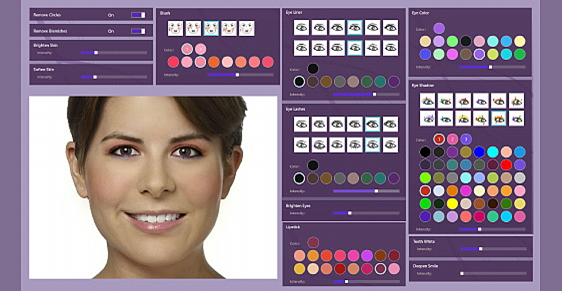
However, Perfect365 is a state of the art Android app released by Arcsoft Inc. that manages to make you fabulous with just one tap. Perfect365 is a one-of-a-kind app that lets you select chic makeover styles or fine-tune every detail of your face, just like having a plastic surgery. And the end result is a dazzling new you. Users apply a natural touch-up or a sizzling makeover to their face for amazing results.
The Perfect365 Android app is remarkably easy to use. The first step to looking fabulous includes uploading a picture from your Android device’s photo gallery. Thanks to the instant facial mapping feature, the app automatically pin points important regions of the face like eyes, nose, lips, cheeks and etc. The user then needs to adjust and set the key points perfectly on the face. The app does pretty well in detecting the key points and user barely has to make any adjustment. Once the key points are set, the user can manually edit the photo or select from some predefined looks.
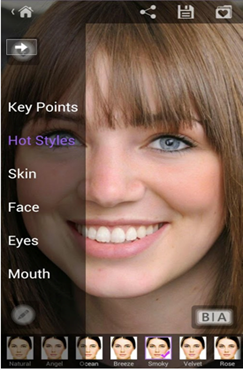
There are options on the left side of the screen to help the user edit the photo. The app includes templates for different makeup looks, like Natural, Breeze, Smokey and etc., for users to choose from, which are located under the “Hot Styles” tab. Users can select a particular look and get the exact makeover.
If the users prefer to have more control over their photo, they can even manually edit every aspect of their face and skin, giving a personal touch to the photo. Through the “Skin” tab, users can remove blemishes, lighten under eye dark circles, brighten and soften skin and add blush to the cheeks.
The “Face” tab lets the users have a virtual plastic surgery by slimming the face, enhancing the nose and lifting the cheekbones. The “Eyes” tab lets them apply eye shadow, eyeliner, brighten and enlarge eyes, change the eye color and add fake eyelashes. Users can whiten their teeth, deepen their smile and add lipstick through the “Mouth” tab. Users can turn from drab to fab with just one tap. All the settings are adjustable to help users experiment with their look. Before saving their enhanced photo, users can review the before and after enhancements. Users can then choose to share it via Facebook, Twitter or Flickr.
Adobe Photoshop is unarguably the most comprehensive editor in the market but not everyone has the time to learn its ways and it can be a bit intimidating for first-time users. This is where Perfect365 comes in. With the Perfect365 app on your Android device, you don’t have to worry about looking tired in a picture or having a dull face.
Whether you have to erase a blemish, whiten your teeth or give yourself a complete makeover, Perfect365 makes it all easy and super-convenient for you. All you need is a couple of casual taps to fix your makeup and you might just get mistaken for a hot celebrity on one of your night outs.
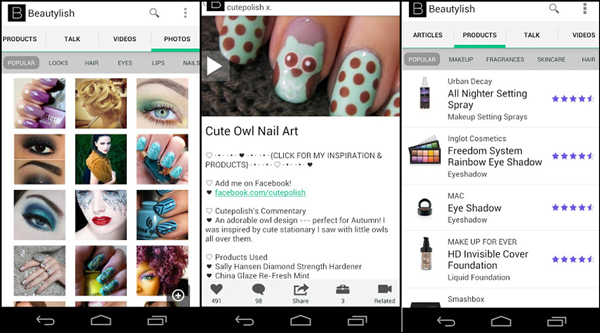
Beautylish is the ultimate Android app for all the ladies out there who are looking for a personalized solution to bring out their beautiful side. This Android app has all the latest beauty tips, tricks and trends, contributed by various beauty and makeup experts, in the form of step-by-step video tutorials, photos, product reviews, ratings and articles.
The Beautylish app also has a shop section for users to purchase their favorite product right from their Android device and make some stunning additions to their repertoire. Its large community of honest and enthusiastic experts is the biggest part of its charm.
On downloading the Beautylish app, the user is required to create an account with Beautylish. The set up process involves giving the app a few key personal details like eye color, complexion, Hair color, skin type and etc., all those bits required to create your own beauty profile. The next step is uploading a profile picture. Once the profile is created, the user can start using the app and get down to the beautification process.
The Beautylish home screen displays 6 tabs:
- Shop
- Editorial
- Photos
- Reviews
- Videos
- Talk
These tabs help the user navigate through the app. Each tab is broken down into specific beauty categories like Makeup, Skincare, Hair and etc. making it easier for the user to search for a product. There is also a category of all popular products to inspire the users and update them on the latest trends. Users can shop for various beauty products right from their android device by tapping on the “Shop” tab that displays a dazzling array of beauty products.
The “Editorial” section posts stories featuring hair, nail, makeup tutorials, new product releases, skin care information, expert tips, advice and makeup reviews. It is very informative for both the makeup-loving divas and the next door plain Janes.
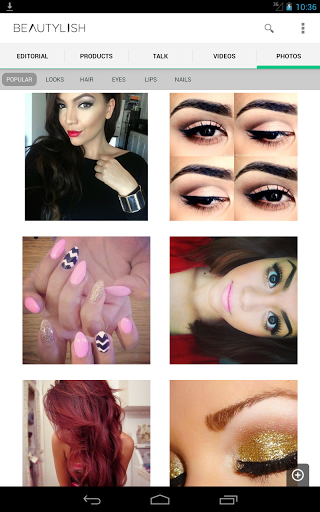
The “Photos” tab displays various pictures posted by the beauty nerds around the world. Users can find almost every kind of photo ranging from hairstyles and makeup to various beauty trends. It is all very inspiring.
The “Reviews” tab contains reviews and ratings on various skincare and hair products. Clicking on the camera button at the bottom of the page shows all the pictures uploaded by various people on that product. Users can learn how to create new looks, like the latest braids and hairstyles or learn new make-up tips with the help of step-by-step video tutorials found under the “Videos” tab. The videos could be on very specific topics like eyes, lips and nails or more general like an overall spring look for instance.
The “Talk” tab showcases the social aspect of the app. It lets its user post questions and comments to a community of beauty and makeup experts. Users can also attach pictures with their questions to bring their interaction to life. When users read a particular article or view a product, they can favorite it, comment on it and share it via Facebook, Twitter and Email, through the menu bar at the bottom of the screen. There is also a little briefcase on the bar that shows all the products referred to, in an article, for the users to purchase. Overall it’s an amazing app with tons of awesome content.
Beautylish is not just a haven for all the beauty enthusiasts out there, but it is also very helpful for a cosmetics amateur, or even a guy looking to buy the right makeup gift for their enthusiastic girlfriends. So download this app right away and gain some much needed beauty wisdom to make you look as sexy as possible.

