Pulling off all-nighters has become second nature to our generation whether it’s for work or just a late night out with your friends. A large factor in the design of smartphone display screens is how effortlessly are you are able to view your screen under different light conditions. With growing use of Android devices, a major use of them is made during the dark.
We use it to interact and chat in the dead of night when running here and about to attend meetings is not feasible. We can even use them as a torch to navigate our way through places in the night. Walking away from the conventional realm of the night use of apps, here’s two Android apps that offer you an interesting drift into the use of your devices at night.
Here’s an app that thoroughly engages its users into an all-world scientific experiment by simply gazing into the sky and looking for stars. Literally!
It encourages you to be a part of a global movement that seeks to reduce overall light pollution caused by extra lighting that covers the natural lighting of the stars and the subsequently evade the health issues that follow.
All across the world poorly designed street lamps throw out light that is artificial. This light pollution covers the beauty of the stars and changes the natural environment. It also affects health, society and the environment as said by scientists.
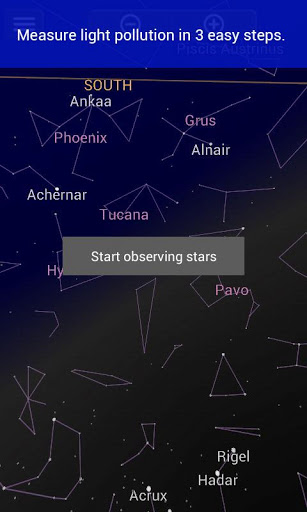
The objective of the Loss of the Night app is to use your camera to observe the existence of certain stars in the sky at your current location and add it to the database. This in turn enables scientists to have a large database which they use to preserve the environment using effective scientific methods.
The steps to follow are easy:
Step 1: Start observing stars through your phone.
Step 2: The arrow on your screen guides you to a star.
Step 3: Choose if you can see it.
On completing a few observation of your locality and submitting it, it gives the scientists and operatives of the app a rough idea of the lighting of your area.
The Loss of the Night app is based on Google’s Sky map and users across the map use it for experiments and the huge database gathered is analyzed by scientists to figure out correlations to biodiversity, life quality and many other factors.
Screen brightness and screen darkness through a very small part of our usage, has been structured by Android developers in a way that truly enhances and explains the importance of the effect of screen brightness on the user’s eyes.
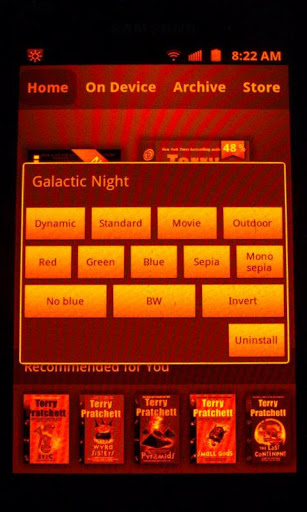
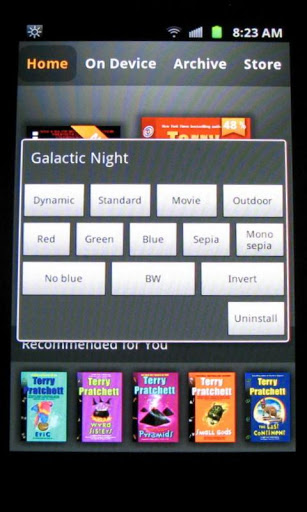
Galactic Night, following on those lines is an experimental app that consists of multiple lighting modes for your screen. It consists of modes like:
- Dynamic
- Standard
- Natural
- Movie
- Red
- Blue
- Green
- Sepia
- Mono Sepia
- Black and White
- Outdoor
- Invert
The Black and White and Mono Sepia mode is suitable for reading. A few eBook reader apps use sub pixel rendering causing colour fringes around a few letters. These two modes eliminate this.
These modes can be used when your battery is tanking and you are looking for alternatives to conserve battery.
Galactic Night uses your Android phone's mDNIe system and thus should not significantly impact graphics speed.
On the flip side, it does have a few cons to deal with. Using the Blue, Red and Green screen may lead to a burn-in on the AMOLED display of your Android device causing a colour tint. The Galactic Night app majorly also works only on rooted Samsun S2, S3 and note devices.
Overall, Galactic Night is a fantastic Android app for night mode usage with several unique features that will allow you to efficiently operate your device under any lighting conditions.