There’s no bigger nightmare for a parent than to lose their children from sight and not have any idea about where they are. Many parents experience heart-pounding instances like losing track of their kids in Walmart or while going for a family picnic. Curious minds will be curious minds, but it is your priority to ensure their safety at all times. Keeping this under consideration, the ingenious developers from the Android world have introduced an outstanding new child safety app that will allow you to keep a perpetual guardian angel hovering over your children by keeping track of where they are at all times. The Android app in discussion is appropriately named
Family Tracker.
The primary functionality of the Family Tracker Android app centers on the application of a GPS tracking system combined with a lot more intricate features that enable for easy tracking of your children.
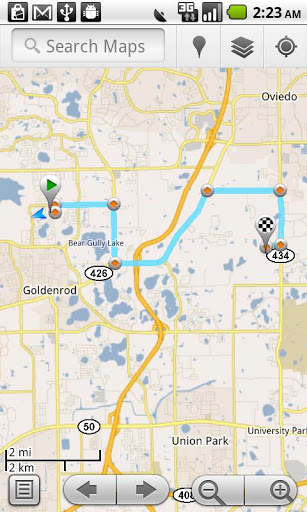
Over and above, it uses Wi-Fi if available and a cellphone triangulation system to give you the most accurate possible location of the person you are finding. It can also track Android tablets with the same level of competence.
On opening the Family Tracker app, you get to see the precise location of anyone you can track and a tab next to it that configures the privacy settings for GPS tracking.
Family Tracker attempts to give the most accurate location of the person you are trying to locate even if the app on their device is not switched on. In fact, even when your Android phone is rebooted, the app will continue tracking automatically without prior intimation.
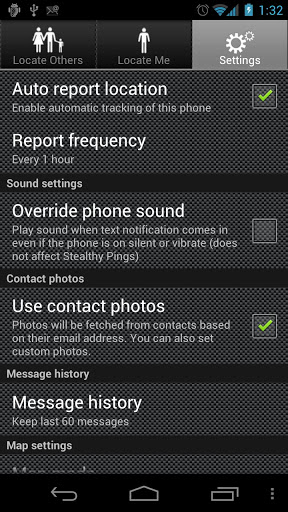
Now Family tracker does come with a few forceful and unnecessary features such as occasionally coaxing you with sound alerts even when your phone is on vibrate or silent.
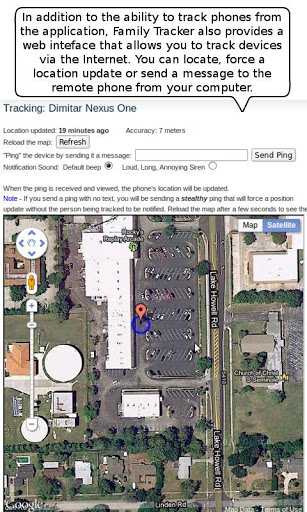
You can also send in a text message and automatically get the location of your family member.
A great feature in this app called the ‘Stealth ping’ allows you to get the location of the person without even informing the person that he/she is being tracked.
It uses the pictures from your contacts to display photos in relation to whom you are locating via the app.
By extending the use of the Family Tracker app, you can also use it to track business consignments and goods, shipments and transport vehicles that are being moved from one place to another.
Another nifty feature offered by Family Tracker is that it virtually utilizes negligible battery life to run unlike several other power-guzzling GPS apps. Hence, it has no negative impact on the smooth functioning of your Android device.
You can use Family tracker to even find your lost phone.
There is no limit on the number of people you can track through the app.
The developers have also devised a web interface so that you can track phones and devices on the whole through the internet using your OC as well.
The device being tracked obviously needs to have Family Tracker installed on it.
There is an auto-update function built into the Family Tracker app that allows you to receive updates after every 1 minute to 1 hour if needed. The settings tab allows you to change the frequency of how often the updates appear.
Using this app, you can track someone even if the auto-tracking feature on the app is disabled. Now if you are in a place where you do not have access to your android devices log on to the web interface and track away.
Family Tracker is a brilliant security solution for Android users who need to exercise constant vigilance over their loved ones and keep them away from danger. So what are you waiting for? Download it today from Google Play Store and never be worried with uncertainty on your mind again! All it requires is your Android smartphone to pack an OS of version 2.2 and above, and you are good to go!