With 12 years of dedicated service after the first idea for an online encyclopedia that came out in the year 1993 suggested by Rick Gates, the realm of digital information sure has gone through a super revolution over the past decade. With the idea for an open source encyclopedia proposed by Richard Stallman, Wikipedia finally came to life in the year 2001.
Since then there’s been no looking back for this digital Alexandria and it has become the premier online information provider to millions of users online. This online encyclopedia has information in it from our caveman days to the existence and works of the Mayans and also how the future is going to look a 100 years from today. You can enlighten yourself in any subject you like with
Wikipedia.
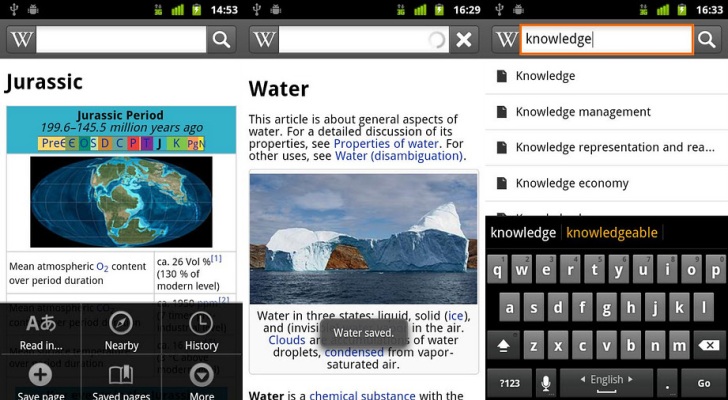
The Wikipedia we go to and eventually stumble upon through a direction given to us from the infamous Google search that is responsible to spoil us and redefine the meaning of secondary research today. Even this search engine mammoth prioritizes the Wikipedia page for nearly anything you search for and presents it on the front page itself for your convenient reference. However, the Wikipedia search engine is no joke either and can make your information extraction for an obscure topic look like a piece of cake. The working of it, the layout, the way it functions and a lot more.
The Android app for Wikipedia is all just the same and the interface looks like a replica of what you would otherwise see on your computer screen. Wikipedia is perfectly optimized for your device’s smaller screen and all the cool features are carried over to them.
When you dive into Wikipedia on your Android device the first option you see is the search bar that will ensure you are navigated across the paths of Wikipedia fruitfully and extract as much information from the app.
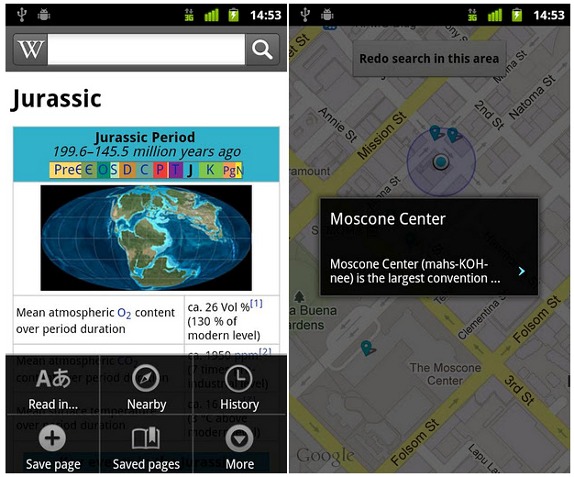
This search bar takes its place at the top and below that you see a featured article that is updated everyday! And as it always has, the article is filled with hyperlinks to other locations describing each word that needs an explanation.
The images are displayed in high definition and details of the image are subsequently given below with parameters according to those of the image. For example the image of a celebrity will have his/her birth date and other relevant information like highlights of work and achievements and contribution to the society on the whole.
Moving on to the maps, which have a good overview and highlight decent levels of accuracy. A conversation bubble too will pop up giving you a description of the place so that it’s easy for you to navigate.
The auto-predict feature will give suggestions on typing in just the first word. Further to the Wikipedia app also allows you to read the data in multiple languages. These could be from:
- English
- Spanish
- Italy
- Germany
- French
And a whole lot more!
You can change the language selection directly from the space bar on the key board too. And if you’re too bored to type you can also add in the key search word through the Voice search bar next to the space bar.
With full screen search you can also look for data online and offline too and search and share it through the respective options on the app.
So for the researcher inside you who loves to look around for intellectual stuff on the internet, you’ve found your match. Download Wikipedia from Google Play Store for free and make your information hunt more fun and efficient than ever before.