

 Its features include:
- Tabbed browsing
- Support for HTTP basic authentication for web pages
- Simple and clean user interface
- Bookmark manager
- Quick search with voice added with default speech recognition
- Address bar auto suggestion from history
- Supports Java Scripts
- Support HTML 5 web pages and videos
- Integrated Google, Youtube, Twitter and Yahoo! search
- Ability to spoof browser's User Agent string to display web pages like desktop, iPhone, iPad, Firefox, Chrome, Safari, Internet Explorer, Nokia Lumia or another downloader
- Browsing speed has been optimized
There is also a File Manager with the features:
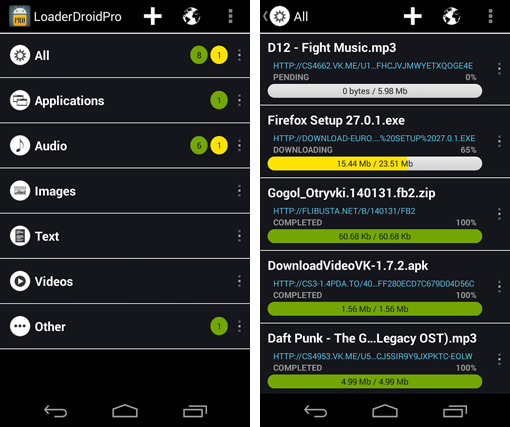
- Fast app, files and website downloading speed
- Android Downloader is designed for UI
- Supports resuming of interrupted downloads reliably
- Live downloading progress bar for speed indicator
- Active downloads badge number
- You can specify downloads with correct filename
- Able to d.wnload file of unknown size and unknown format
It even has a Downloader Media Player with the following features:
- Music audio playback of .aac, .mp3, and .m4a formats
- Video playback of .m4v, .mp4, and .mov formats
- Playlists has been added for both Music and Movie player
- Ability to play all MP3 files in a folder like a playlist
- Repeat and shuffle songs
- Audio playback continues with the screen locked
- Playlist support
- Display album artwork embedded in .mp3
- Background audio
- Alternative Downloader options making downloading easier
Not only is this app good for general download monitoring, it even has specific download functions to manage different kinds of downloading. Download Manager for Android tackles downloads in all aspects and thus, proves to be a very efficient app to download.
Its features include:
- Tabbed browsing
- Support for HTTP basic authentication for web pages
- Simple and clean user interface
- Bookmark manager
- Quick search with voice added with default speech recognition
- Address bar auto suggestion from history
- Supports Java Scripts
- Support HTML 5 web pages and videos
- Integrated Google, Youtube, Twitter and Yahoo! search
- Ability to spoof browser's User Agent string to display web pages like desktop, iPhone, iPad, Firefox, Chrome, Safari, Internet Explorer, Nokia Lumia or another downloader
- Browsing speed has been optimized
There is also a File Manager with the features:
- Fast app, files and website downloading speed
- Android Downloader is designed for UI
- Supports resuming of interrupted downloads reliably
- Live downloading progress bar for speed indicator
- Active downloads badge number
- You can specify downloads with correct filename
- Able to d.wnload file of unknown size and unknown format
It even has a Downloader Media Player with the following features:
- Music audio playback of .aac, .mp3, and .m4a formats
- Video playback of .m4v, .mp4, and .mov formats
- Playlists has been added for both Music and Movie player
- Ability to play all MP3 files in a folder like a playlist
- Repeat and shuffle songs
- Audio playback continues with the screen locked
- Playlist support
- Display album artwork embedded in .mp3
- Background audio
- Alternative Downloader options making downloading easier
Not only is this app good for general download monitoring, it even has specific download functions to manage different kinds of downloading. Download Manager for Android tackles downloads in all aspects and thus, proves to be a very efficient app to download.
Download Manager for Android - Monitor and Optimize Your File Downloads
3 min read
Since the app culture is fast growing and spread like a wildfire, the amount of data has also significantly increased. But since we download so much, and lets be honest, without thinking too much about what files are exactly getting downloaded, we end up downloading a lot of rubbish and in the worst case scenario, we end up downloading viruses. And, stating the obvious, viruses are not good for our devices. So when we cannot keep a tab on our downloads, getting a little help is never a bad idea. And what better help than our friendly apps, who never disappoint us no matter what the requirement is.
Thus, if you have rooted your android device, get ready to have your very own download manager in the form of an app called Download Manager for Android. Not only does it monitor your downloads, it even makes them faster. With it you will get a free Download Manager for video download or clip, free downloads any type of file. It supports all types like APK, RAR, ZIP, MP3, DOC, XLS or other files. You will be able to download everything, download all files, helper, browser, tube functions.
Use Download Manager for Android to efficiently download and manage any type or size file in your phone or tablet. This free Android downloader overcomes most of the limitations of the default downloads, such as authentication, integrity checking, support for all file types and life cycle management, making downloading just a breeze.
Its features include:
- Tabbed browsing
- Support for HTTP basic authentication for web pages
- Simple and clean user interface
- Bookmark manager
- Quick search with voice added with default speech recognition
- Address bar auto suggestion from history
- Supports Java Scripts
- Support HTML 5 web pages and videos
- Integrated Google, Youtube, Twitter and Yahoo! search
- Ability to spoof browser's User Agent string to display web pages like desktop, iPhone, iPad, Firefox, Chrome, Safari, Internet Explorer, Nokia Lumia or another downloader
- Browsing speed has been optimized
There is also a File Manager with the features:
- Fast app, files and website downloading speed
- Android Downloader is designed for UI
- Supports resuming of interrupted downloads reliably
- Live downloading progress bar for speed indicator
- Active downloads badge number
- You can specify downloads with correct filename
- Able to d.wnload file of unknown size and unknown format
It even has a Downloader Media Player with the following features:
- Music audio playback of .aac, .mp3, and .m4a formats
- Video playback of .m4v, .mp4, and .mov formats
- Playlists has been added for both Music and Movie player
- Ability to play all MP3 files in a folder like a playlist
- Repeat and shuffle songs
- Audio playback continues with the screen locked
- Playlist support
- Display album artwork embedded in .mp3
- Background audio
- Alternative Downloader options making downloading easier
Not only is this app good for general download monitoring, it even has specific download functions to manage different kinds of downloading. Download Manager for Android tackles downloads in all aspects and thus, proves to be a very efficient app to download.
Its features include:
- Tabbed browsing
- Support for HTTP basic authentication for web pages
- Simple and clean user interface
- Bookmark manager
- Quick search with voice added with default speech recognition
- Address bar auto suggestion from history
- Supports Java Scripts
- Support HTML 5 web pages and videos
- Integrated Google, Youtube, Twitter and Yahoo! search
- Ability to spoof browser's User Agent string to display web pages like desktop, iPhone, iPad, Firefox, Chrome, Safari, Internet Explorer, Nokia Lumia or another downloader
- Browsing speed has been optimized
There is also a File Manager with the features:
- Fast app, files and website downloading speed
- Android Downloader is designed for UI
- Supports resuming of interrupted downloads reliably
- Live downloading progress bar for speed indicator
- Active downloads badge number
- You can specify downloads with correct filename
- Able to d.wnload file of unknown size and unknown format
It even has a Downloader Media Player with the following features:
- Music audio playback of .aac, .mp3, and .m4a formats
- Video playback of .m4v, .mp4, and .mov formats
- Playlists has been added for both Music and Movie player
- Ability to play all MP3 files in a folder like a playlist
- Repeat and shuffle songs
- Audio playback continues with the screen locked
- Playlist support
- Display album artwork embedded in .mp3
- Background audio
- Alternative Downloader options making downloading easier
Not only is this app good for general download monitoring, it even has specific download functions to manage different kinds of downloading. Download Manager for Android tackles downloads in all aspects and thus, proves to be a very efficient app to download.
Newsletter
Get the latest tech news delivered to your inbox weekly.