Enjoy the Fastest Ringtone Making Experience On Your Android Device
4 min read
For all you music lovers who love playing around and experimenting with ringtones made from your tracks to exhibit your awesome taste in music every time your phone rings, the Mobile 17 Ringtone Maker app for Android is just what you are looking for. This supremely user-friendly app is perfect for those of you crazy about your music and motivated enough to touch it up with your own creative input. Gone are the days when you download those tedious and heavy computer applications to cut and edit songs and then eventually shift them to your mobile devices from your PC. All those obsolete apps came with a huge learning curve and wouldn’t let you understand their proper usage till you spent the first 24 hours navigating the function of multiple buttons.
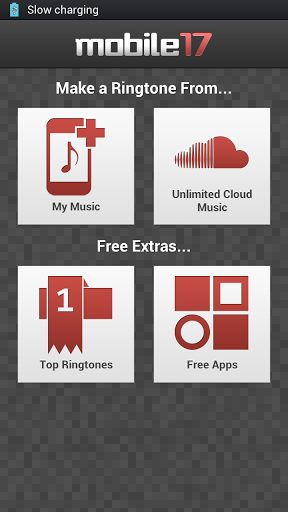
Mobile 17’s Ringtone maker has taken majority of those apps out of the market and posed its dominance to give the user the easiest ringtone creating experience. Mobile 17’s Ringtone Maker is an easy to use app that almost instantaneously cuts the songs into your favorite part.
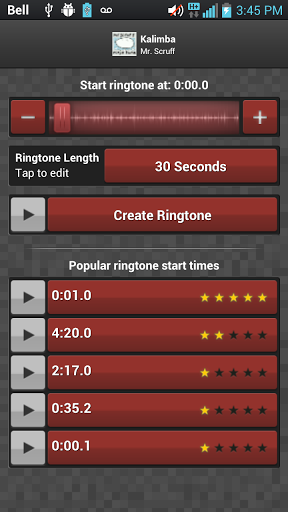
Use finely tuned edits all generated by the cutting-edge Mobile 17 technologies. Simply drag and drop the fine-tuned editing controls and you ringtone is made in seconds. You can make custom made ringtones of up to 40 seconds.
You can remove the ads that keep popping up when you create ringtones.
You can create ringtones from my music or form your unlimited cloud music each with an option on the main screen. Further pick from the free extras from the app, i.e. Top Ringtones and download other free apps from there itself.
Other than creating ringtones, you can even create your very own custom-made text message tones too that can be up to 6 seconds in length. The same can be used for alarm clock tones and reminders, to-do lists and birthday reminders and many other such related alerts on your phone.
The Mobile 17 Ringtone Maker app supports all the popular music formats from mp3, Mp4, M4A, wav files etc.
There are inbuilt fine tuning buttons to get the best clarity for your ringtone. They are represented by the ‘+’ and ‘-’ signs.
A great feature offered by the Mobile 17 Ringtone Maker app is that it suggests you the best start points of a song. This means that if a particular song has a part of the song used the most it displays it on the bottom of the screen so that you can directly pick from it and have the most interesting sounding ringtone of all.
These tracks that you choose have their respective track length displayed right next to them, eg. 2:24, 3:51, 4:35, etc., with user ratings highlighting the popularity of the entire song or any particular part of it.
These are derived on the basis of the popularity of the song in the market and the number of times it has been used by other users to be modified into a ringtone.
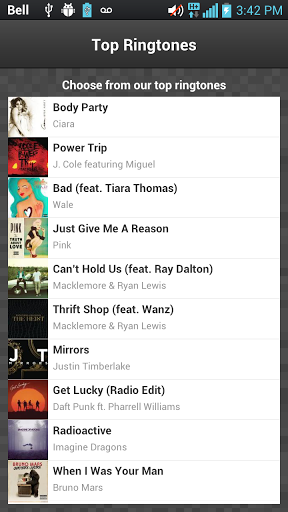
Ringtones can also be downloaded and installed automatically from the apps list of ringtones.
The quality of the created ringtones is great and it allows for instant previewing the minute the tone is created.
The slider control is very easy to understand and very difficult to miss.
You can further search Sound Cloud for popular ringtones or something that you may not have on our phone and is it featured in the list provided by the app.
You can view the latest popular edits from the database of Mobile 17's community. To refine your search, directly type the artists name and a list of their sings will appear and ringtones can be cherry-picked straight from that list.
So that’s Mobile 17 for you. It is a truly premier Android app for music fans who love bringing a personalized touch of their passions to their smartphones. It is one of the most customizable ringtone making apps available and will keep you hooked onto it for hours.

Mobile 17’s Ringtone maker has taken majority of those apps out of the market and posed its dominance to give the user the easiest ringtone creating experience. Mobile 17’s Ringtone Maker is an easy to use app that almost instantaneously cuts the songs into your favorite part.
Use finely tuned edits all generated by the cutting-edge Mobile 17 technologies. Simply drag and drop the fine-tuned editing controls and you ringtone is made in seconds. You can make custom made ringtones of up to 40 seconds.
You can remove the ads that keep popping up when you create ringtones.
You can create ringtones from my music or form your unlimited cloud music each with an option on the main screen. Further pick from the free extras from the app, i.e. Top Ringtones and download other free apps from there itself.
Other than creating ringtones, you can even create your very own custom-made text message tones too that can be up to 6 seconds in length. The same can be used for alarm clock tones and reminders, to-do lists and birthday reminders and many other such related alerts on your phone.
The Mobile 17 Ringtone Maker app supports all the popular music formats from mp3, Mp4, M4A, wav files etc.
There are inbuilt fine tuning buttons to get the best clarity for your ringtone. They are represented by the ‘+’ and ‘-’ signs.
A great feature offered by the Mobile 17 Ringtone Maker app is that it suggests you the best start points of a song. This means that if a particular song has a part of the song used the most it displays it on the bottom of the screen so that you can directly pick from it and have the most interesting sounding ringtone of all.
These tracks that you choose have their respective track length displayed right next to them, eg. 2:24, 3:51, 4:35, etc., with user ratings highlighting the popularity of the entire song or any particular part of it.
These are derived on the basis of the popularity of the song in the market and the number of times it has been used by other users to be modified into a ringtone.
Ringtones can also be downloaded and installed automatically from the apps list of ringtones.
The quality of the created ringtones is great and it allows for instant previewing the minute the tone is created.
The slider control is very easy to understand and very difficult to miss.
You can further search Sound Cloud for popular ringtones or something that you may not have on our phone and is it featured in the list provided by the app.
You can view the latest popular edits from the database of Mobile 17's community. To refine your search, directly type the artists name and a list of their sings will appear and ringtones can be cherry-picked straight from that list.
So that’s Mobile 17 for you. It is a truly premier Android app for music fans who love bringing a personalized touch of their passions to their smartphones. It is one of the most customizable ringtone making apps available and will keep you hooked onto it for hours.

One Click Root Author
Content Writer
Experienced writer covering technology and mobile development.
You Might Also Like
How-To
Android 14 Root Methods: What Changed?
Explore the new root methods and security changes in Android 14.
How-To
Latest Android Security Updates Impact Root Access
Understanding how the latest security patches affect root methods.
How-To
Google Pixel 8 Pro Root Guide Released
Complete step-by-step guide to rooting the Google Pixel 8 Pro.
Comments
JD
John Doe
2 days ago
Great article! Very informative and well-written. Thanks for sharing.
JS
Jane Smith
5 days ago
I found the security section particularly helpful. Looking forward to more content like this!
Leave a Comment
Newsletter
Get the latest tech news delivered to your inbox weekly.
Popular Posts
-
1
Getting Started with Android Development
12.5K views
-
2
Best Practices for Mobile Security
8.2K views
-
3
Understanding Smartphone Hardware
6.8K views