One might be an open book but there are certain things in everyone’s lives that need to remain confidential. People usually don’t access each other’s laptops or desktops, however, there are situations where someone else needs to use our phones. That is fine! We do not have a problem with that, but our phone is not just our phone, it is so much more. It is our photo album, it is our tutor, our entertainer and even our office containing a lot of important documents that are best left alone.
However, when you give your phone to someone even briefly, there is always a risk that someone might try to snoop around. As much as we hate to think like this about our people, it is always good to be cautious. Therefore, you might or might not have password protected your phone, but, you definitely should password protect your documents.
Say hello to the app that is going to help you do that -
Folder Lock. Folder Lock lets you password-protect your personal files, photos, videos, documents, contacts, wallet cards, notes and audio recordings in Android Phones. The app comes with a clean and pleasant interface. You can transfer files from Gallery, PC/Mac, Camera and Internet browser.
Folder Lock includes the following features:
• Protect private photos
• Hide sensitive videos and pictures
• Password-protect secret audio
• Lock down important documents
• Write secure notes
• Record voice recordings and memos secretly
• Import Saved Contacts
• Create Contact Groups
• Secret Contacts Group multiple SMS
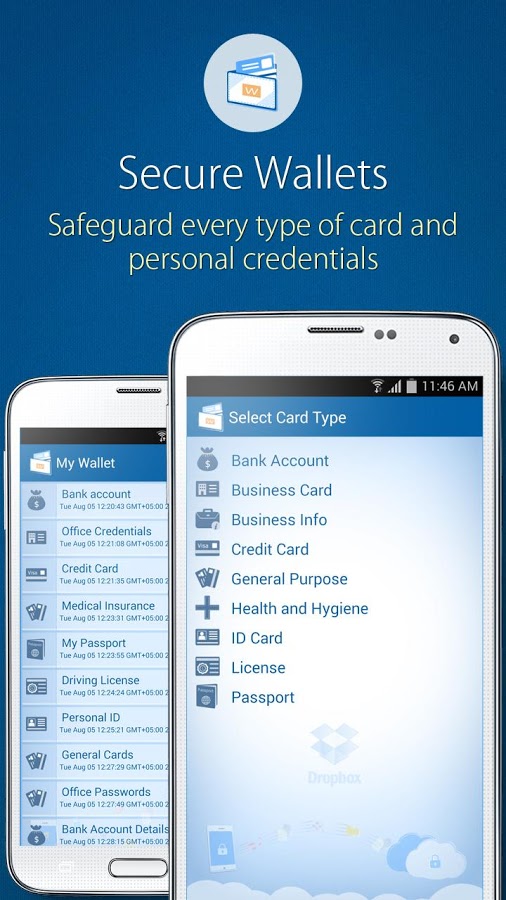
You can keep your wallet cards safe and protected:
• Credit Cards
• Bank Accounts
• ID / Social Security
• Licenses
• Business Cards
• Business Info
• Health and Hygiene
• Passport
• General Purpose Cards
Secure Browser (leaves no traces and privacy enabled)
• Download files from Browser
Import files from
• Gallery
• SD Cards
• PC / MAC
• Secure Browser
View, Run and Play
• Media Player for Videos
• Audio Player for Music and Audios
• Picture Viewer for Photos
• Document Editor for Documents
Settings and Options
• Hacker Deterrents
• Decoy Password (Fake Password)
• Brute force attack prevention
• Takes snaps of unauthorized login attempts
• Logs unauthorized login attempts
• Deterrents on multiple invalid login attempts
• Backup Password in case of forgotten password
Folder Lock supports the following formats:
Documents: csv, dbk, doc, docx, dot, dotx, gdoc, html, pdax, pdf, rtf, rpt, stw, sxw txt, uof, uoml, wps, wpt, wrd, xhtml, xml, xps, epub, ppt, pptx, xls.
Pictures: png, jpeg, bmp, gif, webp.
Videos: 3gp, mp4, mkv, ts, acc, mpeg-ts, webm.
Audios: 3gp, MPEG-4, mp4, m4a, aac, MPEG-TS, flac, mp3, mid, xmf, mxmf, ota, imy, mkv, ogg, rtttl, rtx.
Archives: rar, tar, gzip, 7z, gz, log, torrent
This is free android app that provides security to your data, mainly when you share your mobile with somebody else and you want to hide some personal information.
It is good to trust the people around you but it not good to take chances and regret later. There are always bad elements everywhere and you need to protect your personal information and documents because they can be heavily misused in today’s time!