Here’s one of the best file manager clients to efficiently organize all the numerous and randomly placed files on your Android device. We’re talking about
ES File Explorer – the Android app that gives you all the organizing tools you’ll ever need to never face the headache of going into the ‘needle in a haystack’ search mode while looking for a file among the countless ones stored in your device.
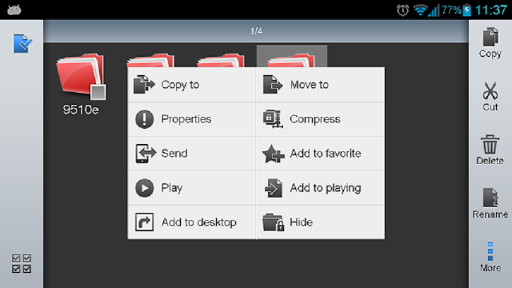
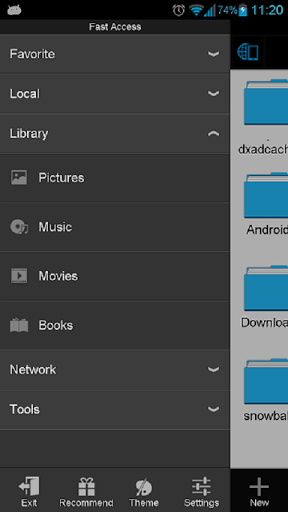
ES File Explorer manages all there is on your device and gives you the collective services of a file manager, cloud storage client application manager, task killer, LAN Samba client and FTP client. It is compatible with the following cloud storage apps:
- Dropbox
- Ubuntu One
- Yandex
- SkyDrive
- Box.net
- Google Drive
- Sugarsync
- Amazon S3
Get access instantly to pictures, documents, videos, files, music, documents and other types of files on your Android device through other locations like your PC. ES File Explorer is compatible with all the versions of Android including the old ones. It is available for free and gives easy access to everything you need all at once. In addition to the above here’s a comprehensive list of what’s in for you.
- File Manager – Allows you to perform all the possible typical features of a file manager just like on the laptop of your PC with features like copy, paste, cut, share, delete, rename, search, hide, move and send. You can do all the above through you Android device or you can do it remotely as well.
- Application Manager – Create shortcuts to your app, categorize them, uninstall and back them up all through the ES File Explorer app.
- Remote File Manager – Enable this feature to use your device remotely using your computer and perform all the phone related functions through your PC.
- ES File Explorer also allows your device to work like your FTP and WebDAV client as it can manage files on FTP, SFTP and WebDAV servers. This is exactly the same as managing files on your SD card.
- Use the ZIP feature to ZIP and Unzip files directly
- Also the RAR support helps you to unpack all the .RAR files.
 Further you can create an AES 256 bit encrypted file.
- View thumbnails for images and APKs.
- Use the in-built Text viewer and editor feature.
- Further, Access use Wi-Fi to access your home PC with SMB.
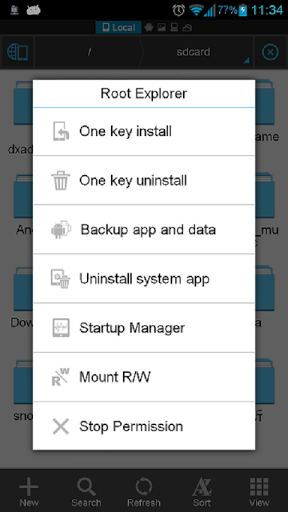
- Root Explorer – Are you a rooted Android user? That’s great news because this is the ultimate tool for you to get access to the entire file system and all data directories. Not only that, you can also to change permissions as privileges given the user through your superuser access.
- Built-in viewers and players for various file types, including photos, music, and videos; supports third-party applications, such as Documents To Go, for opening others
- Good news for developers as they can visit the site and pick up the interface for picking files from your applications, emailing attachments, etc.
- If you have Bluetooth ready devices you can copy and paste files through Bluetooth. With EIS’s inbuilt software, it supports OBEX FTP for browsing devices and transferring files between Bluetooth devices.
- Kill tasks with a single click – Install the ES task manager module and get access to an easy to use the widget as a single click to close running apps. With an ignore list you can shut down only the apps you don’t want running.
ES File Explorer has emerged as not just a fantastic file management app, but also as one of the greatest cloud services coupled with features that come in huge numbers and high on functionality through consistent updates. And what more could you ask for when it’s free. So download it right away from Google Play Store and smarten up your Android device a lot more.