

 Also, if you have some other device, you may try using GMD Gesture Control.
And now back to GMD SPen Control. It’s features include:
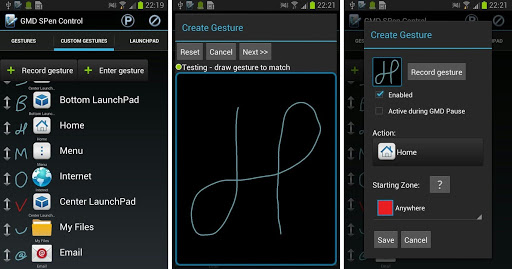
- Graphical gestures - create any gesture you like.
- Trigger gestures - swipe, hold, tap, execute without pressing SPen button.
- Disable finger input (gesture) - disable finger input and capacitive buttons anytime in any application. Get rid of accidental zooming/scrolling when using S Pen.
- Starting zones - assign different actions for same gesture when starting drawing in different area.
- Start any application, shortcut or custom action.
- A lot of custom actions to execute.
- Built in LaunchPads accessible anywhere with your own gesture. Create launch bar on any border or window in center.
- S Pen attach/detach triggers - select custom sound and action (Note 1 does not have this sensor, only works on Note 2, Note 3, Note 8 and Note 10.1)
It is a pretty good app for those who don’t like using their hands or who actually have very thick fingers (seriously, grow up!) because the touch screen proves to be very difficult and time consuming. Therefore, GMD SPen Control is at you service because your wish is it’s command!
Also, if you have some other device, you may try using GMD Gesture Control.
And now back to GMD SPen Control. It’s features include:
- Graphical gestures - create any gesture you like.
- Trigger gestures - swipe, hold, tap, execute without pressing SPen button.
- Disable finger input (gesture) - disable finger input and capacitive buttons anytime in any application. Get rid of accidental zooming/scrolling when using S Pen.
- Starting zones - assign different actions for same gesture when starting drawing in different area.
- Start any application, shortcut or custom action.
- A lot of custom actions to execute.
- Built in LaunchPads accessible anywhere with your own gesture. Create launch bar on any border or window in center.
- S Pen attach/detach triggers - select custom sound and action (Note 1 does not have this sensor, only works on Note 2, Note 3, Note 8 and Note 10.1)
It is a pretty good app for those who don’t like using their hands or who actually have very thick fingers (seriously, grow up!) because the touch screen proves to be very difficult and time consuming. Therefore, GMD SPen Control is at you service because your wish is it’s command!
GMD SPen Control - For the Stylus Users
3 min read
Did you know that your Samsung Android device has a stylus? Did you know that almost all Samsung Android devices, including all of the Galaxy Notes have a stylus attached with them. If you first thought for a second and then realized that its true, my guess is that you are not someone who is in the habit of using it all that often. If you are wondering why I am stating the obvious, it's your lucky day, because today’s article is specifically for you!
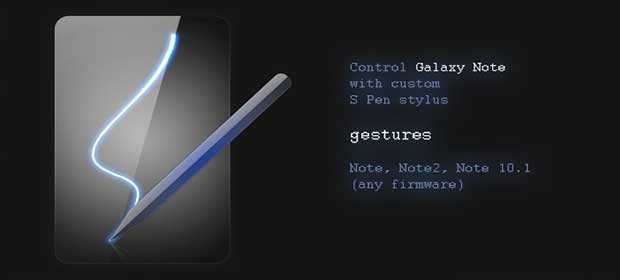
The fact is that once you get used to a stylus, your finger seems too thick (again, no pun intended. Not now and not for the rest of the article) and you experience twice the amount of irritation each time you intend to press something but end up pressing something else. Therefore, today’s app is especially programmed for the Samsung Galaxy note series and is called GMD SPen Control. With it you may control your Samsung Note device with custom S Pen Stylus gestures.
This app has been built keeping in mind that no one, not even the company that built this device should be able to stop you from doing what you like. Therefore, why limit yourself to a few gestures that Samsung provided? Create your own gestures.
Before going into the details, one thing that you must keep in mind is that this application is only for Samsung S Pen Stylus. It is compatible and can be used together with GMD Gesture Control - touch screen gestures application. Also, you can only use this app on a rooted Samsung galaxy device. Apart from that it:
- Works on all Note devices! (Note, Note 2, Note 3, Note 8, Note 10.1)
- Works on all ROM, does not rely on Samsung API.
Also, if you have some other device, you may try using GMD Gesture Control.
And now back to GMD SPen Control. It’s features include:
- Graphical gestures - create any gesture you like.
- Trigger gestures - swipe, hold, tap, execute without pressing SPen button.
- Disable finger input (gesture) - disable finger input and capacitive buttons anytime in any application. Get rid of accidental zooming/scrolling when using S Pen.
- Starting zones - assign different actions for same gesture when starting drawing in different area.
- Start any application, shortcut or custom action.
- A lot of custom actions to execute.
- Built in LaunchPads accessible anywhere with your own gesture. Create launch bar on any border or window in center.
- S Pen attach/detach triggers - select custom sound and action (Note 1 does not have this sensor, only works on Note 2, Note 3, Note 8 and Note 10.1)
It is a pretty good app for those who don’t like using their hands or who actually have very thick fingers (seriously, grow up!) because the touch screen proves to be very difficult and time consuming. Therefore, GMD SPen Control is at you service because your wish is it’s command!
Also, if you have some other device, you may try using GMD Gesture Control.
And now back to GMD SPen Control. It’s features include:
- Graphical gestures - create any gesture you like.
- Trigger gestures - swipe, hold, tap, execute without pressing SPen button.
- Disable finger input (gesture) - disable finger input and capacitive buttons anytime in any application. Get rid of accidental zooming/scrolling when using S Pen.
- Starting zones - assign different actions for same gesture when starting drawing in different area.
- Start any application, shortcut or custom action.
- A lot of custom actions to execute.
- Built in LaunchPads accessible anywhere with your own gesture. Create launch bar on any border or window in center.
- S Pen attach/detach triggers - select custom sound and action (Note 1 does not have this sensor, only works on Note 2, Note 3, Note 8 and Note 10.1)
It is a pretty good app for those who don’t like using their hands or who actually have very thick fingers (seriously, grow up!) because the touch screen proves to be very difficult and time consuming. Therefore, GMD SPen Control is at you service because your wish is it’s command!
Newsletter
Get the latest tech news delivered to your inbox weekly.