

 All the notes that you have taken can be synchronize with Gmail or Google App Mail after you set your account. GNotes lets you take notes, capture photos, create to-do lists, shopping lists, record voice memos, create handwriting, paint and so on, and you can search the note easily. You can organize notes in notebooks/folders, drag and drop to move or delete note, pin the note to the home screen for instant access, share notes to other apps like Gmail, Google Plus, EverNote and so on.
Also, you can add notes via Gmail by sending the note content (include attachments) to your Gmail, and add the label "Notes" to the mail. It will be synced to your device next time you open GNotes. You can easily access your notes online, and you'll never lose it. You can backup or restore all your notes on/from SD card. Also, you can copy the backup file to your PC and open with Browser.
All the notes that you have taken can be synchronize with Gmail or Google App Mail after you set your account. GNotes lets you take notes, capture photos, create to-do lists, shopping lists, record voice memos, create handwriting, paint and so on, and you can search the note easily. You can organize notes in notebooks/folders, drag and drop to move or delete note, pin the note to the home screen for instant access, share notes to other apps like Gmail, Google Plus, EverNote and so on.
Also, you can add notes via Gmail by sending the note content (include attachments) to your Gmail, and add the label "Notes" to the mail. It will be synced to your device next time you open GNotes. You can easily access your notes online, and you'll never lose it. You can backup or restore all your notes on/from SD card. Also, you can copy the backup file to your PC and open with Browser.
GNotes – Get All Your Notes in Sync
3 min read
Since our memory has a tendency to betray us at times, a lot of us are in the habit of taking notes. We take notes so frequently that they tend to get scattered with time. From a small note of the things to buy form the grocery store to long notes of the law lecture, we may or may not have realized how essential notes are to us.
If it were some years in the past then notes could mean one thing – pen and paper. But today is not the time of hand written notes; it is the age of gadgets. And we have started documenting everything as a soft copy. And since we have a lot of gadgets that we use, including our smart phones, tablets, laptops, desktops, separate gadgets for home and office at times, the one thing that has not changed is the notes getting scattered. Since we have so many different things we type our notes on, what we need is an app that syncs all these notes.
And since luck is always on our side when it comes to apps, let us welcome GNotes - an app that syncs notes with Gmail. GNotes is one of the best note apps for android that helps you to take and sync notes easily between your mobile devices, make your life organized and much easier. It is easy-to-use and free.
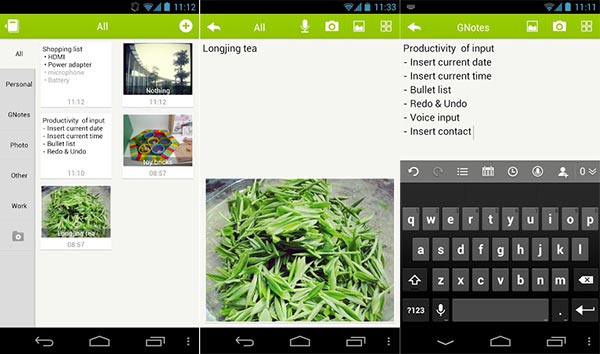
All the notes that you have taken can be synchronize with Gmail or Google App Mail after you set your account. GNotes lets you take notes, capture photos, create to-do lists, shopping lists, record voice memos, create handwriting, paint and so on, and you can search the note easily. You can organize notes in notebooks/folders, drag and drop to move or delete note, pin the note to the home screen for instant access, share notes to other apps like Gmail, Google Plus, EverNote and so on.
Also, you can add notes via Gmail by sending the note content (include attachments) to your Gmail, and add the label "Notes" to the mail. It will be synced to your device next time you open GNotes. You can easily access your notes online, and you'll never lose it. You can backup or restore all your notes on/from SD card. Also, you can copy the backup file to your PC and open with Browser.
All the notes that you have taken can be synchronize with Gmail or Google App Mail after you set your account. GNotes lets you take notes, capture photos, create to-do lists, shopping lists, record voice memos, create handwriting, paint and so on, and you can search the note easily. You can organize notes in notebooks/folders, drag and drop to move or delete note, pin the note to the home screen for instant access, share notes to other apps like Gmail, Google Plus, EverNote and so on.
Also, you can add notes via Gmail by sending the note content (include attachments) to your Gmail, and add the label "Notes" to the mail. It will be synced to your device next time you open GNotes. You can easily access your notes online, and you'll never lose it. You can backup or restore all your notes on/from SD card. Also, you can copy the backup file to your PC and open with Browser.
Newsletter
Get the latest tech news delivered to your inbox weekly.