Does your elder sibling constantly keep snooping into your phone to see what you are viewing on your smartphone? Got little children who just can’t keep their hands off your phone? Let’s just say that you have videos that you want to hide away from anybody’s prying eyes and secure your privacy. Well look no further because the
Video Locker Android app is designed exclusively to give you that kind of protection for all your personal videos stored in your smartphone.
Video Locker comes with high-end features that enable you to lock the videos on your Android phone and ensure they are safe from the outside world. The young ones may just get frustrated by not being able to get in and pretty soon they may have to look for a new hobby other than stealing and snooping into your phone.
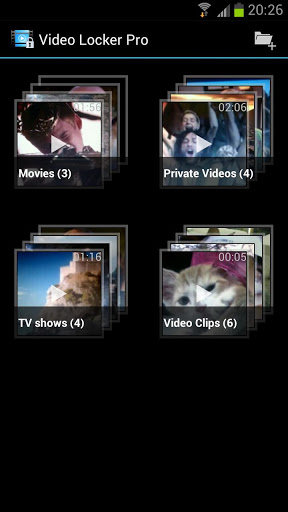
Video Locker is an app that simply password protects all your videos and gives you access to them on entering this unique password.
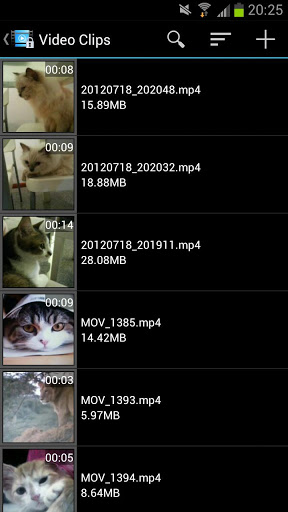
You can add in the password and enter the folder where your hidden videos have been saved.
These may be of any size and any file type, video locker is optimised to secure all that important data through a wall which no one other than the owner/app user can pass through.
Let us explore some of the core features of Video Locker highlighting why this is such a secure app.
- In addition to being moved to a secret location all together, the videos you hide are also encrypted using an advances 128 bit AES encryption technology. The key idea behind doing this is so that your videos are still safe even if your phone is stolen and the stealer tries to access you SD card.
- To extend further security, Video Locker won’t even make its appearance in the recent video list so the hacker won’t know a thing.
- Sometimes you may forget to exit the app and usually this may pose a danger to your phone privacy, but with Video Locker, it exits the app the minute your Android device goes to sleep.
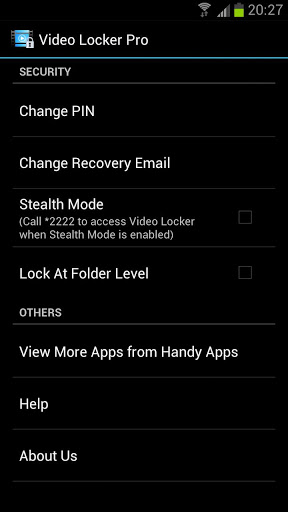
- With the folder level locking, you can also hide folders and have the option to display one hidden video album without exposing off the others.
- Enjoy the video viewing experience on your tablet as well, as Video Locker’s user interface has been created in a way that the app is perfectly optimized for tablet use as well. There is no difference in quality and you can use both devices for locking and viewing.
- You enter the app with a PIN number. This PIN number may be forgotten by you at some point or the other. So what do you do then? Video Locker gives you the option of recovery through a pre-mentioned e mail id which can be changed from the options at any time. In the event of a PIN loss ask the app to send you an e-mail and you’ll regain secured access to your videos once again.
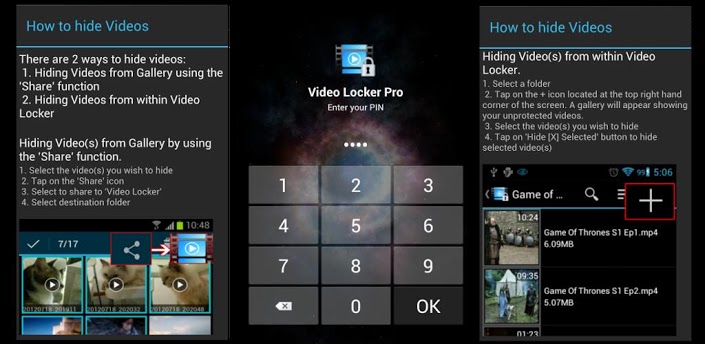
- The easy to use app lets you hide and lock away videos from the app and from the gallery directly as well.
- Another solid feature offered by this app is to bulk hide your videos. You don’t
 have to sit and hide each video at a time at all anymore when you can hide them all at once in a jiffy with this app.
- You can even unhide and specify the location of the video after the hiding process is accomplished.
Video Locker in its premium mode comes with a stealth mode where you can even hide the app itself. You can use the PIN or the innocent looking calculator widget to access the app. If you’ve got a huge secret stack of confidential videos in your Android device, then you’ve got just the perfect app to fulfil your privacy needs with Video Locker in your app tray.