

 -Go to the Google Play Store to download/install S-View
-If you don’t have Google Play Store access, you can download the APK file here
Once the app is installed, you can start to enjoy all sorts of cool features:
-Caller ID will pop up when you have an incoming call
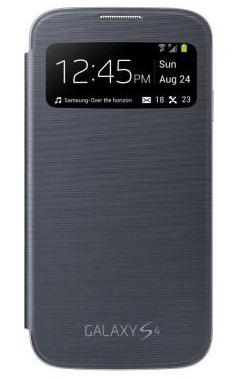
-S-View will automatically display time, data, day, and message information when you don’t have an incoming call
-When playing music, S-View will display music information on your screen
-You can easily adjust the location of S-View on your screen to make sure it aligns perfectly with your phone cover
-On several devices, the screen will automatically wake up when you cover is opened
This version of S-View seems to be better than the default version because users can customize a number of different things about their S-View. You can change where it appears on your device, for example, which is great if you don’t want to buy the S-View cover for $59.99 from Samsung. You could even just cut a hole out of your existing case and move S-View to that part of your screen.
-Go to the Google Play Store to download/install S-View
-If you don’t have Google Play Store access, you can download the APK file here
Once the app is installed, you can start to enjoy all sorts of cool features:
-Caller ID will pop up when you have an incoming call
-S-View will automatically display time, data, day, and message information when you don’t have an incoming call
-When playing music, S-View will display music information on your screen
-You can easily adjust the location of S-View on your screen to make sure it aligns perfectly with your phone cover
-On several devices, the screen will automatically wake up when you cover is opened
This version of S-View seems to be better than the default version because users can customize a number of different things about their S-View. You can change where it appears on your device, for example, which is great if you don’t want to buy the S-View cover for $59.99 from Samsung. You could even just cut a hole out of your existing case and move S-View to that part of your screen.
How to Add S-View Functionality to Any Android Phone
2 min read
One thing I sorta miss about my old flip phone is the ability to take it out of my pocket, press a button on the side, and instantly view time and message notifications from the small front screen. With Android, I have to turn my whole screen on to view that information. Life is rough.
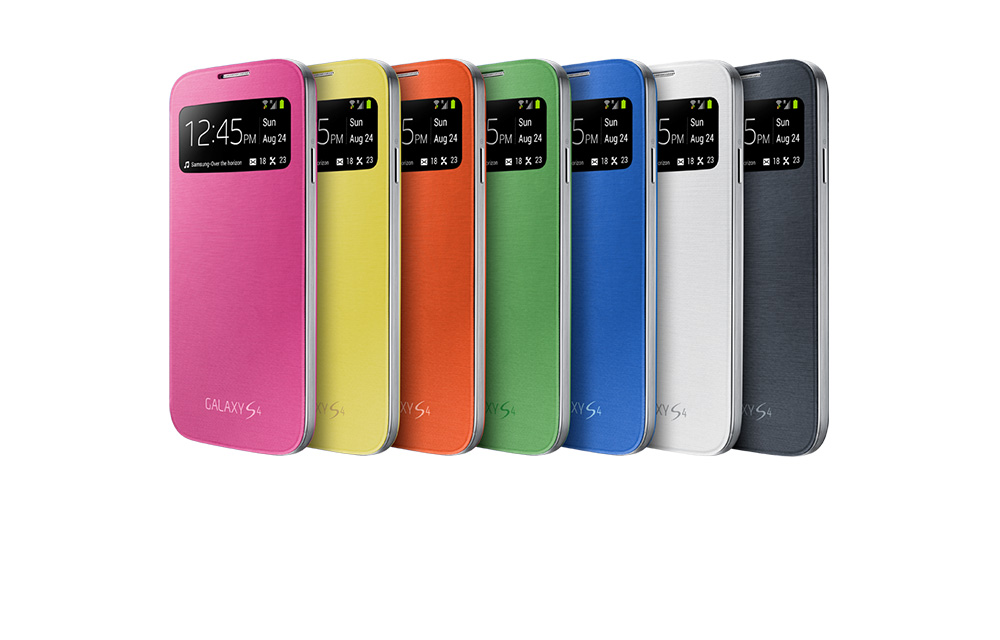
Thanks to the S-View feature on new Samsung devices, you can customize your screen to display relevant information through a hole at the top of your phone’s cover. So if you only want to check the time and see message/call notifications, you can do that by simply taking out your S4 and looking at the top part of the screen through the S-View protective case.
S-View is included by default on the Samsung Galaxy S4. But thanks to a talented member of the XDA Developers’ Forum named HatRoid, anyone can add S-View functionality to their device using a simple app - all you need is the S-View cover, which you can buy at Samsung.com
Once you’ve got the S-View cover, follow the instructions below to start using S-View on your phone:
-Go to the Google Play Store to download/install S-View
-If you don’t have Google Play Store access, you can download the APK file here
Once the app is installed, you can start to enjoy all sorts of cool features:
-Caller ID will pop up when you have an incoming call
-S-View will automatically display time, data, day, and message information when you don’t have an incoming call
-When playing music, S-View will display music information on your screen
-You can easily adjust the location of S-View on your screen to make sure it aligns perfectly with your phone cover
-On several devices, the screen will automatically wake up when you cover is opened
This version of S-View seems to be better than the default version because users can customize a number of different things about their S-View. You can change where it appears on your device, for example, which is great if you don’t want to buy the S-View cover for $59.99 from Samsung. You could even just cut a hole out of your existing case and move S-View to that part of your screen.
-Go to the Google Play Store to download/install S-View
-If you don’t have Google Play Store access, you can download the APK file here
Once the app is installed, you can start to enjoy all sorts of cool features:
-Caller ID will pop up when you have an incoming call
-S-View will automatically display time, data, day, and message information when you don’t have an incoming call
-When playing music, S-View will display music information on your screen
-You can easily adjust the location of S-View on your screen to make sure it aligns perfectly with your phone cover
-On several devices, the screen will automatically wake up when you cover is opened
This version of S-View seems to be better than the default version because users can customize a number of different things about their S-View. You can change where it appears on your device, for example, which is great if you don’t want to buy the S-View cover for $59.99 from Samsung. You could even just cut a hole out of your existing case and move S-View to that part of your screen.
Newsletter
Get the latest tech news delivered to your inbox weekly.