Subverting the paradigm and doing things a bit differently is what makes you shine these days in a world full of excessive imitation. To extend the very same logic to the Android world, here are 3 apps that will allow you to use your phone in an ingeniously cool way that will make your life considerably easier. We all are used to using various features on our phones by typing in the desired location or just going to it.
Luckily, the influx of voice-based apps in the market with rapidly improving voice recognition technologies has made brought great relief to Android users who had to endlessly stress their fingers the entire day by typing so much. Here are 3 great voice apps for your Android device that enable you to do things differently and a lot more things in less time.
Here’s a great voice dialing and voice control app manufactured by the Cyberon Group. It predominantly uses your voice to navigate through your
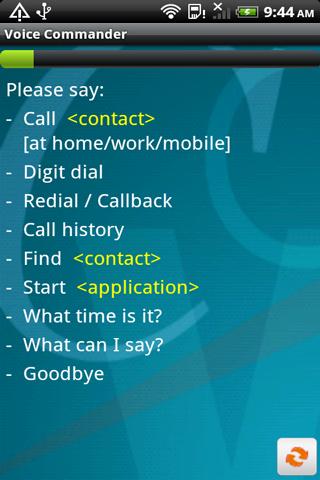
phone and take you to the desired location. Through Cyberon Voice Commander you can:
- Make phone calls
- Launch programmes
- Look up contact info
- Find out the time
- Take back ups
- Install files from the memory card
The accuracy level of the Cyberon Voice Commander app is remarkably high and works best when a single voice is speaking with minimal disturbance in the background.
It operates via Bluetooth and works on Android 2.2 OS and above.
This hands-free and eyes-free voice app is available for about $6 at the Google Play Store and is fully refundable till the first 48 hours of use.
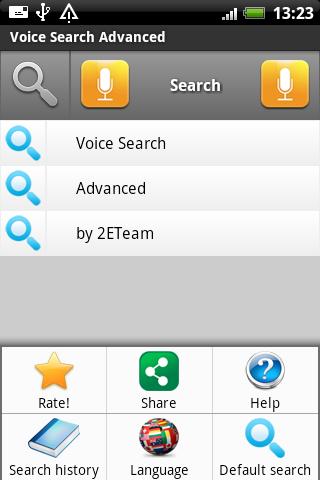
Voice Search Advanced is another great voice search Android app that reaches out of the purview of the phone and provides you ubiquity in search facilities via voice search on the following search engines:
 Wikipedia
- Google
- YouTube
- Yandex
- Google Play.
- Bing
- Play Market
- Yahoo
Through the app homescreen, you can select a search site and speak out what you are searching for. You can search in multiple languages ranging from English, Russian, French, Deutsche,
You can choose the right result of the recognition as well and you can quick edit your voice search request a well.
There is a simple voice search and then there’s an advanced search with detailed filters for a specific search.
You can also pick the “by 2ETeam” search which is another advanced form of search.
Audio Clock
Audio Clock is the perfect audio app for your Android device, especially for those of you who do not wear a watch or are unable to keep checking the time at all times. It tells you the time at regular intervals to keep you aware as the day progresses and chimes in with fun gong-like tunes that include the olden day grandfather clocks as well.
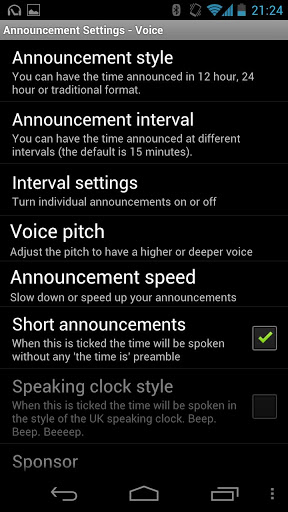
Audio clock can be configured to:
- Show a status icon in the notification bar
- Use a real clock chime Use the alarm, media or notification volume for all announcements.
- Start when you turn your phone on
- Automatically turn itself off between pre-specified times (e.g. overnight)
- Speak out the time, which can be configured to be announced only when you are using Bluetooth or wired headphones
A great feature offered by the Audio Clock is the cool variety of sounds of the alerts it gives you. These options include:
- The grandfather clock with either Winchester or Whittington chimes
- The famous Big Ben
- The clock from St Pauls School (also in London)
- A cuckoo clock as your clock sound.
You can also configure a voice to speak out the time and have it pre-set to say out the time every 30 minutes or every hour or as you specify.
So what are you waiting for? Add these awesome voice apps to your Android device's app tray and enjoy a hands-free and eyes-free Android experience that will make your communications and browsing much more convenient.