How to Get Free 50GB of Online Storage Space Through MediaFire Android App
2 min read
MediaFire is one of the world’s most popular online storage sharing websites. But until recently, there was no MediaFire app for Android. MediaFire has had an iOS app available for quite some time now, but Android users were left out in the cold.
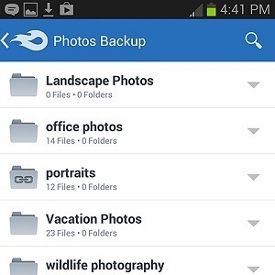
Well, it looks like MediaFire is looking to make amends for ignoring Android users all these years. The new MediaFire app for Android comes with free 50GB of online storage available through the cloud.
All you have to do to access those free 50GB of online storage space is:
Step 1) Download the MediaFire for Android app from the Google Play Store here
Step 2) Sign up for an account through the Android app
Step 3) Your account will include a complementary 50GB of cloud storage space
That’s it! You can use the MediaFire app to upload and download any files you might need. You can send file links to other people and share files across devices.
As you probably already know, nobody gives stuff away for free online. So what’s the catch with the MediaFire app for Android? Well, there are some restrictions, including:
-MediaFire for Android isn’t as feature-rich as cloud storage apps like Dropbox, which offer automatic syncing and other features for free
-Uploads cannot be larger than 200MB, although users can increase that to 1GB by paying $1.50 per month
-If you haven’t accessed files in over 300 days, the MediaFire app will start to bother you with notifications telling you to interact with those files
Still, a free 50GB of online storage space is a lot more free space than any other cloud storage service gives to users. If you need to store a lot of smaller files online and access them over your Android, MediaFire is one of the best ways to do that. Just make sure your files aren’t larger than 200MB.
Download MediaFire for Android free here

What’s the catch?
As you probably already know, nobody gives stuff away for free online. So what’s the catch with the MediaFire app for Android? Well, there are some restrictions, including:
-MediaFire for Android isn’t as feature-rich as cloud storage apps like Dropbox, which offer automatic syncing and other features for free
-Uploads cannot be larger than 200MB, although users can increase that to 1GB by paying $1.50 per month
-If you haven’t accessed files in over 300 days, the MediaFire app will start to bother you with notifications telling you to interact with those files
Still, a free 50GB of online storage space is a lot more free space than any other cloud storage service gives to users. If you need to store a lot of smaller files online and access them over your Android, MediaFire is one of the best ways to do that. Just make sure your files aren’t larger than 200MB.
Download MediaFire for Android free here

One Click Root Author
Content Writer
Experienced writer covering technology and mobile development.
You Might Also Like
How-To
Android 14 Root Methods: What Changed?
Explore the new root methods and security changes in Android 14.
How-To
Latest Android Security Updates Impact Root Access
Understanding how the latest security patches affect root methods.
How-To
Google Pixel 8 Pro Root Guide Released
Complete step-by-step guide to rooting the Google Pixel 8 Pro.
Comments
JD
John Doe
2 days ago
Great article! Very informative and well-written. Thanks for sharing.
JS
Jane Smith
5 days ago
I found the security section particularly helpful. Looking forward to more content like this!
Leave a Comment
Newsletter
Get the latest tech news delivered to your inbox weekly.
Popular Posts
-
1
Getting Started with Android Development
12.5K views
-
2
Best Practices for Mobile Security
8.2K views
-
3
Understanding Smartphone Hardware
6.8K views