For years now, QWERTY keyboards have been the absolute undisputed standard of layout for keyboards and are acknowledged as the universal keyboard format for almost every device. However, it may surprise you to know that this layout created for the Sholes and Glidden typewriter has finally reached a stage in type where it meets its arch nemesis – the KALQ keyboard.
Unfortunately, several tech companies have previously tried in vain to push for redesigns of the traditional format as it is not the most optimal way of typing for PCs, smartphones and tablets because of inconvenience of shifting to a new universal keyboard standard. Never heard of, but definitely an ingenious creation, the brand new KALQ keyboard format has been designed with the motive of sending the outdated 19th QWERTY model into retirement. It is the new kid in town in the Android world and will be introduced to you in the month of May 2013 courtesy a team of German scientists.
Now, the first thing that comes to our minds when we hear this new keyboard style named KALQ is:
- What is it?
- Will it even work?
- Why should we adopt something new after being accustomed to something for years?
- What’s in it for me?
To start off, KALQ is a new layout of the keyboard, designed for the Android device (both smartphones and tablets) that essentially has its keys set in a way it optimizes the typing capacity and speed generated for the individual user while typing. Keeping in mind that users predominantly use their thumbs to type on Android devices along with having gone over 5.6 million possible combinations, the following design was charted out:
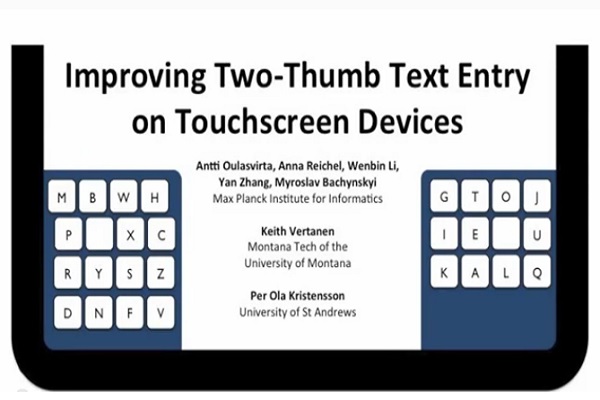
KALQ was designed on the basis of the position the Android tablets are held in by the average user and behavioral data and computational models were extracted as a result of this experiment.
The placement of the letters is such that all the vowels are on the right side of the bifurcated keyboard and to minimize the travelling of the thumb (thumb-travel distance), the recurring letters that are used most commonly are cluttered together. The spacebar that usually increases the distance between the keys and itself is now strategically placed on either side as a blank key that can be reached faster thus minimizing the time taken to type.
Extensive research done on this layout has revealed that this new format increases typing speed by 34%. This is a drastic increase in the number of words per minute and with just an hour of practice for two weeks the average user will be up and running on this new layout with absolute comfort.
Going back to the basics, this layout was designed by first analyzing the ways the average user held the Android device keyboard to type. As evident from above, the thumb was the centre of attraction and the next step was to optimize and create a format that speeds up everything. It was also deemed necessary for either thumb never to be idle. I.e. the thumbs must travel and hover over the next alphabet key while the other thumb is typing. This of course reduces the time taken and work can be sped up.
So this about covers the basics and gives you an ‘all you need to know’ summary about the revolutionary new KALQ keyboard format.
Should you use it? Well it’s going to be introduced in the first week of May and will be free across the Play Store. Worth a shot, don’t you think?