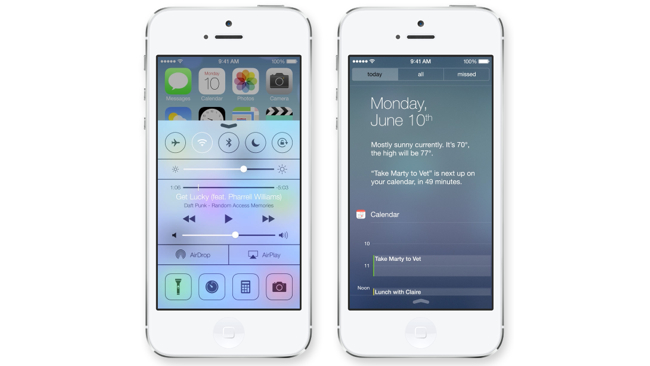
Apple announced iOS7 last month. Parallels were immediately drawn between iOS 7 and Android because, well, Apple seemed to be ‘borrowing’ a lot of concepts from Android.
Normally, this wouldn’t be a problem – the tech industry is filled with companies building on the innovations of others. But since Apple regularly sues companies for billions if they use insignificant features like the “
rubber band effect”, it seems like a douchey move for the world’s most valuable tech company.
All gripes aside, Apple’s iOS 7 includes some slick looking features along with a fantastic-looking ‘Control Center’, which is the term Apple has chosen for the notification shade that slides down from the top of you screen when you want to change brightness, volume, or turn antennas off/on.
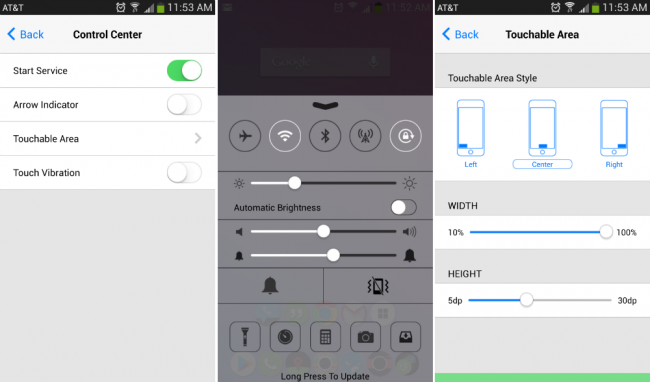
Jealous Android users can enjoy iOS7 today thanks to a free Android app. Interestingly enough, the “iOS7 for Android” app was released before iOS7 was available to the general iPhone-wielding public, which means Apple got beat at its own game.
The app is called Control Center – iOS 7 Style and
can be downloaded here for free. It promises “iPhone style & Android capability”, which sounds like an excellent combination.
Here are the app’s most notable features:
-Access important system features from a Control Center interface that looks and feels like Apple’s recent release of iOS7
-Turn Wifi and Rotation settings on/off
-Control volume with a slider
-Access a quick-launching camera, calculator, and clock shortcut
-Turn GPS and data sync on and off
The only problem with the app is that it forces users to have a ‘Game Center’ shortcut on their Control Center. It’s not a major issue, but there isn’t even a paid version of the app that allows users to disable this shortcut.
The app has been downloaded thousands of times already and is surprisingly well-polished. All you need to do in order to access this fantastic UI app is
install it from the Google Play Store.