

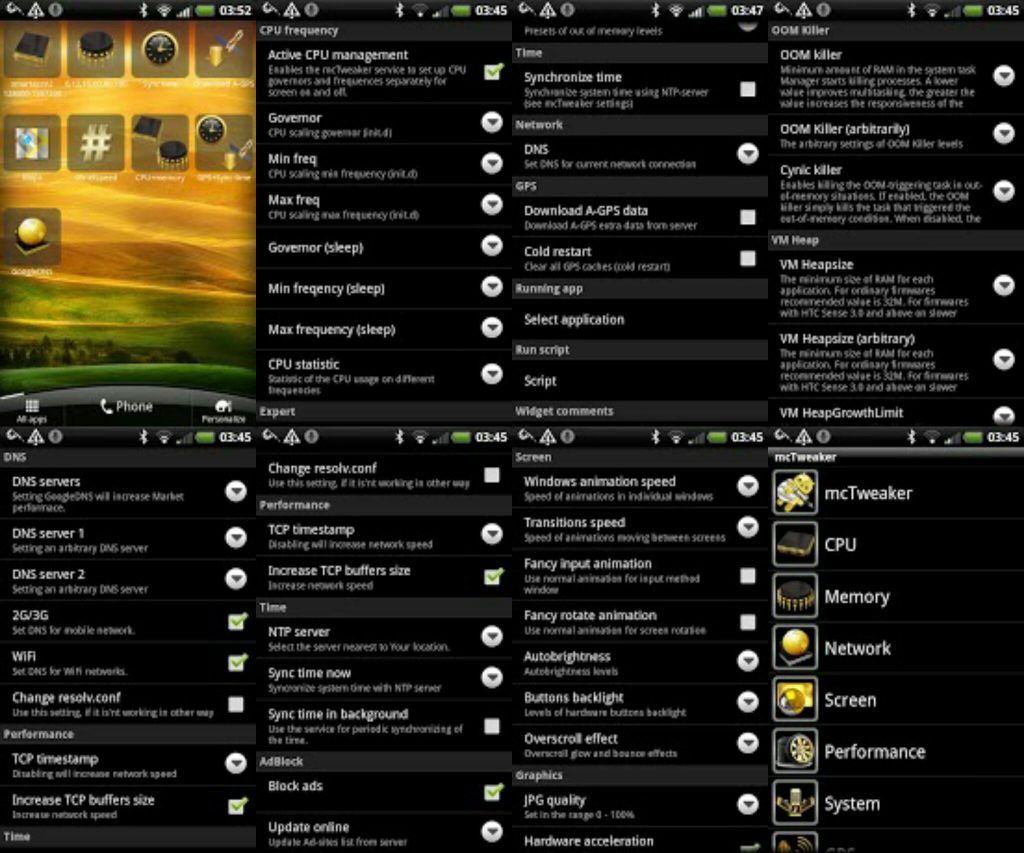
 It includes the following features:
- separate management of the CPU frequency for different states of the screen (ON/OFF);
- CPU voltage control for different frequencies;
- management of the OOM killer parameters;
- setting of Dalvik VM heap parameters;
- setting of file system parameters (IO Scheduler, cache SD-card);
- management of the DNS-servers for different network connections;
- optimization of the network performance;
- manual and automatic synchronisation of time via the Internet, a large selection of NTP-servers;
- blocking of advertising;
- setting of the screen parameters (animation speed, auto brightness);
- optimization of graphics (hardware acceleration, anti-aliasing, the density of the screen, etc.);
- JIT-compilation on/off;
- optimization of energy consumption;
- editing the parameters of the A-GPS (select SUPL-server, select the NTP server, forced request (A-GPS data, cold start);
- editing of parameters in the file build.prop;
- script-manager with a built-in editor;
- auto run any scripts at boot time (emulation of init.d);
- home screen widgets to switch the set of parameters (CPU frequency, the parameters of OOM killer, switching the DNS-servers, time synchronization, the request of A-GPS data;
- launch any application by widget with the simultaneous adjustment of parameters;
- running the script by the widget;
- freezing, uninstallation of system apps and moving apps to the system memory;
- applications auto run management;
So don’t worry, there are ways beyond rooting to get much more than what rooting has to offer. Apps like mcTweaker is one such app, it will make sure that you get much more than what you are expecting!
It includes the following features:
- separate management of the CPU frequency for different states of the screen (ON/OFF);
- CPU voltage control for different frequencies;
- management of the OOM killer parameters;
- setting of Dalvik VM heap parameters;
- setting of file system parameters (IO Scheduler, cache SD-card);
- management of the DNS-servers for different network connections;
- optimization of the network performance;
- manual and automatic synchronisation of time via the Internet, a large selection of NTP-servers;
- blocking of advertising;
- setting of the screen parameters (animation speed, auto brightness);
- optimization of graphics (hardware acceleration, anti-aliasing, the density of the screen, etc.);
- JIT-compilation on/off;
- optimization of energy consumption;
- editing the parameters of the A-GPS (select SUPL-server, select the NTP server, forced request (A-GPS data, cold start);
- editing of parameters in the file build.prop;
- script-manager with a built-in editor;
- auto run any scripts at boot time (emulation of init.d);
- home screen widgets to switch the set of parameters (CPU frequency, the parameters of OOM killer, switching the DNS-servers, time synchronization, the request of A-GPS data;
- launch any application by widget with the simultaneous adjustment of parameters;
- running the script by the widget;
- freezing, uninstallation of system apps and moving apps to the system memory;
- applications auto run management;
So don’t worry, there are ways beyond rooting to get much more than what rooting has to offer. Apps like mcTweaker is one such app, it will make sure that you get much more than what you are expecting!
mcTweaker - Optimize Your Android's Performance Standards
3 min read
In pursuit of an amazing performance out of our Android devices, we end up doing a lot of things. One of the biggest steps forward you can take to achieve this is to root your device. Rooting helps us in getting the maximum output out of our phones, but it can still leave us dissatisfied at times. For such times, there is an app that can be used to tweak the best performance out of our phones and that app is mcTweaker. But before using this app, keep these few things in mind:
1. Before using the program Nandroid backup is strongly recommended! Please do not write negative reviews, if Your machine cannot boot as a result of using of the program. The program works with hidden parameters of the kernel, which setting can lead to unstable operation of the device. Recovery is possible only in the presence of the backup.
2. Before you upgrade to version 3.х.х from versions 2.х.х it is recommended to completely remove the old version of the program and the license.
3. USB debugging option must be enabled.
4. The presence of root-rights necessarily.
5. BusyBox must to be installed.
6. On some devices you need a S-OFF.
7. It's strongly recommended to update BusyBox version to 1.20.x or latter.
If You like, to Your smartphone running at peak performance. If Your experience does not give You peace of mind and You change firmwares one by one, in search of the optimum decision for Your device. Try to adjust Your smartphone by yourself and help other users with similar devices. mcTweaker is a system application, that allows you to set up hidden parameters of Android, to achieving maximum performance and minimum power consumption.
It includes the following features:
- separate management of the CPU frequency for different states of the screen (ON/OFF);
- CPU voltage control for different frequencies;
- management of the OOM killer parameters;
- setting of Dalvik VM heap parameters;
- setting of file system parameters (IO Scheduler, cache SD-card);
- management of the DNS-servers for different network connections;
- optimization of the network performance;
- manual and automatic synchronisation of time via the Internet, a large selection of NTP-servers;
- blocking of advertising;
- setting of the screen parameters (animation speed, auto brightness);
- optimization of graphics (hardware acceleration, anti-aliasing, the density of the screen, etc.);
- JIT-compilation on/off;
- optimization of energy consumption;
- editing the parameters of the A-GPS (select SUPL-server, select the NTP server, forced request (A-GPS data, cold start);
- editing of parameters in the file build.prop;
- script-manager with a built-in editor;
- auto run any scripts at boot time (emulation of init.d);
- home screen widgets to switch the set of parameters (CPU frequency, the parameters of OOM killer, switching the DNS-servers, time synchronization, the request of A-GPS data;
- launch any application by widget with the simultaneous adjustment of parameters;
- running the script by the widget;
- freezing, uninstallation of system apps and moving apps to the system memory;
- applications auto run management;
So don’t worry, there are ways beyond rooting to get much more than what rooting has to offer. Apps like mcTweaker is one such app, it will make sure that you get much more than what you are expecting!
It includes the following features:
- separate management of the CPU frequency for different states of the screen (ON/OFF);
- CPU voltage control for different frequencies;
- management of the OOM killer parameters;
- setting of Dalvik VM heap parameters;
- setting of file system parameters (IO Scheduler, cache SD-card);
- management of the DNS-servers for different network connections;
- optimization of the network performance;
- manual and automatic synchronisation of time via the Internet, a large selection of NTP-servers;
- blocking of advertising;
- setting of the screen parameters (animation speed, auto brightness);
- optimization of graphics (hardware acceleration, anti-aliasing, the density of the screen, etc.);
- JIT-compilation on/off;
- optimization of energy consumption;
- editing the parameters of the A-GPS (select SUPL-server, select the NTP server, forced request (A-GPS data, cold start);
- editing of parameters in the file build.prop;
- script-manager with a built-in editor;
- auto run any scripts at boot time (emulation of init.d);
- home screen widgets to switch the set of parameters (CPU frequency, the parameters of OOM killer, switching the DNS-servers, time synchronization, the request of A-GPS data;
- launch any application by widget with the simultaneous adjustment of parameters;
- running the script by the widget;
- freezing, uninstallation of system apps and moving apps to the system memory;
- applications auto run management;
So don’t worry, there are ways beyond rooting to get much more than what rooting has to offer. Apps like mcTweaker is one such app, it will make sure that you get much more than what you are expecting!
Newsletter
Get the latest tech news delivered to your inbox weekly.