

 With the help of this app, you will be able to figure out any and all the questions you might have about the internet through the following:
- Real-time log display
The log tab shows the network packets being transmitted and their details such as:
* source and destination addresses/ports
* network protocol and interface
* bytes transmitted
* timestamp
- Real-time network usage statistics
The Apps tab lists installed applications along with network usage statistics such as:
* total packets and bytes sent
* active network throughput speed in Bps/Kbps/Mbps
* timestamp of last connection
* list of all the unique connections made by each app
* sortable and filterable packets/bytes counters
- Real-time connection notifications
The status bar icon's up/down arrows will highlight when upload/download traffic occurs, and the notification drop-down shade displays the connection throughput speed in Kbps.
You can also configure toast pop-up notifications on a per-app basis that will pop-up a temporary notification containing connection details no matter which app you are in.
- Graphs
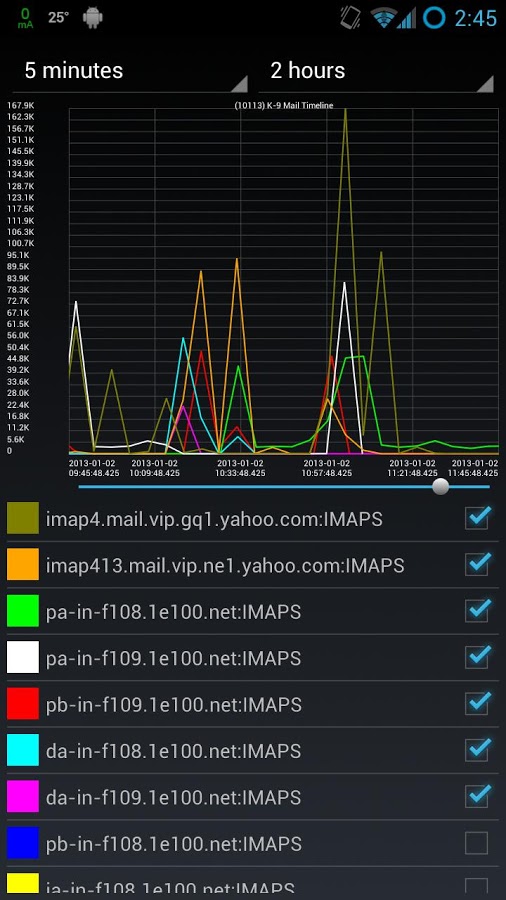
Click an app in either tab to see time-lines of its connections.
Select the 'Apps Timeline' menu item to see an over-all time-line of all apps.
Adjustable interval from 1 ms to 48 hours for summing data:
* to see each packet, set to 1 ms
* for Kbps, set to 1 second
* for Kb-per-hour, set to 1 hour; etc
It also features adjustable pinch-zoomable and scrollable graphs.
This is not it, the app developers of Network Log were careful not to take up too much space as the app itself is designed to use minimal CPU/battery, you can further reduce the CPU/battery use by exiting the app after starting the logging service.
Network Log is the perfect app for the curious soul because it does not let the vast workings of the internet intimidate you and instead, presents it in a platter for you to understand, enjoy and of course, learn.
With the help of this app, you will be able to figure out any and all the questions you might have about the internet through the following:
- Real-time log display
The log tab shows the network packets being transmitted and their details such as:
* source and destination addresses/ports
* network protocol and interface
* bytes transmitted
* timestamp
- Real-time network usage statistics
The Apps tab lists installed applications along with network usage statistics such as:
* total packets and bytes sent
* active network throughput speed in Bps/Kbps/Mbps
* timestamp of last connection
* list of all the unique connections made by each app
* sortable and filterable packets/bytes counters
- Real-time connection notifications
The status bar icon's up/down arrows will highlight when upload/download traffic occurs, and the notification drop-down shade displays the connection throughput speed in Kbps.
You can also configure toast pop-up notifications on a per-app basis that will pop-up a temporary notification containing connection details no matter which app you are in.
- Graphs
Click an app in either tab to see time-lines of its connections.
Select the 'Apps Timeline' menu item to see an over-all time-line of all apps.
Adjustable interval from 1 ms to 48 hours for summing data:
* to see each packet, set to 1 ms
* for Kbps, set to 1 second
* for Kb-per-hour, set to 1 hour; etc
It also features adjustable pinch-zoomable and scrollable graphs.
This is not it, the app developers of Network Log were careful not to take up too much space as the app itself is designed to use minimal CPU/battery, you can further reduce the CPU/battery use by exiting the app after starting the logging service.
Network Log is the perfect app for the curious soul because it does not let the vast workings of the internet intimidate you and instead, presents it in a platter for you to understand, enjoy and of course, learn.

Network Log - Because The Backstage Is a Mighty World of its Own
3 min read
While some of us are happy with watching what all happens on stage, there are a few who are more curious about the backstage happenings. Some of us are satisfied with how things are, others want to know why those things are the way they are. Some of us love a scene while some of us wait fro the scene to get over so that we can rush to what is happening behind the scenes.
If you are someone who loves the internet but not because of what it is but because of why it is what it is and are curious where all the data goes, comes from, how it is handled - basically the whole networking aspect of the internet and if you are someone who has gotten their android device rooted, Network Log is the app for you. Network Log monitors iptables-logging to display a real-time list of which apps are making network connections, and provides statistics about those app connections.
With the help of this app, you will be able to figure out any and all the questions you might have about the internet through the following:
- Real-time log display
The log tab shows the network packets being transmitted and their details such as:
* source and destination addresses/ports
* network protocol and interface
* bytes transmitted
* timestamp
- Real-time network usage statistics
The Apps tab lists installed applications along with network usage statistics such as:
* total packets and bytes sent
* active network throughput speed in Bps/Kbps/Mbps
* timestamp of last connection
* list of all the unique connections made by each app
* sortable and filterable packets/bytes counters
- Real-time connection notifications
The status bar icon's up/down arrows will highlight when upload/download traffic occurs, and the notification drop-down shade displays the connection throughput speed in Kbps.
You can also configure toast pop-up notifications on a per-app basis that will pop-up a temporary notification containing connection details no matter which app you are in.
- Graphs
Click an app in either tab to see time-lines of its connections.
Select the 'Apps Timeline' menu item to see an over-all time-line of all apps.
Adjustable interval from 1 ms to 48 hours for summing data:
* to see each packet, set to 1 ms
* for Kbps, set to 1 second
* for Kb-per-hour, set to 1 hour; etc
It also features adjustable pinch-zoomable and scrollable graphs.
This is not it, the app developers of Network Log were careful not to take up too much space as the app itself is designed to use minimal CPU/battery, you can further reduce the CPU/battery use by exiting the app after starting the logging service.
Network Log is the perfect app for the curious soul because it does not let the vast workings of the internet intimidate you and instead, presents it in a platter for you to understand, enjoy and of course, learn.
With the help of this app, you will be able to figure out any and all the questions you might have about the internet through the following:
- Real-time log display
The log tab shows the network packets being transmitted and their details such as:
* source and destination addresses/ports
* network protocol and interface
* bytes transmitted
* timestamp
- Real-time network usage statistics
The Apps tab lists installed applications along with network usage statistics such as:
* total packets and bytes sent
* active network throughput speed in Bps/Kbps/Mbps
* timestamp of last connection
* list of all the unique connections made by each app
* sortable and filterable packets/bytes counters
- Real-time connection notifications
The status bar icon's up/down arrows will highlight when upload/download traffic occurs, and the notification drop-down shade displays the connection throughput speed in Kbps.
You can also configure toast pop-up notifications on a per-app basis that will pop-up a temporary notification containing connection details no matter which app you are in.
- Graphs
Click an app in either tab to see time-lines of its connections.
Select the 'Apps Timeline' menu item to see an over-all time-line of all apps.
Adjustable interval from 1 ms to 48 hours for summing data:
* to see each packet, set to 1 ms
* for Kbps, set to 1 second
* for Kb-per-hour, set to 1 hour; etc
It also features adjustable pinch-zoomable and scrollable graphs.
This is not it, the app developers of Network Log were careful not to take up too much space as the app itself is designed to use minimal CPU/battery, you can further reduce the CPU/battery use by exiting the app after starting the logging service.
Network Log is the perfect app for the curious soul because it does not let the vast workings of the internet intimidate you and instead, presents it in a platter for you to understand, enjoy and of course, learn.
Newsletter
Get the latest tech news delivered to your inbox weekly.