If you have ever extensively used your laptop or desktop for work, then you would agree that Microsoft Outlook is one of the most commonly used platforms for e-mail management. Nothing can be compared to the variety of convenient functions that Outlook provides, especially its latest versions. It makes sending and receiving emails quite convenient, at the same time provides an array of other mail management options.
However, if you are unfamiliar with Outlook, here are a few reasons why it works so well:
- Users need to know absolutely nothing to connect. They just fire up Outlook, enter their e-mail address, and it and Exchange commune. Transparently. That cuts down on IT involvement in client configuration and allows users to switch computers easily.
- Active Directory's authentication extends to Exchange. That means that a user can simply log on to a computer, start Outlook, and her Active Directory credentials are passed to the Exchange server-no typing or separate logon required.
- If you're possessed by any sort of PDA or smartphone, there's a way to synch it with Outlook. Some vendors don't even provide a native personal information manager for their devices, but rely on the fact that most customers have a copy of Outlook that does the trick very nicely.
- Outlook's messaging isn't limited to mere e-mail. Companies can set up workflows for functions such as online voting. For example, if a group wants to decide on a location for a festive lunch, the coordinator can send a message offering several options. Recipients simply click a voting button within the e-mail message to send their responses.
These are just a few of the reasons why Outlook proves to be an excellent option of mail management. Therefore, it would be great if it could also be extended to out smartphones. You will be glad to know that it can!
OWA or the
Outlook Web App for Android lets you interact with your email, calendar, and contacts from virtually anywhere using your Android phone. You can triage email, manage your schedule, and sync contacts on the go, while protecting your business data.
With OWA for Android you can get work done faster with e-mail:
- Organize your email quickly with Conversation View, Mark as Junk, Flag, and Categories.
- Quickly search or browse email in all folders including Outlook Favorites.
- Use inline apps for shipment tracking, Bing maps for addresses, and other great features.
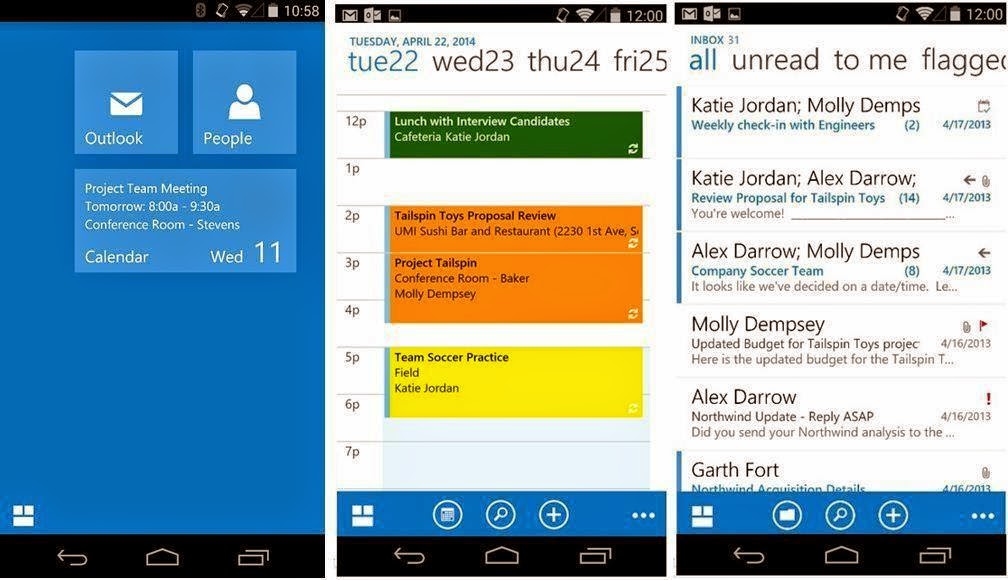 You can also manage your schedule with ease:
- Schedule meetings using attendee free/busy and room finder features.
- View shared calendars, including delegate support.
- Use your voice to look up a contact or retrieve your schedule:
Take your mailbox's contacts with you:
- No need to use Exchange ActiveSync to see your mailbox's contacts on your phone. Use OWA for Android to sync your contacts to your phone.
- Update your contacts’ information from your phone's address book, which will then be synced back to your mailbox.
- Keep business data secure
- Skip the device administrator setup — we'll set up a PIN for you within the app. You don’t need a PIN on your device (unless your admin requires encryption)!
- Use remote wipe if your phone is lost or stolen. It erases only your corporate date and leaves your personal data on the device alone.
Requirements:
- Device is running Android 4.4 KitKat or higher
- Mailbox is running on the latest version of Office 365 for business
So now top quality mail management can be extended to our android devices as well, thanks to
Outlook Web App for Android!