Google is a name that comes to mind whenever we talk about anything related to the internet. It searches for everything you want with just a few words you input. Over the course of a few years, it has become the universal all pervasive search-engine that everyone net user banks on at least 10 times a day for information.
Fetch is an Android app that aims to replicate Google's lofty reputation and translate it for the ever-popular Android app market. You could arguably call it the Google of the Android app world with a few off-track features that gives you the perfect app just to suit your needs. It takes search functionality to a whole new world by studying you as a person and delivering accurate results based on your interests.
Fetch identifies your consistent and fundamental traits and gives you the power to link them together to find exactly what you’re looking for.
It studies the kind of apps you have downloaded in the past and tells and recommends you similar apps.
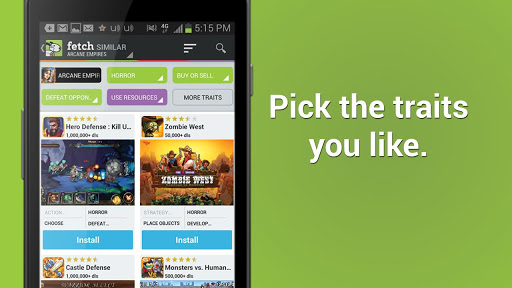
On the Fetch app, all you have to do is add in the traits you are looking for in a game or an app and all similar search results come up in an informative display with quick features of the game and an install button as well.
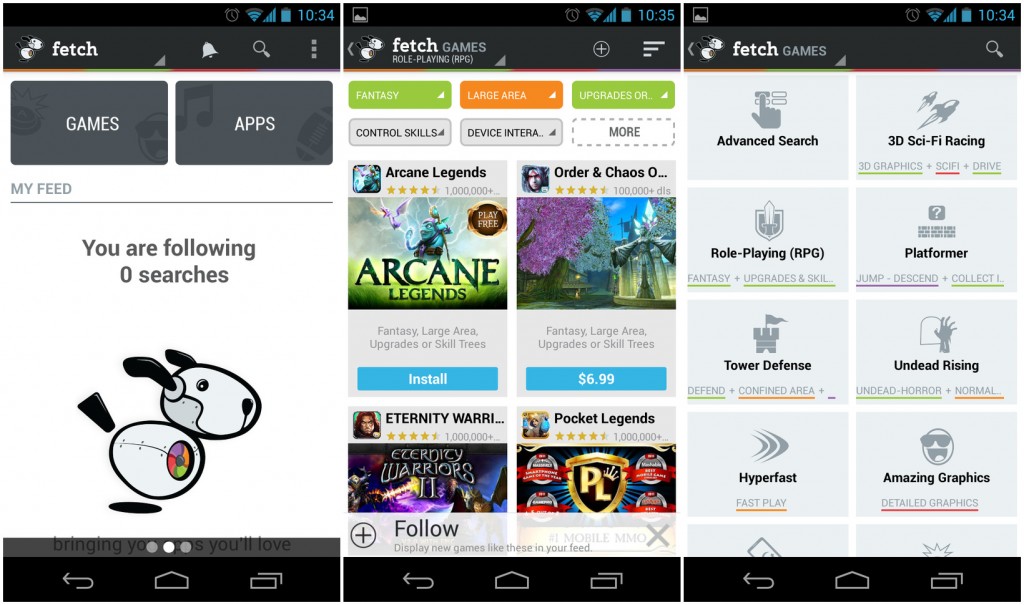
You can separately look for games or apps and follow sets of search traits for regular updates.
By simply swiping to the left, you can see those searches that are already stored on your phone.
These searches are segregated app/game wise and have a ‘similar’ tab right next to it.
These traits are visible in boxes above the game you are in and can be added and taken out and the search filter adjusts the results accordingly almost instantly.
When Fetch figures out your likes and dislikes over a period of time, it will update its systems to give you the best result and hide the rest so that you see only what you like.
But all this sounds very simple and looks like Google Play Store does the same as well. So what makes Fetch different and what really is its unique selling point? Well, it is the kind of detailing and parameters undertaken by it to carefully evaluate and match the finest apps related to your needs rather than cluttering your screen with unnecessary bloatware that you don’t need.
It uses a hundreds of user traits paired with millions of combination of keywords such as:
“3D + games + arcade + 4.5 stars and above + size above below 10 mb + realistic visuals”
OR
“Food + Community + Search + Tools + Recipe + Share”
The categories in games section of Fetch include:
- RPG
- Button mashing
- Tower Defence
- 3d Sci-Fi racing
- Tilting games
- Frist person shooter
- Wars Games
- Distraction games
- Casino games etc.
On clicking any category, you get multiple options similar to what you were on. For example, you can change from 1st person to 3rd person shooter or from shooting to fighting.
Within a game/app, you have tags that give you a better idea of what all categories this game can fall under. They are displayed in different colours in groupings of visuals, compatibility, game/app genre etc.
You have a detailed description of the game as well along with brief user reviews and download numbers.
You can follow lists as well to see new games added.
Eventually after getting a hang of this cool app-search platform and seeing the number of parameters it uses, you will definitely be lining up as a loyal customer to benefit from the superb customization options offered by Fetch. There are games for almost all moods and you will never get bored. Not a lot of people out there are aware of this app. So go ahead join the elite clan and customizing your downloads like never before.