

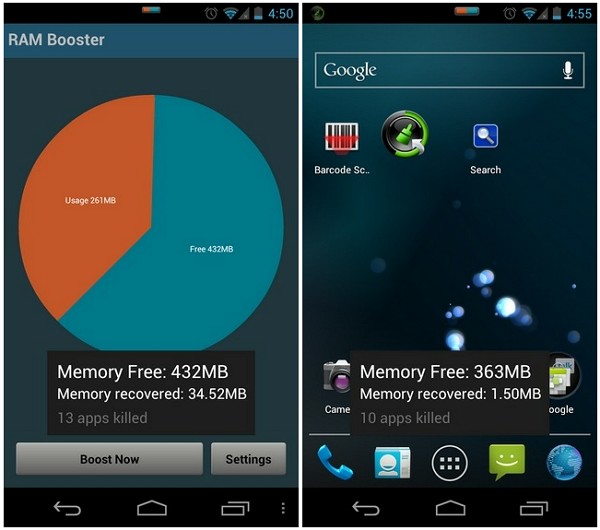
 Here are Smart Booster Pro’s features:
Fast cache cleaner
- 1-click to clean cache
- Show detail internal cache and external cache
- Select apps that use most cache
Quick SD Card cleaner
- Show SD card partition
- Scan for junk folder, big files, orphaned files
- Nice photo cleaner, music cleaner
- Notify for low storage usage
Advanced application manager
- Easily backup, uninstall unused apps
- App2SD - recommend apps to move to sd card
- Hibernate rarely used apps to save battery
- Disable system apps
- Scan auto-start apps
- Manage backup (.apk) files
Although these are enough reasons to go for this RAM booster over anyone else but the ease of use that Smart Booster Pro provides is hard to beat! Get, set, go!
Here are Smart Booster Pro’s features:
Fast cache cleaner
- 1-click to clean cache
- Show detail internal cache and external cache
- Select apps that use most cache
Quick SD Card cleaner
- Show SD card partition
- Scan for junk folder, big files, orphaned files
- Nice photo cleaner, music cleaner
- Notify for low storage usage
Advanced application manager
- Easily backup, uninstall unused apps
- App2SD - recommend apps to move to sd card
- Hibernate rarely used apps to save battery
- Disable system apps
- Scan auto-start apps
- Manage backup (.apk) files
Although these are enough reasons to go for this RAM booster over anyone else but the ease of use that Smart Booster Pro provides is hard to beat! Get, set, go!
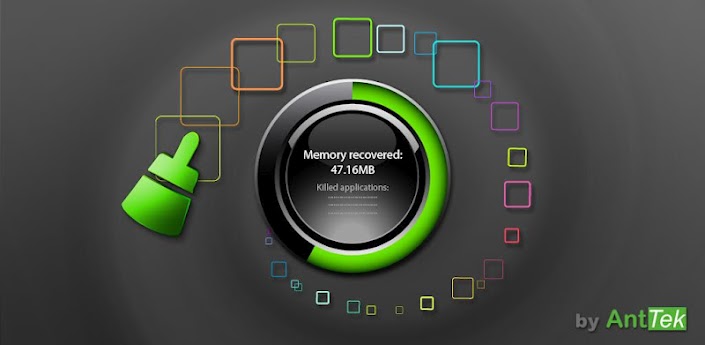
Smart Booster Pro - The Ultimate RAM Booster
3 min read
All of us are caught up with a need for speed. No, not just the game, although that is also a crowd favourite, but all of us are in need for speed in life. We need everything to be quick because everything around us functions in a flash. In such a scenario if we deicide to relax and take it easy, we will be left very far behind. And since our lifeline os our smartphone, we need to boost it up as much as possible.
Therefore, today’s app is Smart Booster Pro. It is the best optimization tool. This is former Smart RAM Booster. A few highlights of the Smart Booster are:
- Smart RAM Booster: small widget to adaptively boost RAM from anywhere
- Fast cache cleaner: one click to clean cache
- Quick SD Card cleaner: efficiently scan and clean junk created by million apps
- Advanced application manager: optimize your devices by hibernate, disable, auto-start apps
If you are thinking why you should buy this app over other apps, it is because it is the most beautiful part of this app is a small, configurable widget that places on top of any app and one-click to RAM boost. Most of Android devices bundle with limited memory. Android task manager will selectively kill low priority tasks in order to reserve memory to higher priority task. That’s not always run at an appropriate time, causing low responsive apps, lagging, especially when you launch a new app after heavily browsing web pages. It causes a worse experience. RAM Booster comes with auto-boost in 4 levels: aggressive, strong, medium, gentle:
- Aggressive: kill most of low priority apps
- Strong: Kill apps that is low priority as well as consume lightly below an “average”
- Medium: kill apps that consumes memory above an “average”
- Gentle: kill only apps that uses considerable memory
There are 5 ways to boost
- Auto-boost: boost automatically under RAM available & timing conditions
- Overlay widget – Enable RAM Booster overlay widget (on by default), adjust widget’s position, and tap on widget to boost anytime you want
- Home screen widget – one tap to boost (long-press your home screen>Widget to add RAM Booster widget)
- Notification bar – one tap to boost (toggle notification bar visibility in app’s setting)
- Boost Now – tap this button from app’s main screen
Here are Smart Booster Pro’s features:
Fast cache cleaner
- 1-click to clean cache
- Show detail internal cache and external cache
- Select apps that use most cache
Quick SD Card cleaner
- Show SD card partition
- Scan for junk folder, big files, orphaned files
- Nice photo cleaner, music cleaner
- Notify for low storage usage
Advanced application manager
- Easily backup, uninstall unused apps
- App2SD - recommend apps to move to sd card
- Hibernate rarely used apps to save battery
- Disable system apps
- Scan auto-start apps
- Manage backup (.apk) files
Although these are enough reasons to go for this RAM booster over anyone else but the ease of use that Smart Booster Pro provides is hard to beat! Get, set, go!
Here are Smart Booster Pro’s features:
Fast cache cleaner
- 1-click to clean cache
- Show detail internal cache and external cache
- Select apps that use most cache
Quick SD Card cleaner
- Show SD card partition
- Scan for junk folder, big files, orphaned files
- Nice photo cleaner, music cleaner
- Notify for low storage usage
Advanced application manager
- Easily backup, uninstall unused apps
- App2SD - recommend apps to move to sd card
- Hibernate rarely used apps to save battery
- Disable system apps
- Scan auto-start apps
- Manage backup (.apk) files
Although these are enough reasons to go for this RAM booster over anyone else but the ease of use that Smart Booster Pro provides is hard to beat! Get, set, go!
Newsletter
Get the latest tech news delivered to your inbox weekly.