

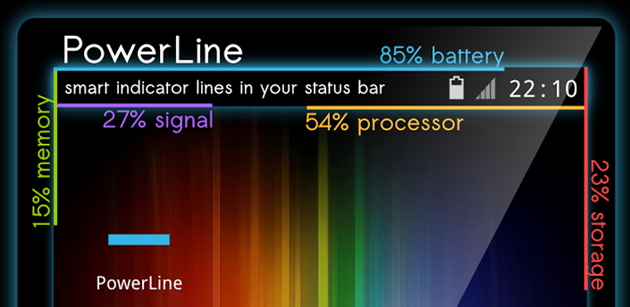
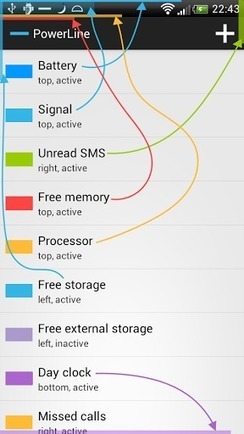
 These smart line indicators are placed at the top, bottom or the sides of the screen depending on your personal choice, all the time, so one can continuously keep a tab on various statistics, even while playing full screen games.
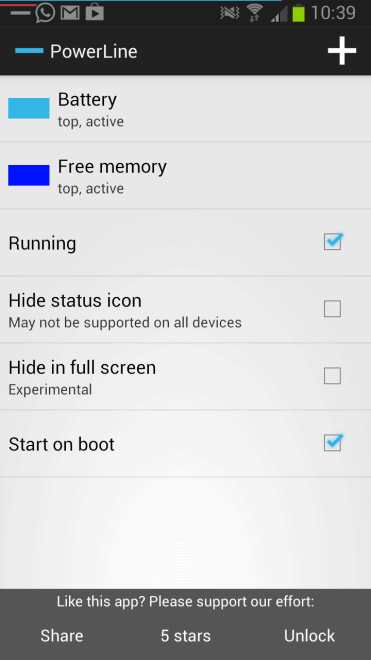
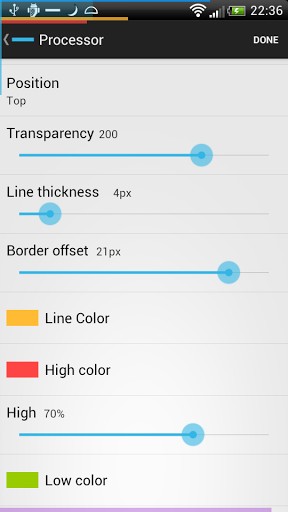 battery indicator on the screen for the user to get an idea of how the app works. The default indicator is easily removable completely and gives you the option to add in an indicator of your choice. The app’s settings allow the user to adjust the transparency, line thickness and the color of the line indicators (with an option to use different colors when the indicator reaches a high or a low point), depending on one’s preference.
There are also settings to change the position of the indicator lines on any corner of the screen, including how close to the edge of the screen the line is displayed, as well as the alignment of these smart lines.
You also get the privilege of seeing these changes live on the screen so you don’t have to save and preview every time u change any settings. The app also provides users with an option of hiding or pausing the appearance of lines if necessary.
Powerline comes as both free and paid versions. While the former allows you to add only two indicators, the latter does not have any restrictions and allows you to use all the 14 indicators. While using the free version, if you already have two active indicator lines and try to add another, the app will remind you of the limit and provide you with an option to buy the unlocked version or continue using the free version.
While this is a great Android app to try out, the user will have to unlock its full version for $1.49 to realize its true significance and make utmost use of its features. To add to that, you can also get rid of inconspicuous advertisements that keep bombarding the bottom of your screens while you are using this app. While it has a few cons like the indicator lines getting in the way of other readings, this application is worth giving a try. Overall if you’re looking for a good old nerdy service presented in a fashionable style, then Powerline is just the app for you.
battery indicator on the screen for the user to get an idea of how the app works. The default indicator is easily removable completely and gives you the option to add in an indicator of your choice. The app’s settings allow the user to adjust the transparency, line thickness and the color of the line indicators (with an option to use different colors when the indicator reaches a high or a low point), depending on one’s preference.
There are also settings to change the position of the indicator lines on any corner of the screen, including how close to the edge of the screen the line is displayed, as well as the alignment of these smart lines.
You also get the privilege of seeing these changes live on the screen so you don’t have to save and preview every time u change any settings. The app also provides users with an option of hiding or pausing the appearance of lines if necessary.
Powerline comes as both free and paid versions. While the former allows you to add only two indicators, the latter does not have any restrictions and allows you to use all the 14 indicators. While using the free version, if you already have two active indicator lines and try to add another, the app will remind you of the limit and provide you with an option to buy the unlocked version or continue using the free version.
While this is a great Android app to try out, the user will have to unlock its full version for $1.49 to realize its true significance and make utmost use of its features. To add to that, you can also get rid of inconspicuous advertisements that keep bombarding the bottom of your screens while you are using this app. While it has a few cons like the indicator lines getting in the way of other readings, this application is worth giving a try. Overall if you’re looking for a good old nerdy service presented in a fashionable style, then Powerline is just the app for you.