Moods! They come and go as our experiences change, and rise and subside at their whims. Music is probably the best companion for our temperamental states of emotion that helps give us a greater sense of purpose for the moments that have passed and the moments yet to come. But how can you truly find the bridge between your mood and your taste in music? For this very purpose, here comes
Stereomood – an Android app for music lovers that adapts every mood you are currently feeling into a musical that will put you in a transcendental trance of clarity regarding your experiences.
Stereomood is a one-of-a-kind app that is unlike all the stereotypical radio apps that enable you to stream music and create playlists. This app creates playlists using algorithms and user preferences to cater to all the moods you can think of and those that you even don’t know of or haven’t ever felt.

On downloading the Stereomood app, you can see a screen that asks you to create a user account or sign in using your Facebook account credentials.
The creative and intuitively designed interface of the Stereomood app captivates your attention as soon as you come across the homescreen. It displays a blank black screen with a plethora of moods scrolling around the screen. All you have to do is pick one of them to suit your mood and lose yourself in the music experience.
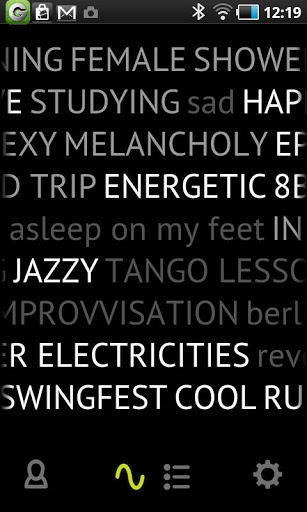
You feel sad, happy, elated, overjoyed, depressed and Stereomood converts all of that into music that you will like.
The principle of working of the app is simple and all the user has to do is add tags and that’s it.
The in-built software of the Stereomood app makes sure that the tags you add are representative of your mood and the next time you or anyone else clicks on that mood, the song you added to the list gets played for the user.
Stereomood is a music app that extends the concept of radio playlists and takes it to a level of customization that you will leave you lost in wonder and encourage you to explore new music.
These moods can range from:
- Calm
- Candlelight Dinner
- Jazz
- Beach Party
- I Feel
- Chill out
- Cooking time
- Cool
- Electrics
- Tango lesson
- Run
- Jog
- Lost in Jamaica
- New York
 Island
- Beach
- Sea Side
- A Sea side jog
- Rock music
- Meditation
- Melancholy
- Funky
- Blue grass
- Lonely
- Dreamy
- Disco Dance
- Sunny Day
- Elegance
- Sad
- Smooth
- Digital
- Pump up the volume
The list just goes on and on.
When you pick out any mood or input a tag yourself, you will automatically be driven to a long playlist featuring tracks similar to the theme you want to listen to. It will play all the songs that match your mood the best.
It indirectly creates a community of people who feel different things at different times all catering to your needs when you are in the mood for something cool.
You can shuffle the playlist and share it with all your friends on Facebook and Twitter as well.
A great and insightful little feature packed into the Stereomood app is that of providing interesting artist details that tell you more about the song, who created it and how it originated.
To improve your listening experience further, it is recommended for you to master the process of adding suitable tags to each song you come across and tagging it with a mood that you feel. This will help others too when they are in a similar mood. In fact users can create their own mood too and add it into the list to create a closer community vibe that benefits each and every Stereomood user.
You can also discover your emotional profile of the week through the ‘mood filter’.
Discover new artists through these intelligently customized playlists. If you hate the ads and want to clean up your app’s pretty looking interface, then simply purchase the full version of the app from Google Play Store and eliminate them for good.