Despite the convenience brought to us by the portability factor of smartphones, it is still a considerable annoyance to delve deep in and out of your pockets to respond instantly and not miss out on anything important. What if we told you that there was a way to virtually create a telepathic connection between you and your smartphone to alert you of what messages and calls you must respond to urgently and which ones you can skip and attend later?
This is where the
Vybe app for Android comes in to make your life much more convenient. Vybe is a vibrating app for your Android device that helps you understand what your phone is telling you without you having to even as much as touch it. It works on the simple principle of vibration and adds a great variety in its operation to give the user the best feel ever. You can create your own custom vibrations and use them at many places for different contacts and situations as and when required.
The main objective of the Vybe app is to allow the user to create his own custom-made vibrations that can be used not just on his Android phone, but across various platforms such as:
- Whatsapp
- Gmail
- Skype
- Viber
- Facebook
- Facebook Messenger.
The user interface of the Vybe app is extremely intuitive and easy to use. To get started with this cool app, all you need to do is go through this comprehensive guide:
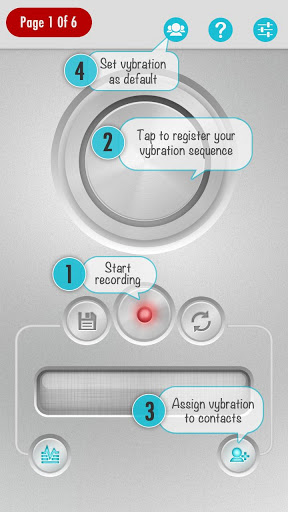
- It starts off with a grey screen and with a red button right in the centre of the world of the app.
- There then exists a huge grey button that is like the woofer on a speaker that you know is placed there for you to be your own DJ.
- You tap it and it vibrates which then gives you liberty to tap as many times with as many stoppages and long presses to create the best vibrating beats for yourself.
- A small blue button at the bottom right allows you to assign these self-created vibrations to your contacts from your list.
- You can also set theses vibrates as a default vibrate tone that are different from the ones already pre-set on your phone.
- You can search contacts by clicking on the magnifying glass icon on the top right on the landed page.
- A great feature is the ability to set the single created vibrates for multiple contacts at that time itself.
- You can also apply it to SMS’s Whatsapps and to Viber as well.
- Back to the recording screen, the big grey button has a blue and red moving light around it to give you a musical DJ feel when you press it.
- There also is a graph that shows the ups and downs as you click the grey button.
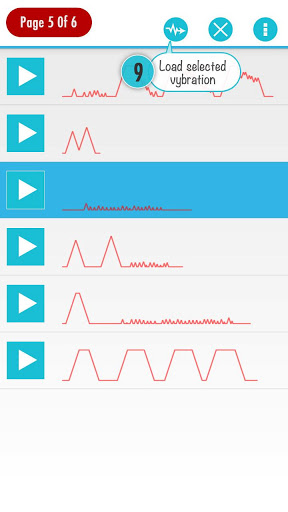
- All of these created ‘vyberations’ appear with a small box to the left with a picture of their graphs for the user to identify all what he has made.
- You can load your created ‘vyberations’ and play them.
- You can easily disable the vibrations form the settings screen.
- You can enable these too from the same settings page in the ‘Accessibility settings’.
You can use this when your Android device is on silent or when you’re in a meeting and want to know who is calling.
You could also use it when you’re stuck on the road and want to know whether it is an important call to pick or no.
The free version is not ad free and so to be free from this minor inconvenience, you can buy the Vybe Unlocker.
Vybe all in all is a great app and is currently featured in the top 3 for "Featured Android Apps", "Trending Apps" categories and in the top 10 list for "Staff Picks" worldwide on the Google Play Store.
With its modest rating of 4.0 stars, this free app is worth a shot and will add a new layer of intuitiveness to your daily messaging and call alerts.