

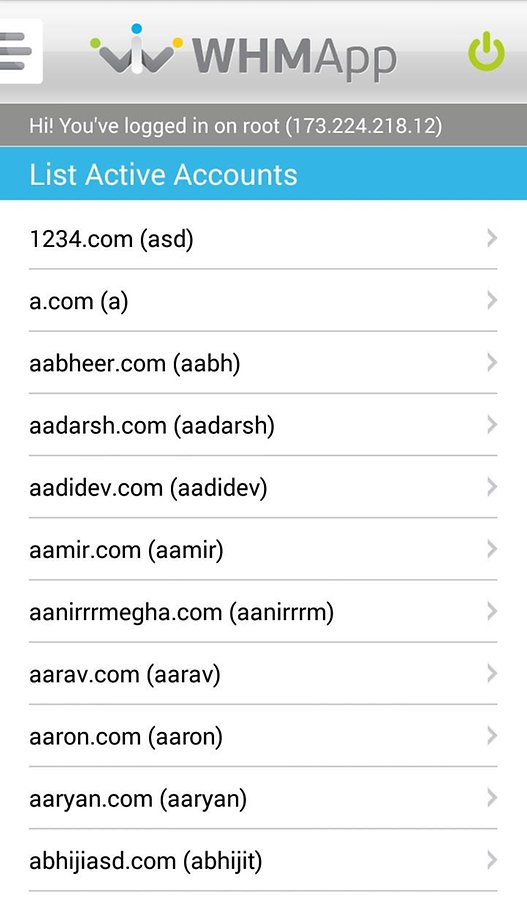
 WHM App for Root and Reseller includes a massive range of incredible features, including:
- Add Unlimited WHM/cPanel Servers and WHM /cPanel Resellers
- Manage End-User cPanel Hosting Accounts
- Manage Reseller Hosting Accounts
- Manage Hosting Packages
- Manage Email Address (cPanel Function)
- Manage Email Forwarders (cPanel Function)
- Manage Parked Domains (cPanel Function)
- ConfigServer Firewall
- Server Related Alerts Notification on Your Mobile
- Backup and Restore Accounts
- Advanced DNS Management
- Advanced IP Management
- Manage Mail Queue
- Server Reboot
- Manage Server Services
- Configure Server Settings
- Configure Server Security
These are, however, just a few features. The app contains many more!
Now, while I am pretty sure that all of you know what I am talking about here, but, just incase you were wondering what WHM is, it is the Web Host Manager. cPanel 3 was released in 1999; its main features over cPanel 2 were an automatic upgrade and the Web Host Manager (WHM). The interface for cPanel 3 was improved when Carlos Rego of WizardsHosting made what became the default theme of cPanel.
It is a powerful program that allows administrative access to the back end of cPanel. There are two versions that Host Gator uses. Reseller accounts get basic WHM. Dedicated Servers and VPS accounts get root WHM (also called rWHM), which has features that require root access to the server enabled. Resellers can not have rWHM.
WHM gives you a lot more control and flexibility when managing either a few very popular and resource intensive sites, or large number of sites. On top of giving you the ability to sell hosting services to other people, WHM also gives you the option to create and manage multiple cPanels.
So if you were confuse about WHM, now you know, and after reading about this app, I’m sure you would want to get into the back-end of your android device just so that you can make use of WHM App for Root and Reseller!
WHM App for Root and Reseller includes a massive range of incredible features, including:
- Add Unlimited WHM/cPanel Servers and WHM /cPanel Resellers
- Manage End-User cPanel Hosting Accounts
- Manage Reseller Hosting Accounts
- Manage Hosting Packages
- Manage Email Address (cPanel Function)
- Manage Email Forwarders (cPanel Function)
- Manage Parked Domains (cPanel Function)
- ConfigServer Firewall
- Server Related Alerts Notification on Your Mobile
- Backup and Restore Accounts
- Advanced DNS Management
- Advanced IP Management
- Manage Mail Queue
- Server Reboot
- Manage Server Services
- Configure Server Settings
- Configure Server Security
These are, however, just a few features. The app contains many more!
Now, while I am pretty sure that all of you know what I am talking about here, but, just incase you were wondering what WHM is, it is the Web Host Manager. cPanel 3 was released in 1999; its main features over cPanel 2 were an automatic upgrade and the Web Host Manager (WHM). The interface for cPanel 3 was improved when Carlos Rego of WizardsHosting made what became the default theme of cPanel.
It is a powerful program that allows administrative access to the back end of cPanel. There are two versions that Host Gator uses. Reseller accounts get basic WHM. Dedicated Servers and VPS accounts get root WHM (also called rWHM), which has features that require root access to the server enabled. Resellers can not have rWHM.
WHM gives you a lot more control and flexibility when managing either a few very popular and resource intensive sites, or large number of sites. On top of giving you the ability to sell hosting services to other people, WHM also gives you the option to create and manage multiple cPanels.
So if you were confuse about WHM, now you know, and after reading about this app, I’m sure you would want to get into the back-end of your android device just so that you can make use of WHM App for Root and Reseller!

WHM App for Root and Reseller - For Easy WHM Account Management
3 min read
If you have ever faced difficulty in managing your WHM account or have wished that there was an easier way, you will be glad to know that there is, in fact, a way to manage your entire WHM/cPanel Servers and WHM /cPanel Resellers accounts easily. That way is called WHM App for Root and Reseller.
It is the best Android mobile application for WHM/cPanel Servers and WHM /cPanel Resellers. WHMApp mobile app connects to your WHM/cPanel Servers and allow you to manage resellers and end-user accounts, hosting packages, manage email accounts, manage parked domains, DNS manager, IP addresses, backup and restore configuration, restart and monitor services and servers, manage ConfigServer Firewall functions and much more and that too through an easy interface design. WHMApp client is designed broadly to handle WHM/cPanel Servers with Root access and reseller accounts.
Unlike other apps, WHMApp is an android app that works directly with WHM/cPanel Core APIs to manage all functions of server without using any 3rd party backend developed in PHP or other script which makes this android application more secured and safe to use. All your server credentials and WHM /cPanel resellers accounts will remain secured in your phone.
WHM App for Root and Reseller includes a massive range of incredible features, including:
- Add Unlimited WHM/cPanel Servers and WHM /cPanel Resellers
- Manage End-User cPanel Hosting Accounts
- Manage Reseller Hosting Accounts
- Manage Hosting Packages
- Manage Email Address (cPanel Function)
- Manage Email Forwarders (cPanel Function)
- Manage Parked Domains (cPanel Function)
- ConfigServer Firewall
- Server Related Alerts Notification on Your Mobile
- Backup and Restore Accounts
- Advanced DNS Management
- Advanced IP Management
- Manage Mail Queue
- Server Reboot
- Manage Server Services
- Configure Server Settings
- Configure Server Security
These are, however, just a few features. The app contains many more!
Now, while I am pretty sure that all of you know what I am talking about here, but, just incase you were wondering what WHM is, it is the Web Host Manager. cPanel 3 was released in 1999; its main features over cPanel 2 were an automatic upgrade and the Web Host Manager (WHM). The interface for cPanel 3 was improved when Carlos Rego of WizardsHosting made what became the default theme of cPanel.
It is a powerful program that allows administrative access to the back end of cPanel. There are two versions that Host Gator uses. Reseller accounts get basic WHM. Dedicated Servers and VPS accounts get root WHM (also called rWHM), which has features that require root access to the server enabled. Resellers can not have rWHM.
WHM gives you a lot more control and flexibility when managing either a few very popular and resource intensive sites, or large number of sites. On top of giving you the ability to sell hosting services to other people, WHM also gives you the option to create and manage multiple cPanels.
So if you were confuse about WHM, now you know, and after reading about this app, I’m sure you would want to get into the back-end of your android device just so that you can make use of WHM App for Root and Reseller!
WHM App for Root and Reseller includes a massive range of incredible features, including:
- Add Unlimited WHM/cPanel Servers and WHM /cPanel Resellers
- Manage End-User cPanel Hosting Accounts
- Manage Reseller Hosting Accounts
- Manage Hosting Packages
- Manage Email Address (cPanel Function)
- Manage Email Forwarders (cPanel Function)
- Manage Parked Domains (cPanel Function)
- ConfigServer Firewall
- Server Related Alerts Notification on Your Mobile
- Backup and Restore Accounts
- Advanced DNS Management
- Advanced IP Management
- Manage Mail Queue
- Server Reboot
- Manage Server Services
- Configure Server Settings
- Configure Server Security
These are, however, just a few features. The app contains many more!
Now, while I am pretty sure that all of you know what I am talking about here, but, just incase you were wondering what WHM is, it is the Web Host Manager. cPanel 3 was released in 1999; its main features over cPanel 2 were an automatic upgrade and the Web Host Manager (WHM). The interface for cPanel 3 was improved when Carlos Rego of WizardsHosting made what became the default theme of cPanel.
It is a powerful program that allows administrative access to the back end of cPanel. There are two versions that Host Gator uses. Reseller accounts get basic WHM. Dedicated Servers and VPS accounts get root WHM (also called rWHM), which has features that require root access to the server enabled. Resellers can not have rWHM.
WHM gives you a lot more control and flexibility when managing either a few very popular and resource intensive sites, or large number of sites. On top of giving you the ability to sell hosting services to other people, WHM also gives you the option to create and manage multiple cPanels.
So if you were confuse about WHM, now you know, and after reading about this app, I’m sure you would want to get into the back-end of your android device just so that you can make use of WHM App for Root and Reseller!
Newsletter
Get the latest tech news delivered to your inbox weekly.