

 Battery info
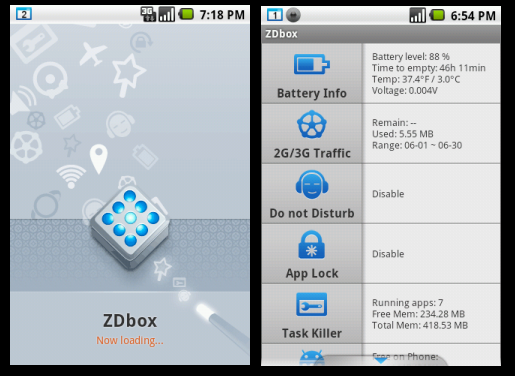
Monitoring and showing information about remaining battery time, temperature, health, time since last boot, necessary time until full charge and so on.
One tap power saver
Click battery saving button to turn battery saving mode on/off. Turn off battery saving mode to resume the previous mobile status before battery saving.
Traffic counter
Monthly/daily mobile data usage overview, shows remaining data traffic, detailed data usage information for each app.
Do not disturb
Just set days and the time when you need your privacy and you won’t be disturbed by your phone. Set phone to silent, vibration or airplane mode.
App lock
Protect apps with a password or pattern, for exaMple your contacts, Facebook, Twitter, Whatsapp, Gmail and so on.
Task killer
Kill all apps at once, define protected apps which won’t be killed, set auto kill when screen gets locked, mark single or multiple apps to kill.
If your phone is rooted, you can use root task killer to stop self-starting apps and save more battery.
History eraser
Clean your browser history, market search history, map search history, email search history, or clipboard
Uninstaller
Shows used/available internal and SD card memory. Apps can be easily uninstalled. Single or multiple (batch) uninstall possible.
App to SD
Move apps to your SD card. Single or multiple (batch) move possible. Only for Android 2.2 and 2.3.
Cache Cleaner
With Cache Cleaner, you can clean your cache of phone.protect your secret without a trace.
ZDbox is the only app you will need because, as you can see, it manages almost every rooted android function that you can imagine. Thus, download this app and let it kill all the root tasks for you.
Battery info
Monitoring and showing information about remaining battery time, temperature, health, time since last boot, necessary time until full charge and so on.
One tap power saver
Click battery saving button to turn battery saving mode on/off. Turn off battery saving mode to resume the previous mobile status before battery saving.
Traffic counter
Monthly/daily mobile data usage overview, shows remaining data traffic, detailed data usage information for each app.
Do not disturb
Just set days and the time when you need your privacy and you won’t be disturbed by your phone. Set phone to silent, vibration or airplane mode.
App lock
Protect apps with a password or pattern, for exaMple your contacts, Facebook, Twitter, Whatsapp, Gmail and so on.
Task killer
Kill all apps at once, define protected apps which won’t be killed, set auto kill when screen gets locked, mark single or multiple apps to kill.
If your phone is rooted, you can use root task killer to stop self-starting apps and save more battery.
History eraser
Clean your browser history, market search history, map search history, email search history, or clipboard
Uninstaller
Shows used/available internal and SD card memory. Apps can be easily uninstalled. Single or multiple (batch) uninstall possible.
App to SD
Move apps to your SD card. Single or multiple (batch) move possible. Only for Android 2.2 and 2.3.
Cache Cleaner
With Cache Cleaner, you can clean your cache of phone.protect your secret without a trace.
ZDbox is the only app you will need because, as you can see, it manages almost every rooted android function that you can imagine. Thus, download this app and let it kill all the root tasks for you.
ZDbox - The All-In-One Toolbox for Your Android Device
3 min read
Just rooting your android device for optimum usage of your smartphone is not enough. You need to know how to optimize its system properly in order to make the most out of rooting. For this you need specific tools. Tools that will aid you in using your smartphone is the best way possible.
But since there are a lot of functions, there are a lot of tools that can be used to make use of those functions. And the more number of tools there are, the more confusion can be created in their management. Therefore, instead of separate tools, we need a toolbox that is easily manageable. And that toolbox is in the form of an app called ZDbox.
ZDbox is an amazing all-in-one toolbox. It can save your battery and boost your android running speed. ZDbox holds a collection of useful tools and has a nice and easy to use interface. With ZDbox, you’re getting your mobile/cell phone under control, do easily some optimization and customize it to your needs.
This app is going to help you with the following functions:
Anyshare
· No flow consumption among Android devices, 60 times faster than bluetooth, share anything!
· You'll not worry about big files transfering by your phone, because it needn't the external network.
Quick Switches
Cache cleaner toggle and other 14 toggles for more your convenience.
Task killer | Cache cleaner | Screen sleep | Powersave
Widgets
Keep screen always on, kill all tasks, WiFi on/off, airplane mode on/off, brightness adjustment, sound settings, rotate screen on/off, bluetooth on/off, start/stop sync, switch between 2G/3G/4G, app lock on/off, GPS on/off, APN on/off (mobile access point),LED flashlight on/off
Battery info
Monitoring and showing information about remaining battery time, temperature, health, time since last boot, necessary time until full charge and so on.
One tap power saver
Click battery saving button to turn battery saving mode on/off. Turn off battery saving mode to resume the previous mobile status before battery saving.
Traffic counter
Monthly/daily mobile data usage overview, shows remaining data traffic, detailed data usage information for each app.
Do not disturb
Just set days and the time when you need your privacy and you won’t be disturbed by your phone. Set phone to silent, vibration or airplane mode.
App lock
Protect apps with a password or pattern, for exaMple your contacts, Facebook, Twitter, Whatsapp, Gmail and so on.
Task killer
Kill all apps at once, define protected apps which won’t be killed, set auto kill when screen gets locked, mark single or multiple apps to kill.
If your phone is rooted, you can use root task killer to stop self-starting apps and save more battery.
History eraser
Clean your browser history, market search history, map search history, email search history, or clipboard
Uninstaller
Shows used/available internal and SD card memory. Apps can be easily uninstalled. Single or multiple (batch) uninstall possible.
App to SD
Move apps to your SD card. Single or multiple (batch) move possible. Only for Android 2.2 and 2.3.
Cache Cleaner
With Cache Cleaner, you can clean your cache of phone.protect your secret without a trace.
ZDbox is the only app you will need because, as you can see, it manages almost every rooted android function that you can imagine. Thus, download this app and let it kill all the root tasks for you.
Battery info
Monitoring and showing information about remaining battery time, temperature, health, time since last boot, necessary time until full charge and so on.
One tap power saver
Click battery saving button to turn battery saving mode on/off. Turn off battery saving mode to resume the previous mobile status before battery saving.
Traffic counter
Monthly/daily mobile data usage overview, shows remaining data traffic, detailed data usage information for each app.
Do not disturb
Just set days and the time when you need your privacy and you won’t be disturbed by your phone. Set phone to silent, vibration or airplane mode.
App lock
Protect apps with a password or pattern, for exaMple your contacts, Facebook, Twitter, Whatsapp, Gmail and so on.
Task killer
Kill all apps at once, define protected apps which won’t be killed, set auto kill when screen gets locked, mark single or multiple apps to kill.
If your phone is rooted, you can use root task killer to stop self-starting apps and save more battery.
History eraser
Clean your browser history, market search history, map search history, email search history, or clipboard
Uninstaller
Shows used/available internal and SD card memory. Apps can be easily uninstalled. Single or multiple (batch) uninstall possible.
App to SD
Move apps to your SD card. Single or multiple (batch) move possible. Only for Android 2.2 and 2.3.
Cache Cleaner
With Cache Cleaner, you can clean your cache of phone.protect your secret without a trace.
ZDbox is the only app you will need because, as you can see, it manages almost every rooted android function that you can imagine. Thus, download this app and let it kill all the root tasks for you.
Newsletter
Get the latest tech news delivered to your inbox weekly.