So for the new-age tech-savvy investor of the financial markets, a blessing in disguise would be the availability of all he needs at the touch of a button wherever he goes, and what more could he possible ask for if that were available on the home screen of your very phone?
The
Android Stocks Tape Widget is an app that seeks to realize that fantasy by enlightening you with your stock trading purpose with just a glimpse of your eyes. The sole purpose of this brilliant finance app is to ensure that your day starts with the right stocks and accompanies you throughout the day on your Android device.
As veterans or even beginners in the world of stock investment, you’re sure to have seen the sliders and tickers at the bottom of the screen on your TV screens, or glamorized in movies like Wolf of Wall Street.
These bars that slide are indicators of constantly moving stock prices and give quotes along with the company stock code.
The Android Stocks Tape Widget app gives you access to an innumerable list of indexes and you can choose a simple ticker slider from the respective index. These indexes include:-
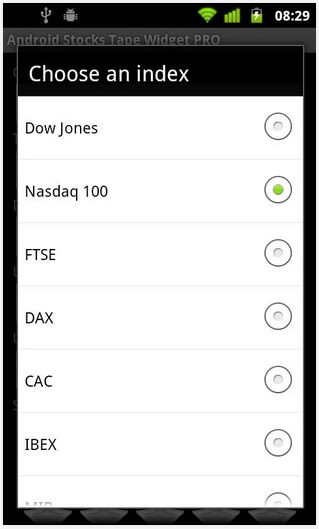
- Dow Jones (DJIA)
- StockTwits 50
- Nasdaq 100
- S&P 500
- TSX (Canada)
- CAC 40 (France)
- SENSEX (India)
- IBEX (Spain)
- Bovespa (Brazil)
- MIB (Italy)
- DAX (Germany)
- SMI (Switzerland)
- AEX (Netherlands)
- ATX (Austria)
- PSI (Portugal)
- BEL 20 (Belgium)
- HSI (Hong-Kong)
The above indexes are not the only indexes that are available. Due to success of the app and increased requests from Android Stocks Tape Widget subscribers, the following lists have also been added:
- STI (Singapore)
- BRIC ADRs
- Chinese ADRs
- Main world indexes
- RTS (Russia)
- S&P Sectors
- Currency pairs (USD, EUR, JPY, GBP, AUD, CAD, CHF)
- Commodities
- Topix Core 30 (major Japanese stocks)-
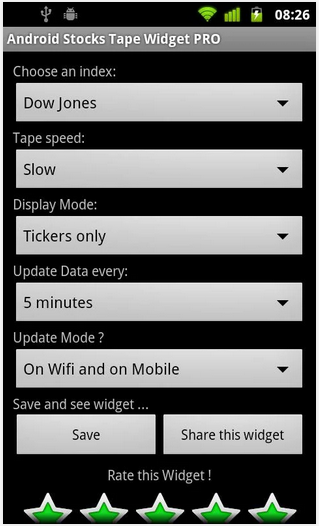
The above indexes are all included and can be easily picked and set through the setting in the app.
The Android Stocks Tape Widget app essentially is a widget that can be accessed directly through the home screen and lock screen.
Here you’ll have access to a scroll just like you use on your TV screen. No nuisance of having to go into the app and navigating through it.
You can set what index you’d like to focus on and you’re good to go. You can even compare indexes on the basis of respective stocks directly on the home screen.
You can check out heat maps with a collage like demonstration of all your stocks. These are then bifurcated into a list of categories as per their industry be it technology, energy, Basic markets, Global markets, Currency trades etc.
These charts are available as graphs, bar charts, and candle stick diagrams as well.
And the best if it all, it’s all in the middle of your home screen.
You can compare the EPS growth on the 2 stocks, compare their margins, their prospects and the movement cues on the respective stocks.
This app created by WaveStock.com is sure to make navigating the markets much more easy than you thought was possible, and there’s only one way of getting down with it! Download it for free from Google Play Store and find out how.
You see it on the other side of your Television screen and now you see it on the other side of your Android screens. We’re talking he most reputed financial news source in the world that has brought you and a million others like you, the best and latest coverage of all the events and happenings in the world of finance for a long time. You guessed it, we’re talking about CNBC.
Fortunately, Android users now have the power to use the
CNBC app and get real-time coverage from the greatest finance news source whenever they wish. The app is a product of NBC Universal Media, which exemplifies the same high-quality journalism in the world of finance that millions have relied on throughout the years for their daily dose of financial news.
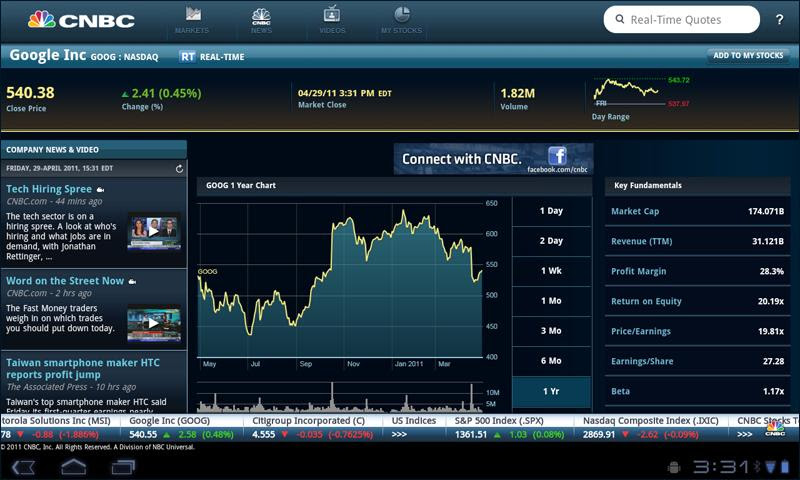
On entering the CNBC app, the first thing you will be asked to choose from is to pick whether you would like to see international news or American news.
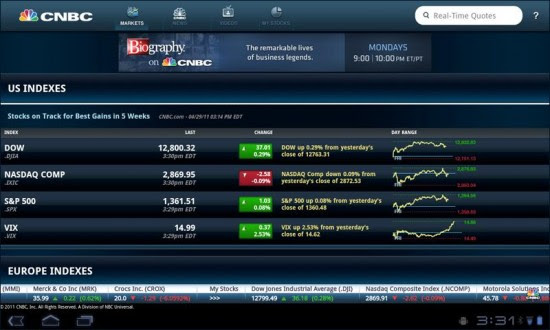
Once you enter the app, you can see that the top bar has a CNBC logo through which you can access the menu and the other market indexes and prices of stocks, videos and other sort of similar market news. To the right, you will see a search box where in you can enter the ticker on a stock or its stock name to get its price quote.
Once you move forward, you can see a Home section which has the ‘My Stocks’ section within it. This is the area where all your stocks that you save on a daily basis will be available to you for you to see and keep a tab of whenever you want.
You can also add these to a ‘My favorites’ list where all your stocks that matter the most to you will be enlisted.
Below that, you have options to check the Pre-Market queues, World Indexes, Top News Stories and Top Videos.
Once you enter ‘My stocks’, a list of your stocks with their ticker name is displayed and the price aligned to it.
Below that you can see categories like Energy Stocks, Tech Stocks, Pharma stocks, Consumer Goods etc.
You can also access power point presentations through an available list of presentation on the news and reviews from the day and week and month for your easy reading.
Don’t forget to catch the CNBC interviews with key individuals from the areas of their expertise. These are all in video formats that can be screened through your devices directly.
You get coverage from the extended hours and pre-market coverage’s too so that you are on top of the news at all times.
You also have access to all the top stocks that CNBC declares and follows as that.
You get breaking news alerts straight to your screen and that includes 24-hour global coverage for stock market news, personal finance, analysis and expert opinions on the economy, top business stories, technology, world markets, investment, politics, energy, health care etc.
The video content ranges from over 150 odd videos uploaded to the app database and onto your Android screens every day. This amazing content includes all possible global coverage from Europe, Asia, US, etc.
The interviews range from over 800 in number, all of which can be watched straight from the CNBC app on your Android device.
That’s more comprehensive and succinct than a newspaper at your doorstep can ever be, and it puts the hottest financial news at your finger tips no matter where you go as long as you have an internet connection.
For the true financial news follower that wants to progress from financial student to financial pundit, the CNBC app is your elixir to help you get there. So what are you waiting for? Download it from Google Play Store for free right away!