The news at the end of 2013 stated that it was a year when nearly 18 million Android devices reported being infected with malwares, and statistics dictate that your device could be one of these victims too. In the light of all this, protecting your Android smartphone was an utmost necessity, and in order to do that, a plethora of security apps came to the forefront on Google Play Store with tall claims as being the cheapest and greatest anti-viruses ever built.
However, if you aren’t careful enough, you could get suckered in to download some shady malware or spyware disguised as a security tool and infect your device. This made it even more critical for Android users to exercise extreme caution with such apps and download only the best-rated and highly reputed anti-virus apps to protect their devices, and the
Lookout app happens to be just the kind of high-quality security tool that you ought to install on your phone. It is one of the best anti-viruses in the mobile market and its features will tell you exactly why this is a good bet when it comes to phone security.
On downloading this free app, the first thing you will notice is the small size of the app in spite of its utility and the features and what all it does.
On launching the Lookout app, you will be escorted to the main interface through a few simple slides on your touchscreen device, which will fully guide you about the proper usage of the app.
You can then create your account by just adding in your password, as the e-mail id is already there and you’re good to go.
The Lookout app protects your photos, videos, music, and call history in case of any calamity that strikes your Android phone and holds it hostage.
Once you log in, you are asked to authorize a mobile protection protocol that will send data about apps from your phone for analysis and scanning and come back to your with results.
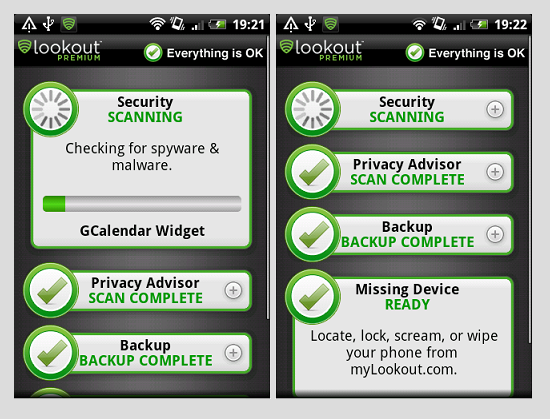
This is optional. Once you move in to the main menu, it tells you how many apps you have downloaded and runs a check on them immediately.
It intimates you using a green indicator if everything is okay and asks you to erase required apps that pose a threat to your Android device.
The following are the features the Lookout Android app provides other than just security scanning.
- Security
- Backup
- Missing Device
- Safe browsing
- Privacy advisor
Security even tells and after scanning any new app that is downloaded how safe it is. It will also intimate you through the notifications panel.
The backup feature allows you to send a list of all your contacts from your phone to the website lookout.com where you can revive your lost contacts from.
The photos can be backed up and you can also implement other graphics if you choose to go for the premium version of this nifty app.
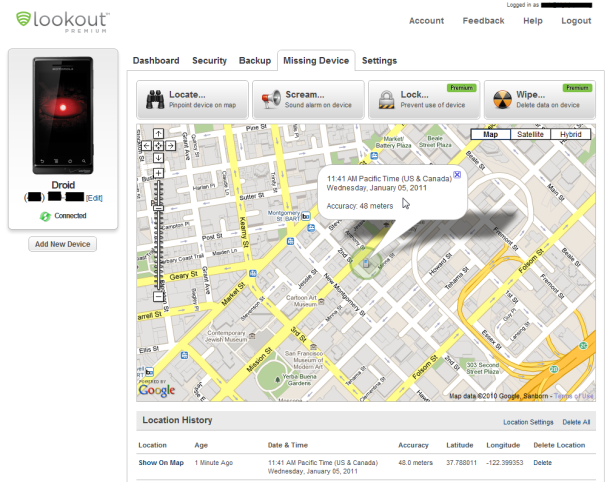
Once you enable this feature, you can use the app’s developer company website and locate your phone. If you enable your GPS it gives you better accuracy.
You can have you phone scream out a loud warning alarm to locate it nearby. This works even when the phones on silent.
You also can activate and enable ‘Lock Cam’ a feature that will take a photo of anyone who enters a wrong password and intimates you. The signal-flare auto stores your location before battery dies out.
The safe browsing feature, available in the premium version ensures that you aren’t bombarded by malware affected sites which aren’t quite the rarity nowadays; thus making it an important feature.
The ‘protect your privacy’ shows you all the apps that access your personal details and scans apps to give you real time alerts. Additionally, you can also access app details to gain further insights on your usage, app capabilities and other privacy risks that you haven’t addressed.