With our increasing dependability on our Android devices to manage our daily lifestyles, here’s another app to add to the mix that will probably make you think, “Now, how did I possibly ever manage things without this?” Money apps are a hot commodity in the Android app market these days as people from all walks of life are starting to pull up their socks in terms of managing their finances and not letting their boats sink into the murky depths of debt.
Using these apps, you can check how much money you have left without having to call up banks or log in to your bank accounts online. The app in discussion is appropriately titled ‘
My Money’. My Money is a digital wallet and personal money app for your Android smartphone that gives you all features of a typical savings app plus a lot more. It provides you with a wallet feature that you can open and keep left open without worrying about someone stealing money out of it.
My Money allows you to efficiently manage your finances through the use of simple management tools that fall under the following categories:
- Accounts
- Budgets
- Transactions
- Statistics
You can also later on export, import and get an ‘about’ on what the particular feature you are looking at functions and how to apply it.
These could be export to a .csv file and imported from an excel sheet.
Accounts enable you to maintain multiple sets of financial accounts that you can use just like you use in a Bank.
In creating these accounts, you can add and remove multiple parameters, incomes and expenses under multiple headings just like you do in a balance sheet or a profit and loss statement and get detailed reports displayed as well. These can be viewed in various formats being a graph chart, a pie diagram etc.
Budgets are created just like in a company and a household or any other institution and their state can be viewed at all times.
The main objective is to maintain self-discipline and ensure you’re monthly targets are met and limits aren’t exceeded.
Transactions are an extremely important tab and here’s where you enter everything you have done that includes a monetary transactions so that all your incomes and expenses are accounted for and the details represented in your transactions and reports generated for your viewing.
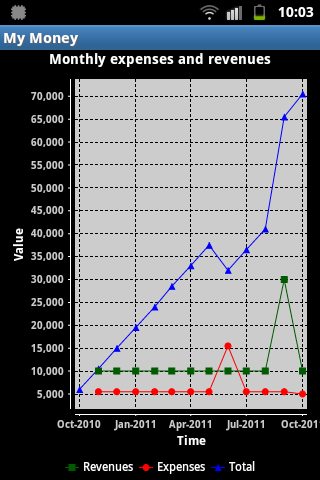
Statistics help visually depict your expenses and revenues through graphs that include all mathematical functions integrated to give you details of your monetary excursions so that you can do a comparative study and further allocate resources efficiently.
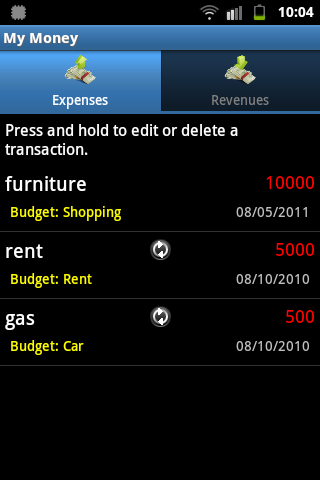
The revenues and the expenses are further bifurcated tab wise and you can see all the details of each sub heading.
This means you will be able to track various types of expenses related to your home furniture, gas, rent, stationary, groceries, etc. each with their date and time of entry for exact details.
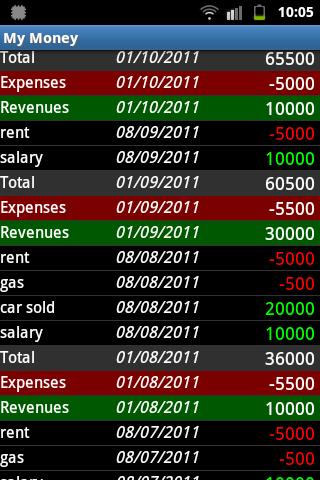
The same is in the case of your revenues, be it from salaries, incoming rent, savings account interest or any other forms of active or passive income.
My Money lays out a simple and user-friendly interface that also gives you a date wise description of the transactions to track down exact availability of money on different days of the month according to your pre-set budgets. My Money you can also set Frequency displays so as to keep the money in check. It also offers extensive language support, which makes it appealing to the numerous culturally diverse Android users across the world.
You can also see what proportion of your money you spent on what sub category through a line graph too.
All in all, My Money is a highly effective money manager app that is highly efficient with minimalistic yet important features. It is definitely a great resource for those without extensive financial expertise but enough money-savvy and sense of personal responsibility to control their expenses.