Microsoft has committed itself to a massive rebranding campaign, and one aspect of that campaign involves pushing users away from Hotmail and towards Outlook.com, a new online email platform that aims to improve the way we send and receive emails.
Outlook.com recently surpassed the 25 million user mark. To celebrate, Microsoft decided to release an Outlook.com Android app. Although it’s surprising that Microsoft didn’t release this app sooner, the Outlook app seeks to steal some momentum away from the current king of Android email apps – Gmail – which currently has
over 400 million active users.
So which app is the best for your Android email needs? Today, we’re going to answer that question to see if making the switch to Outlook is worth it.
Microsoft says 4 out of 5 people prefer the Outlook.com app
Microsoft recently hired/paid a research firm to perform a comparison study between Outlook.com and Gmail apps. The result?
Microsoft claims 4 out of 5 Gmail users would like to switch to Outlook.com because of its apparent advantages in terms of:
-Clean user design
-Better spam blocking
-Photo and document sharing
This research has been called “skewed” and “biased”, so keep reading to find out why Microsoft is so proud of the Outlook.com app.
Outlook.com killer features
Microsoft isn’t a fool when it comes to designing good software. It knows it has to have some killer features to try to win people away from Gmail. Microsoft plans to include all of the following ‘killer’ features in the Outlook.com app for Android:
-One-click message archiving
-Extensive array of keyboard shortcuts
-Inbox customization
The interface
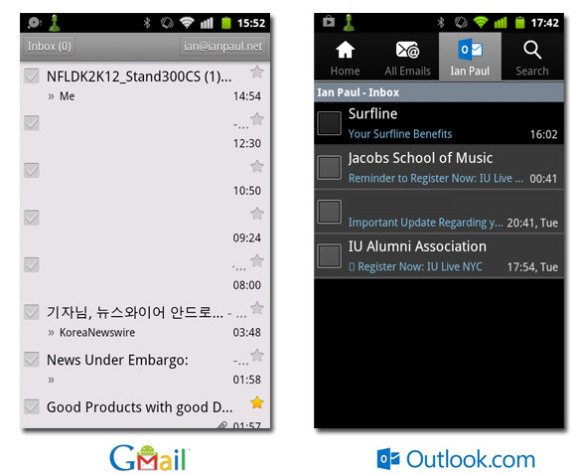
Above, you’ll see a comparison between how the Gmail interface looks and how the Outlook.com interface looks. The only major difference is that the Outlook.com app has four buttons at the top and a black on grey color scheme (which can be changed).
Other than that, the two aren’t that different from one another. Outlook.com’s tab system is useful because you can access multiple accounts by simply tapping the account button in the top menu. Switching accounts with Gmail tends to be difficult, so if you’re the kind of person who has multiple email addresses, then Outlook.com provides a distinct advantage.
Outlook.com’s tab system also allows users to pick which folder they want to choose. You can look at your spam message folder, drafts, and any other categories you have set up.
Gmail also has all these features, although it doesn’t have the tab system used by Outlook.com. Instead, users tap the ‘Inbox’ button to see a list of different inboxes, and other options can be accessed by pressing the ubiquitous three dotted lines in the bottom left corner of the screen.
But here’s the real kicker: Microsoft is advertising Outlook.com as a vastly improved replacement to Hotmail. Here’s what the Hotmail app for Android looks like:
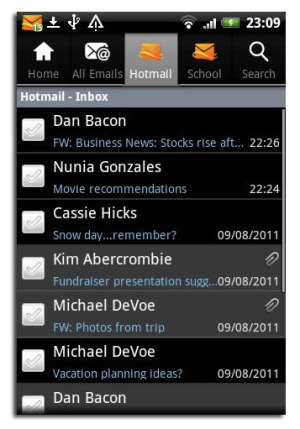
I don’t know about you, but I can’t see much of a difference between Outlook.com and Hotmail.
Contacts and calendar options
Both Outlook.com and the Gmail app fully synchronize with their respective calendars. So if you use either the Outlook calendar or the Gmail calendar, all of your appointments and events can be accessed from each email app. The only difference is that calendar synchronization is hardcoded into the Android operating system, whereas it has to be enabled on the Outlook.com app.
Outlook.com’s unique ‘Quiet Time’ feature
There is one area where Outlook.com beats Gmail hands down. That area is the Quiet Time feature, which allows users to choose when they want to prevent Outlook from automatically checking their email. During these set periods, users can still check their email manually, but the phone will not automatically bother you every time a new email is received.
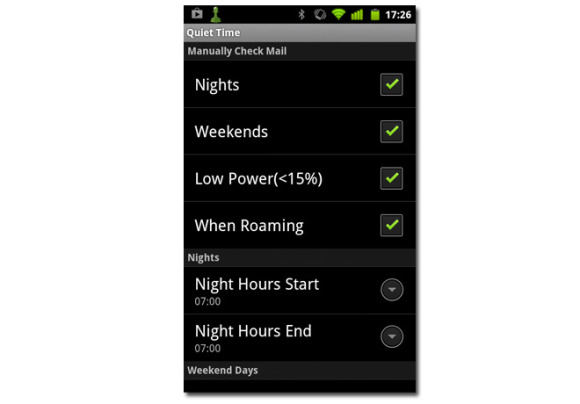
This is a good way to create a separation between your work life and your home life. As you can see in the above image, you can set Outlook.com to disable automatic email on nights and weekends. You’ve gotta appreciate having a stress reliever built-in to your email app!
POP/IMAP support
The terms POP and IMAP might not mean anything to you. But they play an important role in how your email gets delivered. Gmail has had POP/IMAP support for years, and it allows users to manage multiple email addresses from a single inbox. Outlook.com supports POP, but it doesn’t support IMAP, which means that some users will have trouble synchronizing email across multiple accounts and devices.
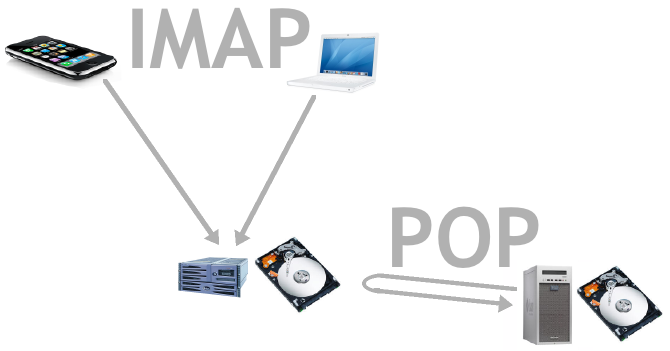
POP/IMAP support matters for smartphone users. When you receive an email on your smartphone, you want that email to appear as ‘already read’ on your computer and all other devices. Without POP/IMAP support, that’s not always the case, which can cause synchronization problems for mobile users.
If you use Microsoft’s Exchange ActiveSync feature, then cross-platform and cross-account synchronization becomes easier, but not everybody uses that. The lack of IMAP support could be a deal breaker for some users.
Should you switch from Outlook to Gmail?
So far, the Outlook.com app is getting less than stellar reviews on its Google Play Store listing. Surprisingly, one of the main complaints seems to be that the app doesn’t look
enough like Windows 8’s Metro interface. Users are downloading the newest Outlook app and expecting to add colorful tiles to their phone, when they actually just find a slightly improved version of Hotmail.
As a result, Outlook.com is currently rated a disappointing 2 stars out of 5. So no, Microsoft, it doesn’t look like 4 out of 5 Android users want to make the switch to Outlook.
But if you’re unhappy with Gmail for any reason, then Outlook.com is a viable alternative packed with many familiar features. And if you appreciate separation between your work life and personal life, then the Quiet Time feature will be enough to make some people switch.
To download Outlook.com for Android today, click here.