We all appreciate fast internet speeds. But if you choose the wrong browser, then you might never get to experience those internet speeds – even if you’re on the fastest 4G LTE connection in the world.
Performance testing website TomsHardware.com felt your pain and they decided to test the top Android browsers available today. Instead of measuring these browsers based on subjective things like “usability”, TomsHardware.com wanted to see how browsers stacked up in terms of load time, responsiveness, and security.
Ready to find out the results? Keep reading.
The competition
-Google Chrome
-Dolphin
-Firefox
-Maxthon
-Opera
-Sleipnir
The testing system
TomsHardware used an Asus Transformer TF300T for this test. The tablet has the following specs:
-Nvidia Tegra 3 Quad-Core CPU running at 1.2GHz
-1GB DDR3 RAM
-802.11 b/g/n 2.4GHz network card
The full description of system specs as well as the suite of benchmark programs used can be found
here.
Page load time
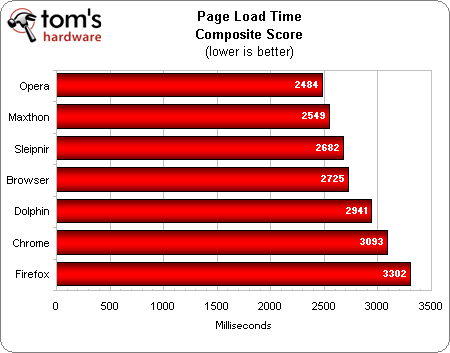
Three of the world’s most underused browsers take top spot in this category. Opera has always been considered a fast operating system – even on desktops – but who knew it was this fast? Meanwhile, most Android users haven’t heard of
Maxthon and
Sleipnir, but they hold up very well in this test, taking second and third place respectively.
And the classic desktop browser speed demon, Chrome, is stuck near the bottom of the chart. Go figure.
Why haven’t you heard about Maxthon and Sleipnir? Maxthon’s a Chinese browser and Sleipnir is a Japanese browser. Fortunately, each app has an English version that was used for testing.
Start time
Start time measures the amount of time it takes for a browser to load the homepage. So, once you click on your web browser logo and you’re ready to browse the internet, you want that homepage to load as quickly as possible:
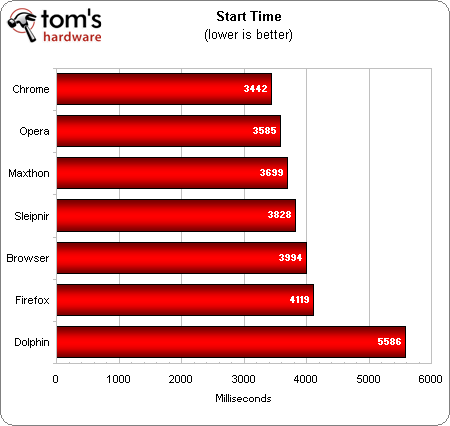
Chrome makes up some ground in this category, taking top prize by a hair. It’s followed closely by the three winners from the previous category. Dolphin, meanwhile, is stuck out at sea with a start time nearly 1.5 seconds higher than the next worst competitor.
Uncached page load time
The page load time graph above was based on a composite score across all tests. However, it doesn’t tell the full story about Android browser speeds. There is a massive difference between cached and uncached page load times.
Uncached pages are those that you’re visiting for the first time. Your browser has never seen the website before and needs to build it entirely from the data it receives over your internet connection:
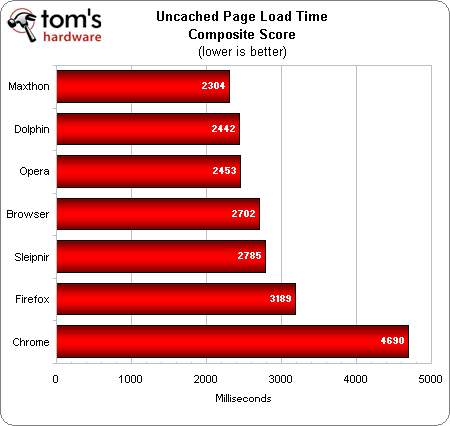
Maxthon and Opera are joined by Dolphin for top spot in this category, while Sleipnir falters slightly.
Cached page load time
Loading pages from a cache is significantly easier for browsers. Some new information might have to be downloaded, but most of the information can be built from the phone’s own memory.
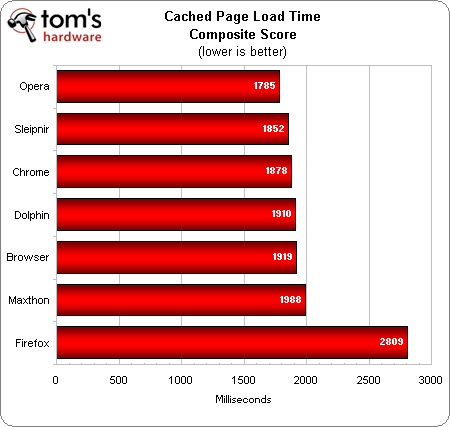
Cached load times are equal across the board, with only 203 milliseconds separating (1/5 of a second) separating 1st and 5th place. And then there’s Firefox, which loads cached pages slower than most other web browsers load uncached pages. Thanks for coming out Firefox!
Responsiveness
To measure responsiveness, TomsHardware.com looked at the scrolling smoothness of various websites as they loaded. The browsers were rated on a scale from 0 to 5, with 0 being a crash or a freeze and 5 being perfectly smooth.
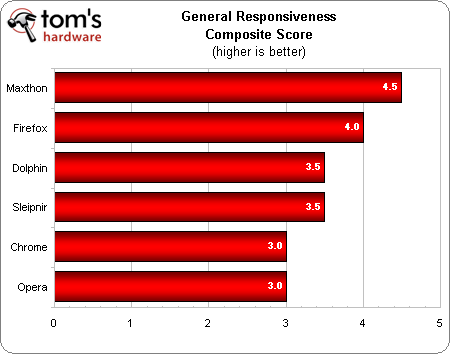
Maxthon was rated as “eerily smooth” during page loads, receiving a 4.5/5. But apparently, if you’re looking for the smoothest browser in the world in this category, then iOS’s Safari receives 5 stars out of 5, which means users can seamlessly scroll through pages as they load. However, there’s no Safari app for Android.
Security
TomsHardware used BrowserScope Security to test the security and safety of the competing browsers. Apparently, this test measures 17 different security checkpoints:
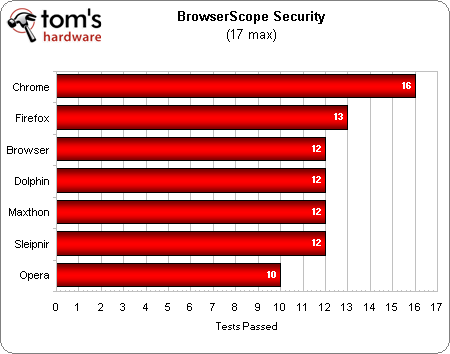
Chrome receives a rare first-place finish in this category. It passed 16 of the 17 different security checkpoints while second place Firefox passed 13 of 17.
Final winner
At the end of all this testing (we only displayed a few of the numerous benchmarks in this article), TomsHardware finally chose a winner based on “championship placing” points:
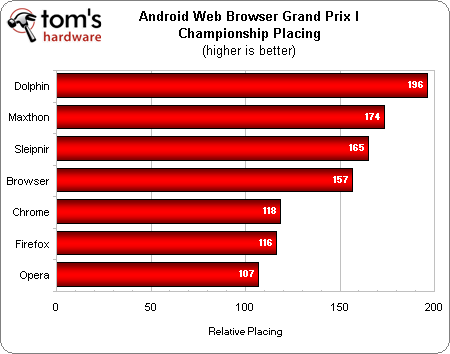
So there you have it – Dolphin was declared the winner, with the two Asian browsers, Maxthon and Sleipnir, not far behind. Why was Dolphin declared the winner despite not leading in page load times and other tests? Dolphin scored significantly better on a number of other tests that we didn’t show in this article, including most notably the “conformance composite score”, which measures how successful a browser will be at loading websites.
And desktop mainstays like Chrome, Firefox, and Opera lagged behind the entire test, finishing in fifth, sixth, and seventh place.