


Explore these top 7 tracking apps for Android
7. FamiSafe
Starting our countdown is FamiSafe, an app that’s tailored specifically for parental control. Although last on our list, it's one of the best family tracking apps out there. A powerful tool with a focus on creating a safe environment for children. FamiSafe recognizes the diverse dangers that kids may encounter on the Internet. So, it provides features that are useful for protection no matter what age group your child belongs to. The app is particularly strong in cyberbullying prevention and content filtering. The key features of this monitoring app are:- Cyberbullying alerts
- Location tracking
- Screen time management
- Content filtering and blocking
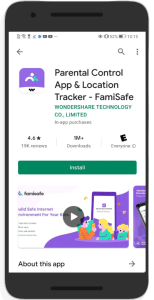 Image credit: famisafe.wondershare.com
6. Spyzie
Spyzie is an easy-to-use option for both parents and employers looking to monitor devices discreetly. It offers essential functionalities, including call and text monitoring, location tracking, and app usage tracking. With the text monitoring feature, you're not only limited to SMS text messages. It also lets you monitor messages on apps WhatsApp, Viber, Snapchat, Facebook Messenger and Instagram. Also important to mention is that Spyzie operates in stealth mode. This ensures the monitored person is unaware of the tracking. The key features of Spyzie are:- Call and text monitoring
- Location tracking
- Instant messaging apps monitoring
- Web history tracking
- Stealth mode operation
5. Qustodio
Qustodio is another tracking app designed with families in mind. It offers an extensive suite of tools to monitor and manage digital activities. This app provides solid web filtering options, allowing parents to block inappropriate content. Moreover, it offers powerful location tracking and screen time management features. Its intuitive interface makes it easy for parents to navigate the app. Besides, Qustodio provides detailed reports that allow them to stay informed and act when necessary. Qustodio’s key features:- Web filtering
- Location tracking
- Screen time restrictions
- Extensive activity reports
- Real-time alerts
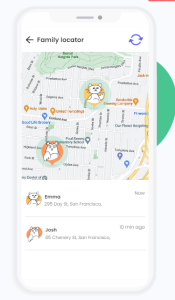 Image credit: qustodio.com (screenshot)
4. Hoverwatch
Landing at number 4 of our best tracking apps for Android, we’ve got Hoverwatch. This app provides a versatile monitoring experience that definitely makes it deserving of this rating. Hoverwatch includes your expected features like call recording, location tracking, and social media monitoring. But a standout aspect is its ability to capture screenshots of the device’s activity. This is perfect for parents and employers who want a visual record of what’s happening on the monitored phone. Hoverwatch’s key features are:- Call recording
- Location tracking
- Social media app monitoring
- Screenshot capture
- SIM card change detection
3. FlexiSPY
Moving into our top 3 tracking apps for Android, we start at the back with FlexiSPY. FlexiSPY provides an advanced suite of tracking tools, making it a great choice for demanding users. Besides some essential monitoring features, it offers unique options like recording keystroke history or checking battery level. These capabilities might be more than what a typical parent needs. However, they’re useful for those looking to get a more detailed monitoring experience. For example, if you run a business that deals with confidential information, you may need some of these options. The key features that make FlexiSPY stand out are:- Call interception
- SIM change detection
- Advanced location tracking
- Keylogger
- Hidden mode
- Browser bookmark monitoring
2. mSpy
Coming in at second place is mSpy, which you may have heard of already. This app is especially helpful for parents who need a reliable way to keep an eye on their kids’ digital lives. However, its focus isn't parental control only; mSpy is just as effective for employee monitoring. This app offers all the basic features, plus advanced ones like screen recording, remote camera and keylogging. Of course, that depends on which subscription plan you choose. Like FlexiSPY, getting the most powerful features may end up costing you over $400 for a year. What makes mSpy different from other tracking apps for Android is its FamilyKit plan. This is a separate plan designed specifically for family monitoring. You get Premium features, plus the option to track up to 3 family members. Some of mSpy’s best features are:- Ambient recording
- Screen recording
- Website and app blocking
- Social media monitoring
- Keylogging
1. Phone Monitor
Topping our list as the best tracking app for Android is Phone Monitor. Phone Monitor is comprehensive, user-friendly and affordable, making it perfect for parents and employers alike. Even with minimal technical skills, you can navigate the platform with ease. Phone Monitor has important features like tracking location, monitoring browsing history, recording calls, and monitoring SMS and social media. What’s different about Phone Monitor are a couple of interesting things. For location tracking, you get both location history and real-time location tracking, for example. You also get detailed statistics and reports. But the two cherries on top are live monitoring and remote control. Live monitoring means you can remotely access the live feed from the target phone. Live feed includes camera, microphone and screen activity. Remote control lets you remotely record audio, take pictures, restart the phone, recover data and more.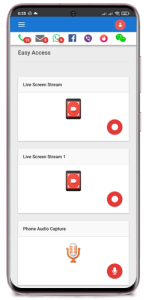 Image credit: phonemonitor.com
- Real-time GPS tracking
- Monitoring and blocking installed apps
- Live audio/video/screen monitoring
- Remote control of the target device
- Geo-fencing alerts