

 Here’s how Echo helps:
-Echo filters your notifications and only delivers the most important notifications to your lockscreen
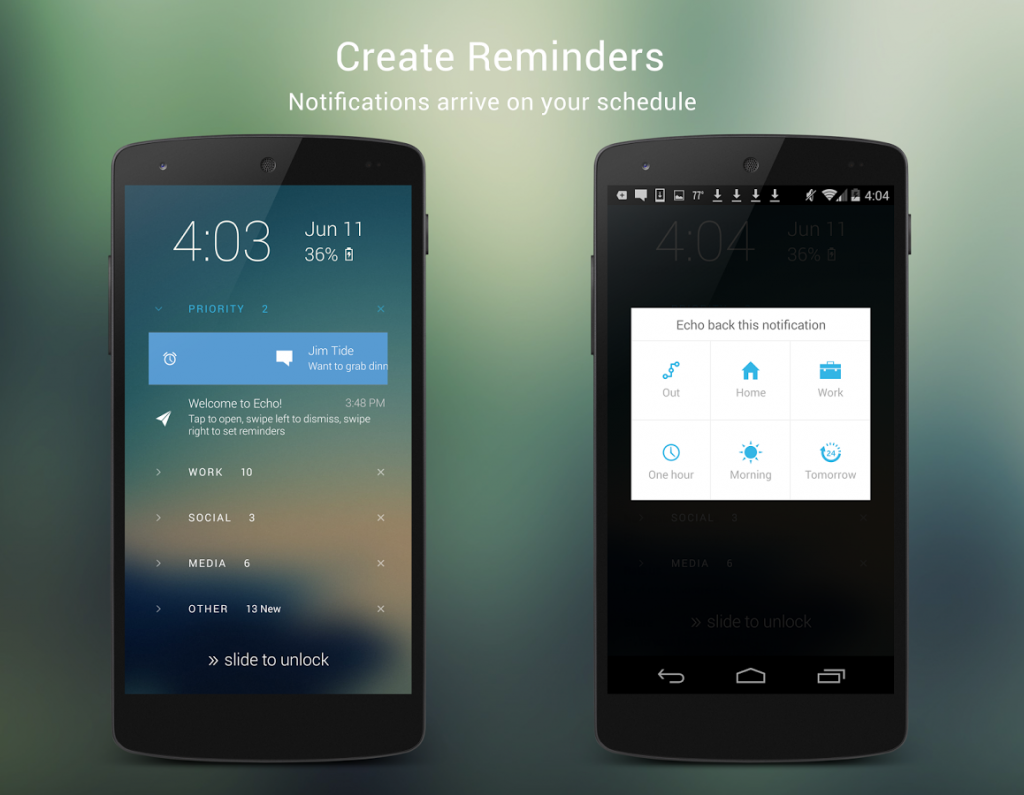
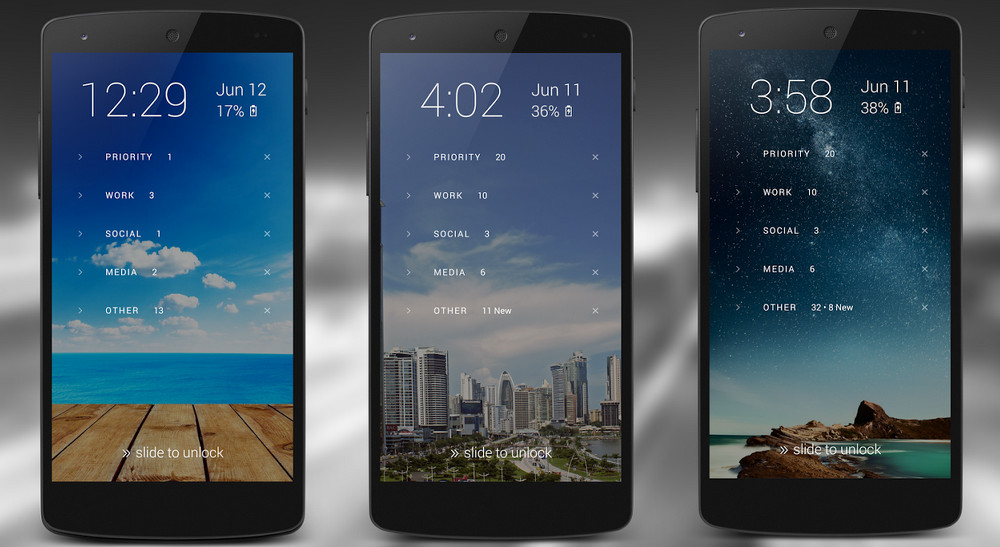
-All notifications are grouped into separate categories, like Gaming, Social, Work, and others
-Echo helps you avoid interruptions and monitors which notifications are important to you. Echo will only wake your screen if you receive a priority message – like a text from an important friend or work email.
-Detailed notifications: Browse through detailed notifications and alerts which describe more than just the subject of the email or your SMS contact’s name.
-Create notification reminders. If your mom calls you at work, for example, you can set a reminder to call your mom back when you’re home.
Basically, Echo is like your personal assistant. It monitors your habits and intelligently decides which notifications require your attention more than others.
If you enjoy checking your phone every 5 minutes, then this may not be the app for you. If you want to organize your life in a tidier, more efficient way, then Echo could help do that.
Even if you don’t care about any of that, Echo is virtually guaranteed to make your phone look more beautiful. It’s a well-designed app that features a beautiful, minimalistic style.
You can download Echo today from the Google Play Store for free.
Here’s how Echo helps:
-Echo filters your notifications and only delivers the most important notifications to your lockscreen
-All notifications are grouped into separate categories, like Gaming, Social, Work, and others
-Echo helps you avoid interruptions and monitors which notifications are important to you. Echo will only wake your screen if you receive a priority message – like a text from an important friend or work email.
-Detailed notifications: Browse through detailed notifications and alerts which describe more than just the subject of the email or your SMS contact’s name.
-Create notification reminders. If your mom calls you at work, for example, you can set a reminder to call your mom back when you’re home.
Basically, Echo is like your personal assistant. It monitors your habits and intelligently decides which notifications require your attention more than others.
If you enjoy checking your phone every 5 minutes, then this may not be the app for you. If you want to organize your life in a tidier, more efficient way, then Echo could help do that.
Even if you don’t care about any of that, Echo is virtually guaranteed to make your phone look more beautiful. It’s a well-designed app that features a beautiful, minimalistic style.
You can download Echo today from the Google Play Store for free.
Clean Up your Android Notifications with Echo Lockscreen
2 min read
If you leave your phone in your pocket for hours without checking it, then you have better self-control than me.
Or maybe you’re just watching a movie.
The point is, you probably have lots of notifications waiting for you. These notifications are bundled up, jammed together, and generally quite messy.
That’s why Echo wants to help. Echo is a new Android lockscreen app that offers a clean, minimalistic design.
That design is meant to organize your life and help you avoid unimportant interruptions.
Here’s how Echo helps:
-Echo filters your notifications and only delivers the most important notifications to your lockscreen
-All notifications are grouped into separate categories, like Gaming, Social, Work, and others
-Echo helps you avoid interruptions and monitors which notifications are important to you. Echo will only wake your screen if you receive a priority message – like a text from an important friend or work email.
-Detailed notifications: Browse through detailed notifications and alerts which describe more than just the subject of the email or your SMS contact’s name.
-Create notification reminders. If your mom calls you at work, for example, you can set a reminder to call your mom back when you’re home.
Basically, Echo is like your personal assistant. It monitors your habits and intelligently decides which notifications require your attention more than others.
If you enjoy checking your phone every 5 minutes, then this may not be the app for you. If you want to organize your life in a tidier, more efficient way, then Echo could help do that.
Even if you don’t care about any of that, Echo is virtually guaranteed to make your phone look more beautiful. It’s a well-designed app that features a beautiful, minimalistic style.
You can download Echo today from the Google Play Store for free.
Here’s how Echo helps:
-Echo filters your notifications and only delivers the most important notifications to your lockscreen
-All notifications are grouped into separate categories, like Gaming, Social, Work, and others
-Echo helps you avoid interruptions and monitors which notifications are important to you. Echo will only wake your screen if you receive a priority message – like a text from an important friend or work email.
-Detailed notifications: Browse through detailed notifications and alerts which describe more than just the subject of the email or your SMS contact’s name.
-Create notification reminders. If your mom calls you at work, for example, you can set a reminder to call your mom back when you’re home.
Basically, Echo is like your personal assistant. It monitors your habits and intelligently decides which notifications require your attention more than others.
If you enjoy checking your phone every 5 minutes, then this may not be the app for you. If you want to organize your life in a tidier, more efficient way, then Echo could help do that.
Even if you don’t care about any of that, Echo is virtually guaranteed to make your phone look more beautiful. It’s a well-designed app that features a beautiful, minimalistic style.
You can download Echo today from the Google Play Store for free.
Newsletter
Get the latest tech news delivered to your inbox weekly.