Today, we’ve never had more options when it comes to contacting another person. You can send them a Facebook message, tweet at them, text them, email them, and of course, call them. But all of these contact methods have made keeping track of your friends’ information a little difficult.
That’s why the Contacts+ app wants to help. Contacts+ allows users to have full control over their contact list while integrating updates across multiple social networks.
When you fire up
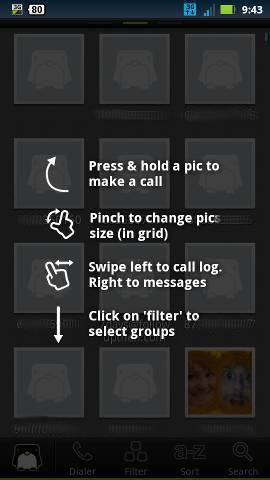
Contacts+ for the first time, you’re greeted with a very brief tutorial. That tutorial shows you the range of touch-screen features available on the app, including the ability to press and hold a contact picture to make a call and swipe left to reveal call and texting history with that person.
Each individual contact also has a detailed page of information. After clicking on each contact, you’ll see instant links to calling, texting, emailing, or instant messaging that person. That page also has the information that you would expect to find in an address book, like their phone number, email address, and any other personal information that you choose to enter.
The trouble with birthdays
Quick! What’s your best friend’s birthday? If you’re like most people, then you turn to Facebook to answer that question. Insults about the simplification of society aside, one of Facebook’s most useful features is the ability to tell us exactly when our friends are having their birthdays. But what if you don’t have a friend on Facebook? That’s where Contacts+ comes in handy.
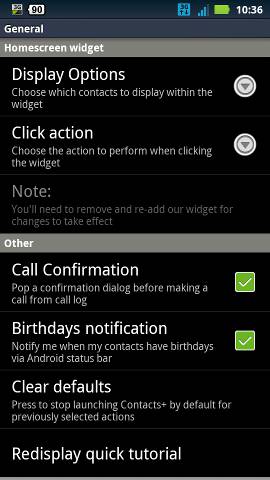
After entering a contact’s birthday data into Contacts+, you can choose to receive a notification when any friends have birthdays. This notification appears in the Android status bar, which means you’ll never ‘forget’ your best friend’s birthday again.
Other cool features
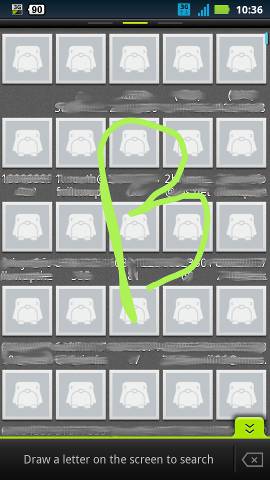
Contacts+ also gives Android users the ability to draw letters on the screen of the app in order to find contacts. You can draw a giant letter ‘B’, for example, in order to find contacts with the first name B. This search method tends to be much faster than trying to scroll through your list of contacts.
Contacts+ will also start to show incoming texts on-screen by default, just like the iPhone. Since not everybody likes this feature, it can be disabled from the Contacts+ settings menu.
Ultimately, the main advantage of Contacts+ is that all contact information is in a single place. Whether you just want a simplified contacts system or you want easy birthday reminders, Contacts+ can help.