

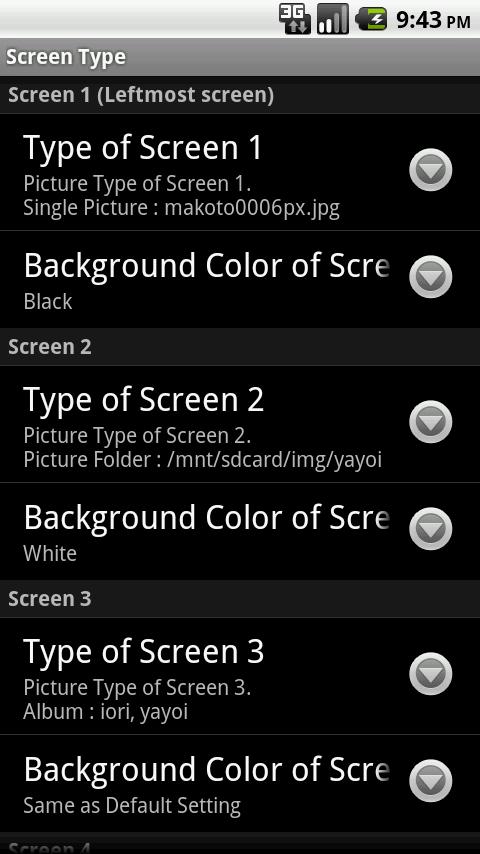
 One cool feature with Free MultiPicture Live Wallpaper is the ability to set different wallpapers for different homescreens. So, if you have a contact shortcut homescreen setup for your friends, you can set a background picture of you hanging out with your friends. Or, you can put a picture of a concert on your music player homescreen.
And one final touch that deserves mentioning is the fact that Free MultiPicture Live Wallpaper will automatically crop photos in order to fit on your homescreen. So, if you’ve taken widescreen pictures but your wallpaper spans vertically, then that picture won’t be awkwardly compressed to fit the screen. Instead, MultiPicture Live Wallpaper is smart enough to crop the picture to make it look its best.
If you don’t have a lot of pictures on your Android phone, or if you want to grab pictures from another source, then you can easily do that with MultiPicture Live Wallpaper. The app even allows you to pull images from a Picasa album.
MultiPicture Live Wallpaper is 100% free, so check it out today by clicking here.
One cool feature with Free MultiPicture Live Wallpaper is the ability to set different wallpapers for different homescreens. So, if you have a contact shortcut homescreen setup for your friends, you can set a background picture of you hanging out with your friends. Or, you can put a picture of a concert on your music player homescreen.
And one final touch that deserves mentioning is the fact that Free MultiPicture Live Wallpaper will automatically crop photos in order to fit on your homescreen. So, if you’ve taken widescreen pictures but your wallpaper spans vertically, then that picture won’t be awkwardly compressed to fit the screen. Instead, MultiPicture Live Wallpaper is smart enough to crop the picture to make it look its best.
If you don’t have a lot of pictures on your Android phone, or if you want to grab pictures from another source, then you can easily do that with MultiPicture Live Wallpaper. The app even allows you to pull images from a Picasa album.
MultiPicture Live Wallpaper is 100% free, so check it out today by clicking here.
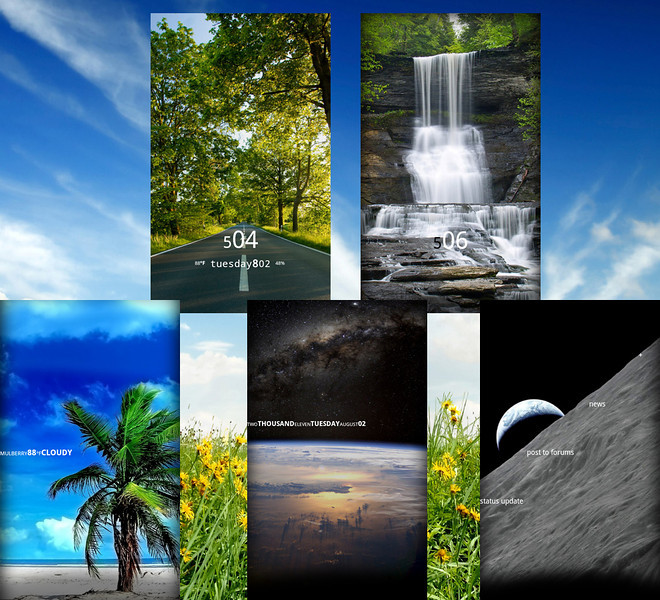
Free MultiPicture Live Wallpaper app lets you cycle through background photos
2 min read
If you’re like most Android users, then you have hundreds of pictures saved on your phone. You might have pictures from a family vacation, for example, or maybe you have pictures from a night out with friends. Whatever the case may be, manually switching your desktop background between all of these pictures can be a hassle.
If you’re sick of seeing the same static image as your wallpaper every day, why not download the MultiPicture Live Wallpaper app? This free app allows any Android user to cycle through a group of photos that will be displayed on their desktop.
Using MultiPicture Live Wallpaper, any Android user can dump their Android photos into a single folder and then let the app cycle through all of them. You can place only a few photos in that folder, or you can drag and drop all of your photos inside. One cool feature with Free MultiPicture Live Wallpaper is the ability to set different wallpapers for different homescreens. So, if you have a contact shortcut homescreen setup for your friends, you can set a background picture of you hanging out with your friends. Or, you can put a picture of a concert on your music player homescreen.
And one final touch that deserves mentioning is the fact that Free MultiPicture Live Wallpaper will automatically crop photos in order to fit on your homescreen. So, if you’ve taken widescreen pictures but your wallpaper spans vertically, then that picture won’t be awkwardly compressed to fit the screen. Instead, MultiPicture Live Wallpaper is smart enough to crop the picture to make it look its best.
If you don’t have a lot of pictures on your Android phone, or if you want to grab pictures from another source, then you can easily do that with MultiPicture Live Wallpaper. The app even allows you to pull images from a Picasa album.
MultiPicture Live Wallpaper is 100% free, so check it out today by clicking here.
One cool feature with Free MultiPicture Live Wallpaper is the ability to set different wallpapers for different homescreens. So, if you have a contact shortcut homescreen setup for your friends, you can set a background picture of you hanging out with your friends. Or, you can put a picture of a concert on your music player homescreen.
And one final touch that deserves mentioning is the fact that Free MultiPicture Live Wallpaper will automatically crop photos in order to fit on your homescreen. So, if you’ve taken widescreen pictures but your wallpaper spans vertically, then that picture won’t be awkwardly compressed to fit the screen. Instead, MultiPicture Live Wallpaper is smart enough to crop the picture to make it look its best.
If you don’t have a lot of pictures on your Android phone, or if you want to grab pictures from another source, then you can easily do that with MultiPicture Live Wallpaper. The app even allows you to pull images from a Picasa album.
MultiPicture Live Wallpaper is 100% free, so check it out today by clicking here.
One cool feature with Free MultiPicture Live Wallpaper is the ability to set different wallpapers for different homescreens. So, if you have a contact shortcut homescreen setup for your friends, you can set a background picture of you hanging out with your friends. Or, you can put a picture of a concert on your music player homescreen.
And one final touch that deserves mentioning is the fact that Free MultiPicture Live Wallpaper will automatically crop photos in order to fit on your homescreen. So, if you’ve taken widescreen pictures but your wallpaper spans vertically, then that picture won’t be awkwardly compressed to fit the screen. Instead, MultiPicture Live Wallpaper is smart enough to crop the picture to make it look its best.
If you don’t have a lot of pictures on your Android phone, or if you want to grab pictures from another source, then you can easily do that with MultiPicture Live Wallpaper. The app even allows you to pull images from a Picasa album.
MultiPicture Live Wallpaper is 100% free, so check it out today by clicking here.
Newsletter
Get the latest tech news delivered to your inbox weekly.