
Google Maps Adds Uber Integration and Extensive Offline Functionality with Recent Update
2 min read
Google Maps is the best mapping app for Android.
Google recently added Uber integration to its apps for Android and iOS. That means your favorite mapping app will now include a bunch of cool features, such as:
-Lane change notifications: Which lane should you be in? Which lane do you need to be in to make the next exit? The Google Maps app will now tell you and suggest the best lane for you while driving.
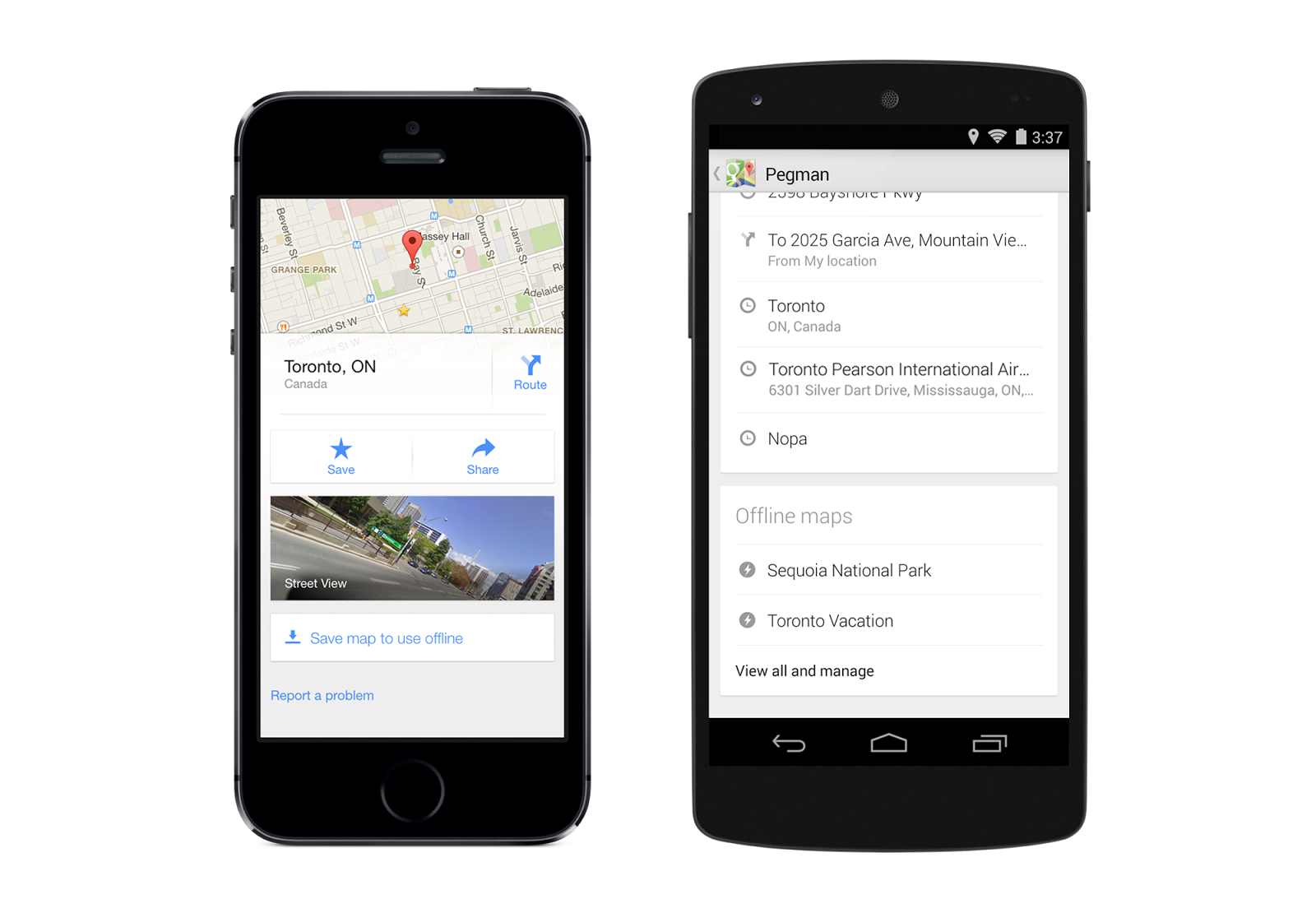
-Custom save online maps: This feature will be great for travelers – you can now easily save an offline map and give it a custom name. Custom maps are locally stored to your device and can be viewed when you’re offline. You could always save offline map data, but now Google has made it easier to do so. Simply search for an area and tap on its place info sheet, then tap the ‘Save map to use offline’ button.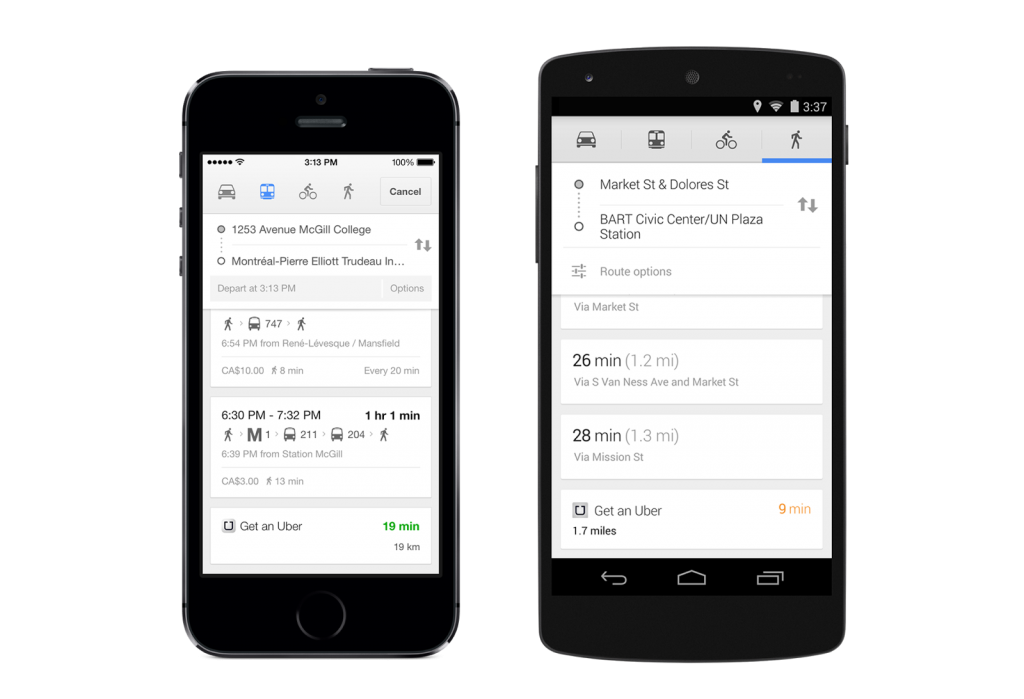 -Custom business filtering: Google has made it easier to find the perfect restaurant, hotel, or club. You can now filter your searches to exclude certain ratings. If you only want hotels that have been rated 3 stars or higher by users, then you can filter results by that. You can also filter results by price or by people in your social circles.
-Uber support: Uber is an innovative cab service that lets users pay and request rides easily via their mobile devices. Google Maps now integrates directly with Uber. If you have the Uber app installed, then Google will automatically add Uber wait information to your direction searches, letting you compare Uber wait times to transit and walking times. If you want to book a ride with Uber, you can tap on the directions directly from Google Maps to open the Uber app.
Other features include more extensive Street View support for hotels and locations around the world as well as the ability to instantly save and favorite locations around the world to recall them at a future date.
If you have already installed Google Maps, then the update should be downloaded automatically.
-Custom business filtering: Google has made it easier to find the perfect restaurant, hotel, or club. You can now filter your searches to exclude certain ratings. If you only want hotels that have been rated 3 stars or higher by users, then you can filter results by that. You can also filter results by price or by people in your social circles.
-Uber support: Uber is an innovative cab service that lets users pay and request rides easily via their mobile devices. Google Maps now integrates directly with Uber. If you have the Uber app installed, then Google will automatically add Uber wait information to your direction searches, letting you compare Uber wait times to transit and walking times. If you want to book a ride with Uber, you can tap on the directions directly from Google Maps to open the Uber app.
Other features include more extensive Street View support for hotels and locations around the world as well as the ability to instantly save and favorite locations around the world to recall them at a future date.
If you have already installed Google Maps, then the update should be downloaded automatically.
-Custom business filtering: Google has made it easier to find the perfect restaurant, hotel, or club. You can now filter your searches to exclude certain ratings. If you only want hotels that have been rated 3 stars or higher by users, then you can filter results by that. You can also filter results by price or by people in your social circles.
-Uber support: Uber is an innovative cab service that lets users pay and request rides easily via their mobile devices. Google Maps now integrates directly with Uber. If you have the Uber app installed, then Google will automatically add Uber wait information to your direction searches, letting you compare Uber wait times to transit and walking times. If you want to book a ride with Uber, you can tap on the directions directly from Google Maps to open the Uber app.
Other features include more extensive Street View support for hotels and locations around the world as well as the ability to instantly save and favorite locations around the world to recall them at a future date.
If you have already installed Google Maps, then the update should be downloaded automatically.

One Click Root Author
One Click Root Author
Content Writer
Experienced writer covering technology and mobile development.
You Might Also Like

Android Apps
Android 14 Root Methods: What Changed?
Explore the new root methods and security changes in Android 14.

Android Apps
Latest Android Security Updates Impact Root Access
Understanding how the latest security patches affect root methods.

Android Apps
Google Pixel 8 Pro Root Guide Released
Complete step-by-step guide to rooting the Google Pixel 8 Pro.
Comments
JD
John Doe
2 days ago
Great article! Very informative and well-written. Thanks for sharing.
JS
Jane Smith
5 days ago
I found the security section particularly helpful. Looking forward to more content like this!
Leave a Comment
Newsletter
Get the latest tech news delivered to your inbox weekly.
Popular Posts
-
1
Getting Started with Android Development
12.5K views
-
2
Best Practices for Mobile Security
8.2K views
-
3
Understanding Smartphone Hardware
6.8K views