

 After a few more clicks, you can finally find a submission form where you explain why that app is bad.
How many users are going to bother walking through those steps to basically do Google’s job for them?
Today, every online service from Twitter to YouTube seems to have a “Flag As Inappropriate” button which make it easy for users to report inappropriate behavior. On the Google Play Store, for whatever reason, Google doesn’t seem to be taking the same approach.
In any case, this is a good step in the right direction for Google – but it’s not going to clean up the messy Google Play Store overnight.
After a few more clicks, you can finally find a submission form where you explain why that app is bad.
How many users are going to bother walking through those steps to basically do Google’s job for them?
Today, every online service from Twitter to YouTube seems to have a “Flag As Inappropriate” button which make it easy for users to report inappropriate behavior. On the Google Play Store, for whatever reason, Google doesn’t seem to be taking the same approach.
In any case, this is a good step in the right direction for Google – but it’s not going to clean up the messy Google Play Store overnight.
Google Play Store Finally Lets You Flag Apps as Inappropriate
2 min read
Anyone can submit an app to the Google Play Store.
Your app doesn’t go through an approval process before it’s available for anyone to download. And, as long as your app doesn’t explicitly violate Google’s terms of service policy, it can stay up there for a surprisingly long time.
Now, things might change.
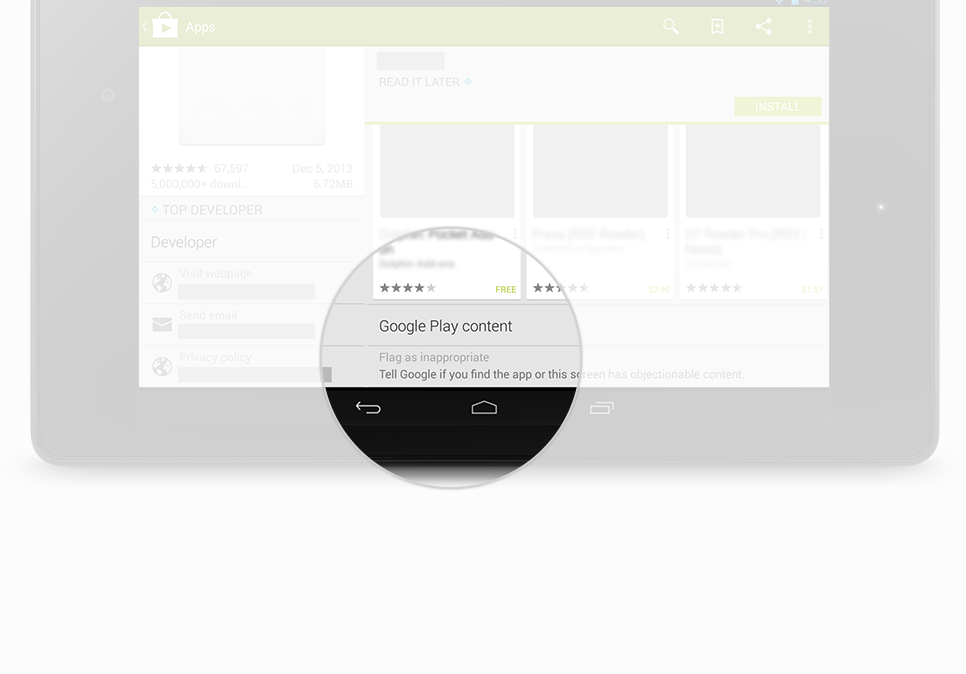
Today, Google finally added a “Flag As Inappropriate” button to the Google Play Store. This button lets you flag malicious or inappropriate apps.
It seems crazy that Google waited so long to add this link to its flagship app store. Previously, the only way to report a bad app was to login to the Android app and report it on your mobile device.
Unfortunately, the “Flag As Inappropriate” button isn’t perfect. After clicking that button, you’re taken to a page on Google Support. That page describes different reasons why you would flag an app.
After a few more clicks, you can finally find a submission form where you explain why that app is bad.
How many users are going to bother walking through those steps to basically do Google’s job for them?
Today, every online service from Twitter to YouTube seems to have a “Flag As Inappropriate” button which make it easy for users to report inappropriate behavior. On the Google Play Store, for whatever reason, Google doesn’t seem to be taking the same approach.
In any case, this is a good step in the right direction for Google – but it’s not going to clean up the messy Google Play Store overnight.
After a few more clicks, you can finally find a submission form where you explain why that app is bad.
How many users are going to bother walking through those steps to basically do Google’s job for them?
Today, every online service from Twitter to YouTube seems to have a “Flag As Inappropriate” button which make it easy for users to report inappropriate behavior. On the Google Play Store, for whatever reason, Google doesn’t seem to be taking the same approach.
In any case, this is a good step in the right direction for Google – but it’s not going to clean up the messy Google Play Store overnight.
Newsletter
Get the latest tech news delivered to your inbox weekly.