

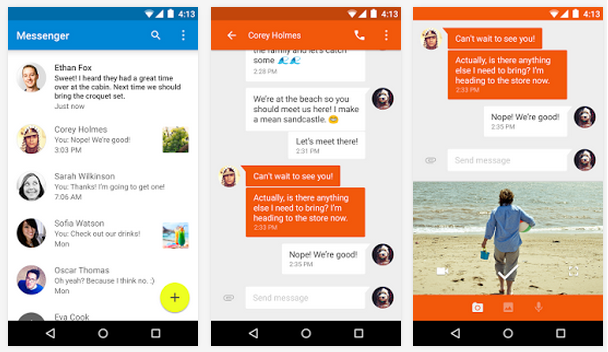
 Anyways, it’s a pretty-looking messenger app that you can use as your default messenger if you so desire. Personally, I think it looks better and cleaner than the default Samsung Messenger – but so do most other Android apps.
Google is slowly letting non-Nexus Android users enjoy a Nexus-like experience without rooting or installing a custom ROM. You can now install the Google Keyboard, run the Google Messenger app as your default SMS app, and use the Google Camera. Those are three killer apps. Keep up the releases good. Us Samsung users love having valid options.
You can install Messenger from the Google Play Store for free by clicking here
Anyways, it’s a pretty-looking messenger app that you can use as your default messenger if you so desire. Personally, I think it looks better and cleaner than the default Samsung Messenger – but so do most other Android apps.
Google is slowly letting non-Nexus Android users enjoy a Nexus-like experience without rooting or installing a custom ROM. You can now install the Google Keyboard, run the Google Messenger app as your default SMS app, and use the Google Camera. Those are three killer apps. Keep up the releases good. Us Samsung users love having valid options.
You can install Messenger from the Google Play Store for free by clicking here
Google Releases Default Android Messenger Onto Play Store
2 min read
One of the neat parts about Android is that you can install whatever messenger app your heart desires.
Today, my heart desires the Google Messenger app because Google just released that app onto the Play Store.
Now, you can install the Google Messenger app onto any device running Android 4.1 or higher. Download it for free here.
The Google Messenger app is capable of handling all your SMS/MMS capabilities. Best of all, you don’t need to link it with Google Hangouts or Google+: this is just a straightforward messenger app.
Google claims that specific benefits of the app include:
-Faster sharing that lets you quickly take pictures and video directly from the app and send them to your contacts
-Easy search that lets you search through contacts, threads, and conversations to find the exact information you’re looking for
-Material design is represented throughout the app, so if you like the new flat, squared-edge look Google has adopted in all its Android 5.0-style apps, you’ll like this Messenger app
-More control that lets you block SMS senders and avoid interruptions when you don’t want to be interrupted
-More features, including audio messaging, emoji support, colored text threads, message archiving and more
Anyways, it’s a pretty-looking messenger app that you can use as your default messenger if you so desire. Personally, I think it looks better and cleaner than the default Samsung Messenger – but so do most other Android apps.
Google is slowly letting non-Nexus Android users enjoy a Nexus-like experience without rooting or installing a custom ROM. You can now install the Google Keyboard, run the Google Messenger app as your default SMS app, and use the Google Camera. Those are three killer apps. Keep up the releases good. Us Samsung users love having valid options.
You can install Messenger from the Google Play Store for free by clicking here
Anyways, it’s a pretty-looking messenger app that you can use as your default messenger if you so desire. Personally, I think it looks better and cleaner than the default Samsung Messenger – but so do most other Android apps.
Google is slowly letting non-Nexus Android users enjoy a Nexus-like experience without rooting or installing a custom ROM. You can now install the Google Keyboard, run the Google Messenger app as your default SMS app, and use the Google Camera. Those are three killer apps. Keep up the releases good. Us Samsung users love having valid options.
You can install Messenger from the Google Play Store for free by clicking here
Newsletter
Get the latest tech news delivered to your inbox weekly.