

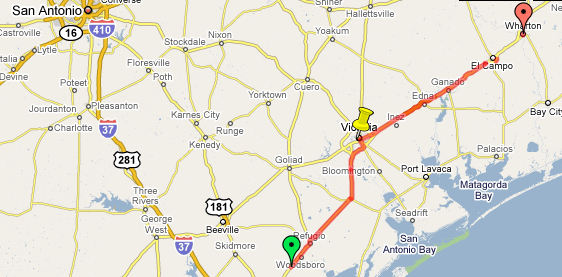
 -Record path, speed, distance, and elevation while running, walking, biking, and “doing anything else outdoors.”
-Sync and share paths with Google Drive, Google+, Facebook, Twitter, and other social services
-Export tracks to Google Maps, Google Spreadsheets, Google Fusion Tables, and external storage devices
-Use the GPS tracker on your smartphone to record geographic and velocity data
-Sync with third-party biometric sensors via Bluetooth (like heart rate monitors)
-Totally open source
Personally, I use Nike+ Running to track my runs while I use Google MyTracks to track my bike rides and everything else I do outdoors – like outdoor skating in the winter. There probably isn’t a need to use multiple fitness tracking apps, but hey, it’s tough to give up Nike+ Running after using it for two years to track hundreds of miles of running.
You can download MyTracks for free from the Google Play Store here. It’s a clean, simple fitness tracking apps with a minimalistic interface that doesn’t try to sell you products or cover your run with advertisements.
-Record path, speed, distance, and elevation while running, walking, biking, and “doing anything else outdoors.”
-Sync and share paths with Google Drive, Google+, Facebook, Twitter, and other social services
-Export tracks to Google Maps, Google Spreadsheets, Google Fusion Tables, and external storage devices
-Use the GPS tracker on your smartphone to record geographic and velocity data
-Sync with third-party biometric sensors via Bluetooth (like heart rate monitors)
-Totally open source
Personally, I use Nike+ Running to track my runs while I use Google MyTracks to track my bike rides and everything else I do outdoors – like outdoor skating in the winter. There probably isn’t a need to use multiple fitness tracking apps, but hey, it’s tough to give up Nike+ Running after using it for two years to track hundreds of miles of running.
You can download MyTracks for free from the Google Play Store here. It’s a clean, simple fitness tracking apps with a minimalistic interface that doesn’t try to sell you products or cover your run with advertisements.
Google Releases Major Update to MyTracks Fitness Tracking App
2 min read
For whatever reason, “health” is the trend of the year in the smartphone world.
The Galaxy S5 kicked off the craze with S Health and its heartbeat sensor, while Apple furthered health mania 2014 with its HealthKit app.
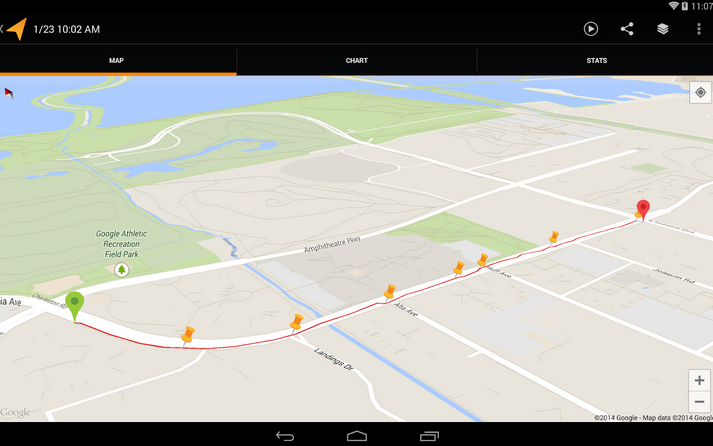
Google recently released a large update for its MyTracks fitness tracking app. That app is available for free on the Google Play Store and provides many of the same features of other fitness tracking apps – but with all the tasty cross-platform compatibility traditionally offered by Google services.
Here’s what you can now do with the new and improved MyTracks fitness app:
-Record path, speed, distance, and elevation while running, walking, biking, and “doing anything else outdoors.”
-Sync and share paths with Google Drive, Google+, Facebook, Twitter, and other social services
-Export tracks to Google Maps, Google Spreadsheets, Google Fusion Tables, and external storage devices
-Use the GPS tracker on your smartphone to record geographic and velocity data
-Sync with third-party biometric sensors via Bluetooth (like heart rate monitors)
-Totally open source
Personally, I use Nike+ Running to track my runs while I use Google MyTracks to track my bike rides and everything else I do outdoors – like outdoor skating in the winter. There probably isn’t a need to use multiple fitness tracking apps, but hey, it’s tough to give up Nike+ Running after using it for two years to track hundreds of miles of running.
You can download MyTracks for free from the Google Play Store here. It’s a clean, simple fitness tracking apps with a minimalistic interface that doesn’t try to sell you products or cover your run with advertisements.
-Record path, speed, distance, and elevation while running, walking, biking, and “doing anything else outdoors.”
-Sync and share paths with Google Drive, Google+, Facebook, Twitter, and other social services
-Export tracks to Google Maps, Google Spreadsheets, Google Fusion Tables, and external storage devices
-Use the GPS tracker on your smartphone to record geographic and velocity data
-Sync with third-party biometric sensors via Bluetooth (like heart rate monitors)
-Totally open source
Personally, I use Nike+ Running to track my runs while I use Google MyTracks to track my bike rides and everything else I do outdoors – like outdoor skating in the winter. There probably isn’t a need to use multiple fitness tracking apps, but hey, it’s tough to give up Nike+ Running after using it for two years to track hundreds of miles of running.
You can download MyTracks for free from the Google Play Store here. It’s a clean, simple fitness tracking apps with a minimalistic interface that doesn’t try to sell you products or cover your run with advertisements.
Newsletter
Get the latest tech news delivered to your inbox weekly.