

 You should Greenify some apps – like Facebook and Twitter – but not all apps – like Gmail. Consider Greenifying apps that you use a lot, but don’t want to constantly receive updates for.
So if you receive work emails in your Gmail account on your Android, but don’t want to be distracted by annoying Facebook friends, then Greenify is a good app to use. Don’t expect to save several hours of battery life, but saving one half hour of battery life over the course of a day isn’t totally unreasonable.
Most apps return from Greenifying without issue. Facebook, for example, seems particularly good at being Greenified. After removing its background functionality, it no longer annoys you with notifications. However, once you reopen it, you’ll hardly notice that it hasn’t been running in the background.
You see, Greenify doesn’t exactly close your Android apps. Instead, it simply pauses them and prevents them from accessing resources without your explicit permission.
Whether you call it “pausing”, “Greenifying”, or “hibernating”, Greenify is a useful app. You can install it on rooted Androids and non-rooted devices by going to the link below:
https://play.google.com/store/apps/details?id=com.oasisfeng.greenify
You should Greenify some apps – like Facebook and Twitter – but not all apps – like Gmail. Consider Greenifying apps that you use a lot, but don’t want to constantly receive updates for.
So if you receive work emails in your Gmail account on your Android, but don’t want to be distracted by annoying Facebook friends, then Greenify is a good app to use. Don’t expect to save several hours of battery life, but saving one half hour of battery life over the course of a day isn’t totally unreasonable.
Most apps return from Greenifying without issue. Facebook, for example, seems particularly good at being Greenified. After removing its background functionality, it no longer annoys you with notifications. However, once you reopen it, you’ll hardly notice that it hasn’t been running in the background.
You see, Greenify doesn’t exactly close your Android apps. Instead, it simply pauses them and prevents them from accessing resources without your explicit permission.
Whether you call it “pausing”, “Greenifying”, or “hibernating”, Greenify is a useful app. You can install it on rooted Androids and non-rooted devices by going to the link below:
https://play.google.com/store/apps/details?id=com.oasisfeng.greenify
Greenify No Longer Requires Rooting
2 min read
Greenify is widely recognized as one of the best root-only apps in the Android community.
At least, it USED to be recognized as one of the best root-only Android apps. A few days ago, the team behind Greenify updated the app to include non-rooted Android users.
That’s right, you unrooted normal people: you too can join in on the fun of Greenify.
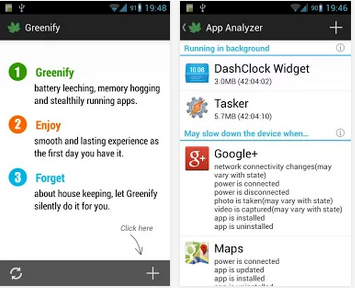
For those who don’t know, Greenify is one of the most effective ways to save battery life. You can “Greenify” an app, which means you remove all its background functionality.
After Greenifying an app, it can no longer run in the background. It will only re-activate when you open the app yourself.
You should Greenify some apps – like Facebook and Twitter – but not all apps – like Gmail. Consider Greenifying apps that you use a lot, but don’t want to constantly receive updates for.
So if you receive work emails in your Gmail account on your Android, but don’t want to be distracted by annoying Facebook friends, then Greenify is a good app to use. Don’t expect to save several hours of battery life, but saving one half hour of battery life over the course of a day isn’t totally unreasonable.
Most apps return from Greenifying without issue. Facebook, for example, seems particularly good at being Greenified. After removing its background functionality, it no longer annoys you with notifications. However, once you reopen it, you’ll hardly notice that it hasn’t been running in the background.
You see, Greenify doesn’t exactly close your Android apps. Instead, it simply pauses them and prevents them from accessing resources without your explicit permission.
Whether you call it “pausing”, “Greenifying”, or “hibernating”, Greenify is a useful app. You can install it on rooted Androids and non-rooted devices by going to the link below:
https://play.google.com/store/apps/details?id=com.oasisfeng.greenify
You should Greenify some apps – like Facebook and Twitter – but not all apps – like Gmail. Consider Greenifying apps that you use a lot, but don’t want to constantly receive updates for.
So if you receive work emails in your Gmail account on your Android, but don’t want to be distracted by annoying Facebook friends, then Greenify is a good app to use. Don’t expect to save several hours of battery life, but saving one half hour of battery life over the course of a day isn’t totally unreasonable.
Most apps return from Greenifying without issue. Facebook, for example, seems particularly good at being Greenified. After removing its background functionality, it no longer annoys you with notifications. However, once you reopen it, you’ll hardly notice that it hasn’t been running in the background.
You see, Greenify doesn’t exactly close your Android apps. Instead, it simply pauses them and prevents them from accessing resources without your explicit permission.
Whether you call it “pausing”, “Greenifying”, or “hibernating”, Greenify is a useful app. You can install it on rooted Androids and non-rooted devices by going to the link below:
https://play.google.com/store/apps/details?id=com.oasisfeng.greenify
Newsletter
Get the latest tech news delivered to your inbox weekly.