HomeTube Lets Your Kids Watch Family-Friendly YouTube Videos
2 min read
Depending on who you ask, YouTube can be one of two different things.
It can be a great source of educational videos about thousands of topics from all over the world. Or it can be a cesspool of filth and disgusting videos.
In any case, it’s not a good idea to let children browse YouTube unsupervised. That’s why one Australian app developer created an app called HomeTube that lets parents pick which YouTube videos their children are allowed to watch.
Here’s how HomeTube works:
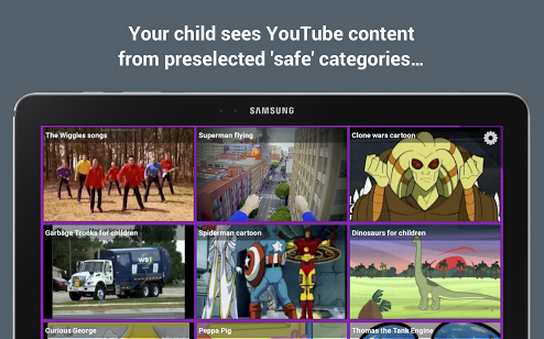
-After downloading and installing the app, you see a grid of video thumbnails
-Those video thumbnails typically include children’s TV shows and family-friendly cartoons
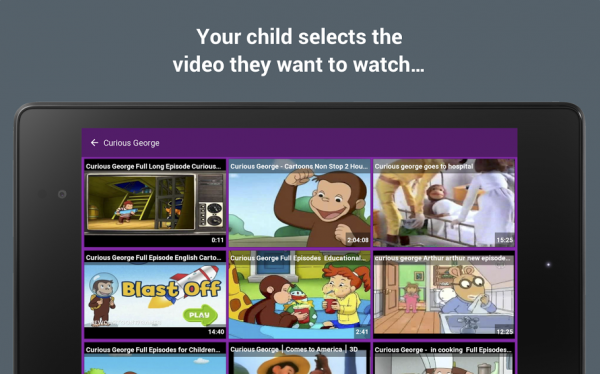
-If you’re happy with the hand-picked categories and videos, then you don’t need to do anything. Just give the app to your kid and let them browse away.
-But if you want to customize your videos further, then you can go to the Settings menu by tapping the “Settings” button six times in a row
-You’ll need to pay 99 cents to customize your own video feed. If you don’t pay that price, then you’ll still see the same main video feed featuring TV shows like Thomas the Tank Engine, Dora the Explorer, and the Clone Wars.
-You can also setup HomeTube as a launcher. That’s a useful feature when you’re setting up profiles for your children. You can establish HomeTube as the only launcher your children see on their homescreen.
HomeTube is free to download and features a wide range of customized content. All videos are pre-selected from “safe” categories and cover everything from dinosaurs to cartoon characters.
Download HomeTube today from the Google Play Store here.

-If you’re happy with the hand-picked categories and videos, then you don’t need to do anything. Just give the app to your kid and let them browse away.
-But if you want to customize your videos further, then you can go to the Settings menu by tapping the “Settings” button six times in a row
-You’ll need to pay 99 cents to customize your own video feed. If you don’t pay that price, then you’ll still see the same main video feed featuring TV shows like Thomas the Tank Engine, Dora the Explorer, and the Clone Wars.
-You can also setup HomeTube as a launcher. That’s a useful feature when you’re setting up profiles for your children. You can establish HomeTube as the only launcher your children see on their homescreen.
HomeTube is free to download and features a wide range of customized content. All videos are pre-selected from “safe” categories and cover everything from dinosaurs to cartoon characters.
Download HomeTube today from the Google Play Store here.
Do not search for HomeTube on Google
HomeTube may be a kids' app, but it's also apparently a porn site. When you search for the kids app on Google Search and Google Image Search, you get a lot of NSFW results. So yeah, just a heads up if you were trying to download the app in front of your kids, you should maybe use this link instead.One Click Root Author
One Click Root Author
Content Writer
Experienced writer covering technology and mobile development.
You Might Also Like
Android Apps
Android 14 Root Methods: What Changed?
Explore the new root methods and security changes in Android 14.
Android Apps
Latest Android Security Updates Impact Root Access
Understanding how the latest security patches affect root methods.
Android Apps
Google Pixel 8 Pro Root Guide Released
Complete step-by-step guide to rooting the Google Pixel 8 Pro.
Comments
JD
John Doe
2 days ago
Great article! Very informative and well-written. Thanks for sharing.
JS
Jane Smith
5 days ago
I found the security section particularly helpful. Looking forward to more content like this!
Leave a Comment
Newsletter
Get the latest tech news delivered to your inbox weekly.
Popular Posts
-
1
Getting Started with Android Development
12.5K views
-
2
Best Practices for Mobile Security
8.2K views
-
3
Understanding Smartphone Hardware
6.8K views