
How to Automatically Change Your Lockscreen PIN Every Minute and Enhance Smartphone Security
2 min read
Android security is important. Duh. People stealing phones are bad. Etc. etc. etc.
Want an easy way to protect your smartphone and evade people who know your PIN? I’ve got a creative solution for you.
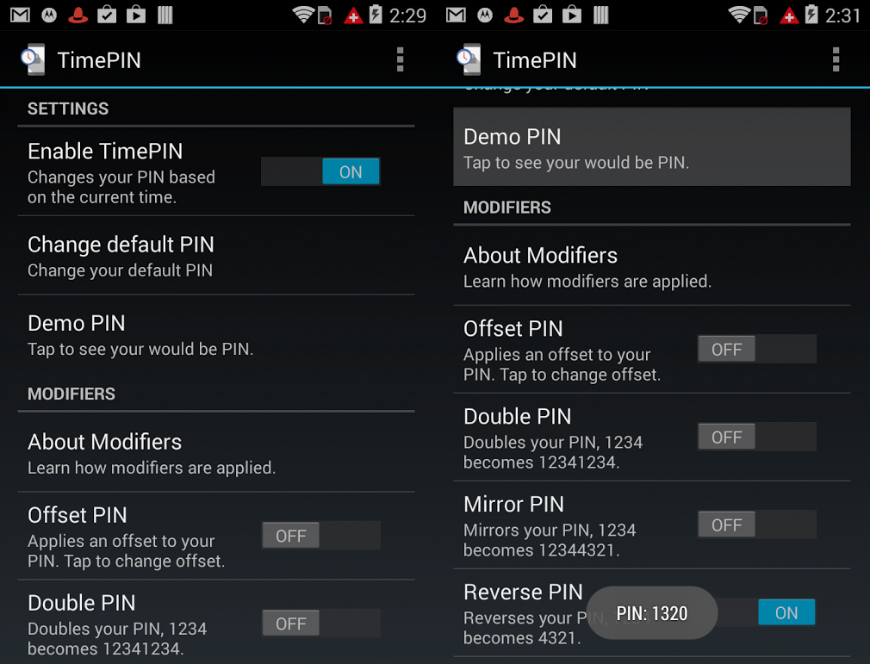
 It’s called TimePIN. TimePIN is an Android security app that automatically changes your PIN every minute. Instead of having to memorize 60 different PINs, however, TimePIN simply changes your PIN to the current time of day.
Ideally, other users won’t know that TimePIN is installed on your phone and won’t be able to guess your PIN: even if they see you type it in or look at your fingerprint smudges on your screen. And that’s really the major benefit of this app – since your PIN is always changing, you no longer really have to worry about hiding your screen or cleaning off smudges.
Obviously, this app has a pretty major flaw at first glance. Once this app becomes popular, the current time is going to be the first password bad people try when they try to hack into your phone.
TimePIN does have a security measure against this: you can change the types of PINs that TimePIN changes to every minute. Here are a few of the options available:
-Reverse PIN, which flips your usual PIN around
-Reverse Time PIN, which flips the time around in reverse. If it’s 3:42, for example, then the PIN would become 2430
-Double PIN, which repeats the time twice for an 8 digit PIN
The free version of TimePIN only includes the reverse option, while the additional features can be unlocked for a one-time payment of $1.99.
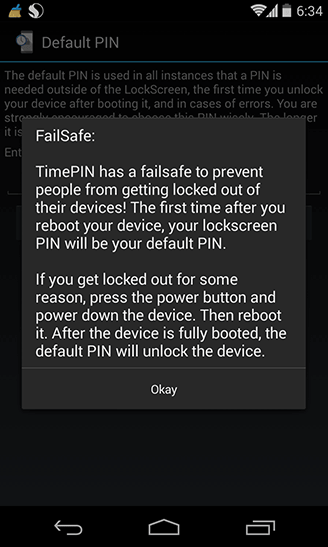
Another major security flaw is that you can disable TimePIN simply by restarting your Android. Restarting your Android takes it back to its original PIN entry mode, which isn’t great if your hacker knows your original PIN.
http://www.youtube.com/watch?v=_PR0OQ7S9L8
So anyways, TimePIN isn’t going to completely lock down your phone, but it’s a cool gimmick to show your friends. Tell them your PIN, show yourself entering that PIN, and then ask your friends to try to get into your phone. Tell them your phone knows your voice or fingerprints or something and watch them lose their minds.
You can download TimePIN from here: https://play.google.com/store/apps/details?id=com.cunninglogic.dynamicpin
It’s called TimePIN. TimePIN is an Android security app that automatically changes your PIN every minute. Instead of having to memorize 60 different PINs, however, TimePIN simply changes your PIN to the current time of day.
Ideally, other users won’t know that TimePIN is installed on your phone and won’t be able to guess your PIN: even if they see you type it in or look at your fingerprint smudges on your screen. And that’s really the major benefit of this app – since your PIN is always changing, you no longer really have to worry about hiding your screen or cleaning off smudges.
Obviously, this app has a pretty major flaw at first glance. Once this app becomes popular, the current time is going to be the first password bad people try when they try to hack into your phone.
TimePIN does have a security measure against this: you can change the types of PINs that TimePIN changes to every minute. Here are a few of the options available:
-Reverse PIN, which flips your usual PIN around
-Reverse Time PIN, which flips the time around in reverse. If it’s 3:42, for example, then the PIN would become 2430
-Double PIN, which repeats the time twice for an 8 digit PIN
The free version of TimePIN only includes the reverse option, while the additional features can be unlocked for a one-time payment of $1.99.
Another major security flaw is that you can disable TimePIN simply by restarting your Android. Restarting your Android takes it back to its original PIN entry mode, which isn’t great if your hacker knows your original PIN.
http://www.youtube.com/watch?v=_PR0OQ7S9L8
So anyways, TimePIN isn’t going to completely lock down your phone, but it’s a cool gimmick to show your friends. Tell them your PIN, show yourself entering that PIN, and then ask your friends to try to get into your phone. Tell them your phone knows your voice or fingerprints or something and watch them lose their minds.
You can download TimePIN from here: https://play.google.com/store/apps/details?id=com.cunninglogic.dynamicpin
It’s called TimePIN. TimePIN is an Android security app that automatically changes your PIN every minute. Instead of having to memorize 60 different PINs, however, TimePIN simply changes your PIN to the current time of day.
Ideally, other users won’t know that TimePIN is installed on your phone and won’t be able to guess your PIN: even if they see you type it in or look at your fingerprint smudges on your screen. And that’s really the major benefit of this app – since your PIN is always changing, you no longer really have to worry about hiding your screen or cleaning off smudges.
Obviously, this app has a pretty major flaw at first glance. Once this app becomes popular, the current time is going to be the first password bad people try when they try to hack into your phone.
TimePIN does have a security measure against this: you can change the types of PINs that TimePIN changes to every minute. Here are a few of the options available:
-Reverse PIN, which flips your usual PIN around
-Reverse Time PIN, which flips the time around in reverse. If it’s 3:42, for example, then the PIN would become 2430
-Double PIN, which repeats the time twice for an 8 digit PIN
The free version of TimePIN only includes the reverse option, while the additional features can be unlocked for a one-time payment of $1.99.
Another major security flaw is that you can disable TimePIN simply by restarting your Android. Restarting your Android takes it back to its original PIN entry mode, which isn’t great if your hacker knows your original PIN.
http://www.youtube.com/watch?v=_PR0OQ7S9L8
So anyways, TimePIN isn’t going to completely lock down your phone, but it’s a cool gimmick to show your friends. Tell them your PIN, show yourself entering that PIN, and then ask your friends to try to get into your phone. Tell them your phone knows your voice or fingerprints or something and watch them lose their minds.
You can download TimePIN from here: https://play.google.com/store/apps/details?id=com.cunninglogic.dynamicpin

One Click Root Author
One Click Root Author
Content Writer
Experienced writer covering technology and mobile development.
You Might Also Like

Android Apps
Android 14 Root Methods: What Changed?
Explore the new root methods and security changes in Android 14.

Android Apps
Latest Android Security Updates Impact Root Access
Understanding how the latest security patches affect root methods.

Android Apps
Google Pixel 8 Pro Root Guide Released
Complete step-by-step guide to rooting the Google Pixel 8 Pro.
Comments
JD
John Doe
2 days ago
Great article! Very informative and well-written. Thanks for sharing.
JS
Jane Smith
5 days ago
I found the security section particularly helpful. Looking forward to more content like this!
Leave a Comment
Newsletter
Get the latest tech news delivered to your inbox weekly.
Popular Posts
-
1
Getting Started with Android Development
12.5K views
-
2
Best Practices for Mobile Security
8.2K views
-
3
Understanding Smartphone Hardware
6.8K views