How to Change the Way You Text With Emu Messenger
2 min read
Texting hasn’t changed much over the last few years. You may have upgraded phones, but basic texting remains the same - you type messages to your friends and maybe send a few pictures.
But a new app called Emu Messenger aims to change the way people text. Emu Messenger adds a number of cool new features to your texting routine. And here’s the best part: you’ll actually want to use these features.
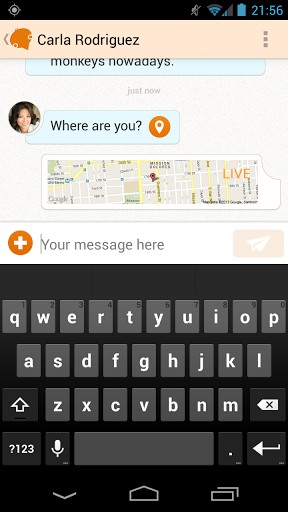
Here are some of the ways in which Emu Messenger (still currently in beta) wants to change the way we text:
-Share your location via text with a single tap. The location displayed within the texting app will change over time based on where you are. In other words, your texting buddy will be able to see exactly where you are if you choose to share your location.
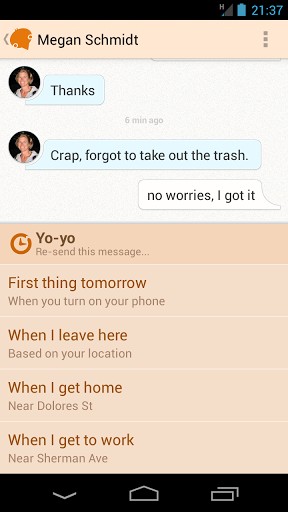
-Use a feature called ‘Yo-yo’ to resend a text to yourself at a more appropriate time. If you receive a sext when you’re at a family dinner, for example, you can have it resent to yourself later that night. Or, if you receive a bill payment reminder text while you’re at the gym, you can have it resent to yourself when you’re at home.
-Push to talk and send a hands-free text. If your thumbs are too busy to type out a text, then you can use the Push to Talk feature to send a text. Just push anywhere on your texting screen and speak into the phone to send a text message. That’s it.
-Here’s my favorite part about Emu Messenger - unlike other messaging apps, you don’t need to add friends with it or give out a new number (I’m looking at you, WhatsApp). Instead, Emu Messenger simply replaces your default Android messaging app. Your phone will automatically use it for all your texting needs.
Emu Messenger is an interesting way to improve your phone’s ability to text. I can see the mapping feature being very useful for parents who want to keep an eye on their kids or for friends who are trying to meet up in the city. You can download Emu Messenger for free today by clicking here.

Here are some of the ways in which Emu Messenger (still currently in beta) wants to change the way we text:
-Share your location via text with a single tap. The location displayed within the texting app will change over time based on where you are. In other words, your texting buddy will be able to see exactly where you are if you choose to share your location.
-Use a feature called ‘Yo-yo’ to resend a text to yourself at a more appropriate time. If you receive a sext when you’re at a family dinner, for example, you can have it resent to yourself later that night. Or, if you receive a bill payment reminder text while you’re at the gym, you can have it resent to yourself when you’re at home.
-Push to talk and send a hands-free text. If your thumbs are too busy to type out a text, then you can use the Push to Talk feature to send a text. Just push anywhere on your texting screen and speak into the phone to send a text message. That’s it.
-Here’s my favorite part about Emu Messenger - unlike other messaging apps, you don’t need to add friends with it or give out a new number (I’m looking at you, WhatsApp). Instead, Emu Messenger simply replaces your default Android messaging app. Your phone will automatically use it for all your texting needs.
Emu Messenger is an interesting way to improve your phone’s ability to text. I can see the mapping feature being very useful for parents who want to keep an eye on their kids or for friends who are trying to meet up in the city. You can download Emu Messenger for free today by clicking here.

One Click Root Author
Content Writer
Experienced writer covering technology and mobile development.
You Might Also Like
Android Apps
Android 14 Root Methods: What Changed?
Explore the new root methods and security changes in Android 14.
Android Apps
Latest Android Security Updates Impact Root Access
Understanding how the latest security patches affect root methods.
Android Apps
Google Pixel 8 Pro Root Guide Released
Complete step-by-step guide to rooting the Google Pixel 8 Pro.
Comments
JD
John Doe
2 days ago
Great article! Very informative and well-written. Thanks for sharing.
JS
Jane Smith
5 days ago
I found the security section particularly helpful. Looking forward to more content like this!
Leave a Comment
Newsletter
Get the latest tech news delivered to your inbox weekly.
Popular Posts
-
1
Getting Started with Android Development
12.5K views
-
2
Best Practices for Mobile Security
8.2K views
-
3
Understanding Smartphone Hardware
6.8K views