

 Users can choose how often the program checks for downtime. Another useful feature is setting the number of successive downtime errors noticed by the app before alerting the user. This is particularly useful on mobile apps because it prevents you from thinking your website is down simply because your phone had a brief connection error as you stood in an elevator.
After setting up pypmin and adding your websites, you can view timelines of activity for each website. This lets you see when a website is down and which errors it experiences at various times of the day.
There are two reasons to use pypmin:
-You’re a website admin trying to keep track of which sites are up and which ones are down
-You really want to keep track of your favorite websites online
No matter which group you fall into, pypmin is a helpful app for any online professionals. You can download it for free here: https://play.google.com/store/apps/details?id=com.creepy.pyp
Or, view the original app thread on the XDA Developers Forum.
Users can choose how often the program checks for downtime. Another useful feature is setting the number of successive downtime errors noticed by the app before alerting the user. This is particularly useful on mobile apps because it prevents you from thinking your website is down simply because your phone had a brief connection error as you stood in an elevator.
After setting up pypmin and adding your websites, you can view timelines of activity for each website. This lets you see when a website is down and which errors it experiences at various times of the day.
There are two reasons to use pypmin:
-You’re a website admin trying to keep track of which sites are up and which ones are down
-You really want to keep track of your favorite websites online
No matter which group you fall into, pypmin is a helpful app for any online professionals. You can download it for free here: https://play.google.com/store/apps/details?id=com.creepy.pyp
Or, view the original app thread on the XDA Developers Forum.
How to Check Website Uptime With a Simple Android App
2 min read
If you run websites, then you know uptime is important. Even if you don’t run websites, you probably know uptime is important because it’s 2014 and everybody does everything on the internet.
For years, the best way to check if your website was up was to manually visit it yourself. This was time-consuming if you had multiple websites on different hosts that needed to be checked.
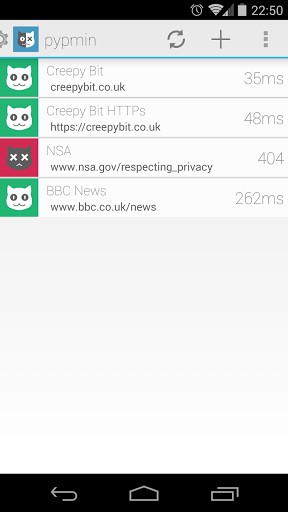
That’s why one talented Android developer created an app called pypmin. pypmin – yes, with all lower case letters – keeps track of the availability and response times of any websites you tell it to track. It runs 24/7 and lets users build a simple list of websites.
When a particular website is unreachable, pypmin will alert the user with the http status code.
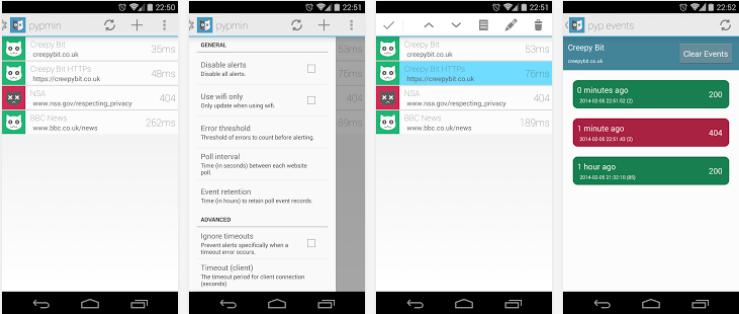
Users can choose how often the program checks for downtime. Another useful feature is setting the number of successive downtime errors noticed by the app before alerting the user. This is particularly useful on mobile apps because it prevents you from thinking your website is down simply because your phone had a brief connection error as you stood in an elevator.
After setting up pypmin and adding your websites, you can view timelines of activity for each website. This lets you see when a website is down and which errors it experiences at various times of the day.
There are two reasons to use pypmin:
-You’re a website admin trying to keep track of which sites are up and which ones are down
-You really want to keep track of your favorite websites online
No matter which group you fall into, pypmin is a helpful app for any online professionals. You can download it for free here: https://play.google.com/store/apps/details?id=com.creepy.pyp
Or, view the original app thread on the XDA Developers Forum.
Users can choose how often the program checks for downtime. Another useful feature is setting the number of successive downtime errors noticed by the app before alerting the user. This is particularly useful on mobile apps because it prevents you from thinking your website is down simply because your phone had a brief connection error as you stood in an elevator.
After setting up pypmin and adding your websites, you can view timelines of activity for each website. This lets you see when a website is down and which errors it experiences at various times of the day.
There are two reasons to use pypmin:
-You’re a website admin trying to keep track of which sites are up and which ones are down
-You really want to keep track of your favorite websites online
No matter which group you fall into, pypmin is a helpful app for any online professionals. You can download it for free here: https://play.google.com/store/apps/details?id=com.creepy.pyp
Or, view the original app thread on the XDA Developers Forum.
Newsletter
Get the latest tech news delivered to your inbox weekly.