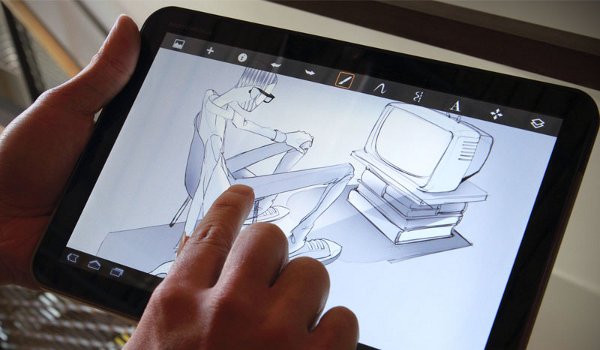
Say what you want about your fancy Android tablets, but it’s no replacement for a piece of paper and a pencil. But if you’re in some awful place without a pencil and paper nearby, then worry not! Because it is now possible (and extremely easy) to turn your Android tablet into a sketchboard.
Today, I’m going to show you exactly how to do that using an app called ArtFlow.
Step 1) Download ArtFlow here
for free
Step 2) When you start up the app for the first time, you’ll see a detailed tutorial appear on screen. That tutorial tells you how to use two fingers to pan across the canvas, how to open the tools panel, and how to pinch to zoom on canvas. You can also drag your finger across the left side of your tablet to open the layer management panel.
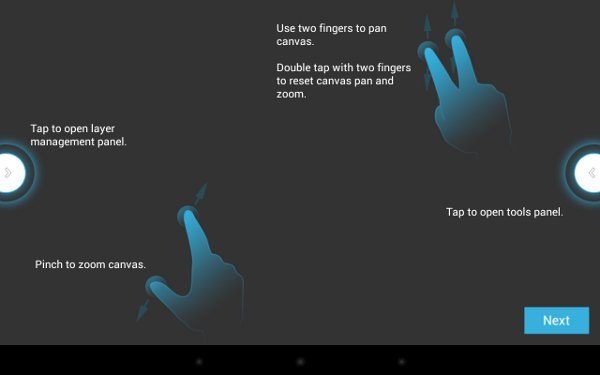
Step 3) If you don’t want to mess around with layers, then you may want to stick to the menu on the right hand side of the screen, which has brush tools, the eraser, and other easy-to-use functions.
Step 3) ArtFlow works best with a stylus like the S-Pen. In fact, if you’re using the S-Pen with ArtFlow, you’ll notice that you can add less pressure to make a lighter line and more pressure to make a darker line.
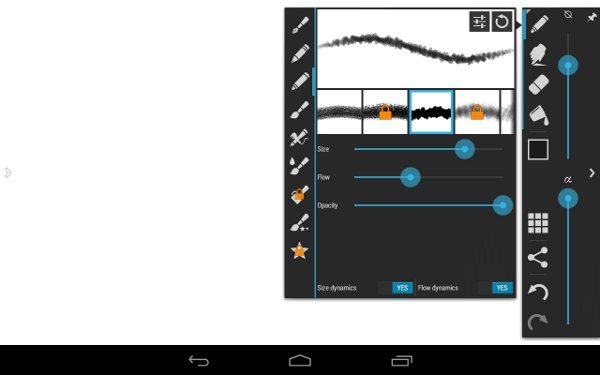
Step 4) Don’t have a stylus? Well, I’ll show you why this app is called ArtFlow. On the right hand menu, play around with brush settings. You can adjust the size, flow, and opacity of the line or brush stroke in order to give it a flowing appearance like you’re drawing on real canvas.
The free version of ArtFlow does come with some restrictions – just like 95% of free apps on the planet. With the free ArtFlow, you can only have a handful of layers, unlike in PhotoShop, where you can have a near limitless number of layers. Other than that, there aren’t too many compelling reasons to splurge on the paid version of ArtFlow.
Once you’ve created your masterpiece artwork, you can share it with your friends on all the usual social media websites or just save it to your storage unit for private viewing. If you draw as poorly as I do, then there’s no way you’re sharing that thing with Facebook.
Today, professional graphic designers invest in expensive software. Amateur designers draw stuff on pieces of paper and take pictures of it with their phones. With ArtFlow, you can have the best of both worlds.
Download it today to try it for yourself.