

How to Use Adjustable Torch to Get a Better Android Flashlight
2 min read
One of the most-used apps on my phone is the flashlight. If I’m walking around my house at night, sometimes I just don’t want to bother finding the light switch and risk waking up roommates. The flashlight on my Galaxy S3 has plenty of brightness, and it’s an excellent solution for camping as well.
That’s why I like a new app called Adjustable Torch. As you may or may not know, British people call flashlights torches. They also call torches torches. So before you dismiss Adjustable Torch as being an app for cavemen learning how to start a fire, read how Adjustable Torch works:
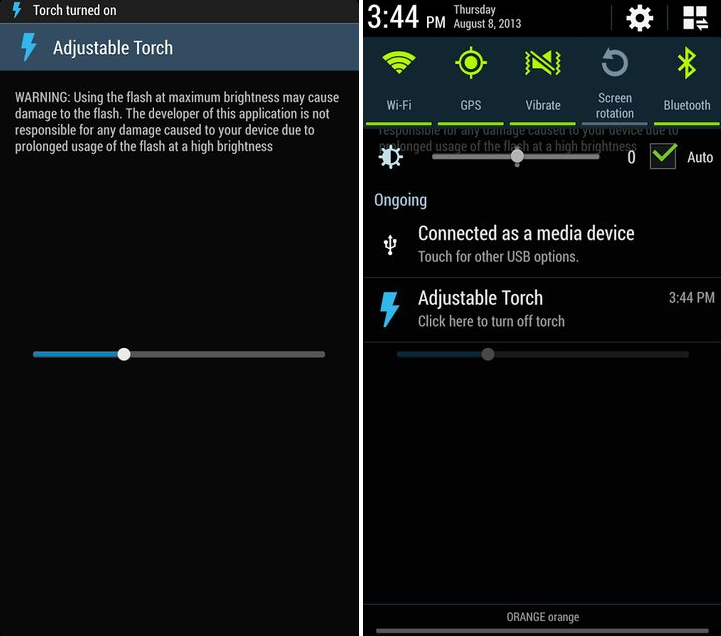
-Adjustable Torch allows you to adjust the brightness of your rear-facing camera flash
-Your smartphone already has a flashlight feature by default, but most manufacturers don’t allow you to set the brightness of this flashlight or the flash of your camera
Yes, that brightness level can be adjusted. By default, the flash is set to about 1/3rd brightness, which means you can make it more or less bright depending on what you’re using it for.
A word of warning
The creator of the Adjustable Torch app does warn users that increasing the flash to maximum brightness can cause permanent damage to the flash feature, and that he does not want to be responsible for any of this damage. To download Adjustable Torch today, visit the application thread at the XDA Developers Forum. The app is confirmed to work with the Galaxy S4 (GT-I9500 and GT-I9505) as well as the Samsung Galaxy Note 2 (GT-N7100), although it’s also expected to work with other devices.One Click Root Author
One Click Root Author
Content Writer
Experienced writer covering technology and mobile development.
You Might Also Like
Android Apps
Android 14 Root Methods: What Changed?
Explore the new root methods and security changes in Android 14.
Android Apps
Latest Android Security Updates Impact Root Access
Understanding how the latest security patches affect root methods.
Android Apps
Google Pixel 8 Pro Root Guide Released
Complete step-by-step guide to rooting the Google Pixel 8 Pro.
Comments
JD
John Doe
2 days ago
Great article! Very informative and well-written. Thanks for sharing.
JS
Jane Smith
5 days ago
I found the security section particularly helpful. Looking forward to more content like this!
Leave a Comment
Newsletter
Get the latest tech news delivered to your inbox weekly.
Popular Posts
-
1
Getting Started with Android Development
12.5K views
-
2
Best Practices for Mobile Security
8.2K views
-
3
Understanding Smartphone Hardware
6.8K views