Microsoft has released a new app called Path Guide that allows users to create easy-to-follow custom routes for indoor areas.
Conventional navigation apps like Google Maps only get you
to the building. With an app like Path Guide, you can navigate your way inside a building.
Path Guide lets you create and follow custom routes that exist as linear instructions separate from a map. It’s kind of like a treasure hunt at a kid’s birthday party. Instead of relying on a physical map – like Google Maps – you walk between waypoints in an indoor space. When you reach a waypoint, you receive instructions for your next waypoint until you reach your destination.
One of the nifty parts about Path Guide is how easy it is to setup directions through the app. When you want to make a path, just fire up the app and go for a stroll. You walk from one point – say, the entrance of your office building – to your destination point – say, your desk in the back corner. Path Guide will pull data from your phone’s sensors as you move to your destination. Then, it will create walking instructions based on your path.
The app was launched on May 25.
Does It Actually Work?
Based on our team’s early trials with the app, it seems to work as advertised to make pathfinding easy enough. However, there are some annoyances. The search function needs some work. If you want to find new routes for areas you frequent, for example, then you may encounter some difficulties finding new routes – although a lot of this can probably be attributed to the lack of people using the app.
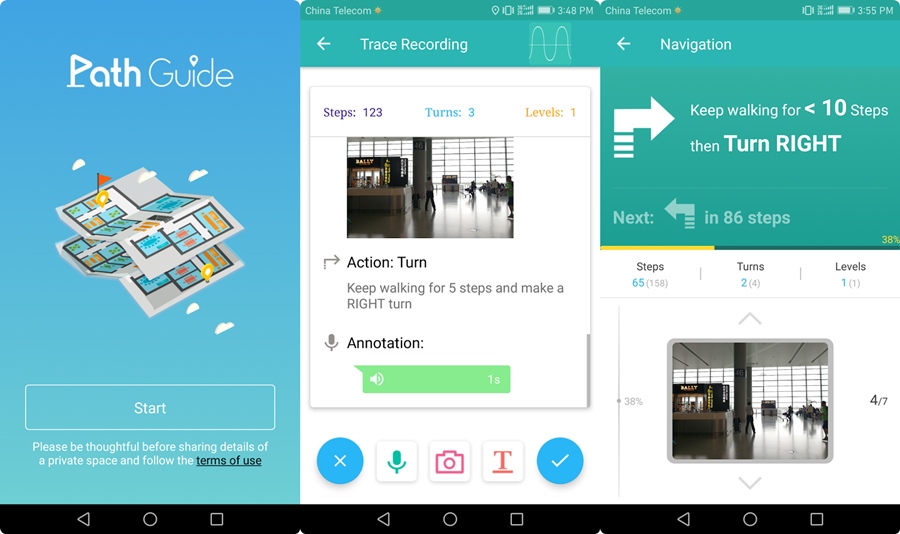
However, we can see Path Guide having big potential for places like indoor stadiums. Need to find the closest bathroom or beer stand? Path Guide can direct you there in a way that Google Maps cannot.
Ultimately, Path Guide isn’t intended to change the world. It’s designed to introduce and demo Microsoft’s new technology – something we’ll probably see implemented in future apps from Microsoft.
However, Path Guide is certainly worth a try yourself – even if it’s just for the novelty factor. As the app grows, we can see it becoming more and more useful.
Download it for free from the Google Play Store today (where it’s maintaining a rating of about 5 stars out of 5, by the way).