
Security Warning: Enabling “Ok Google Everywhere” Lets Anyone Place Calls and Access Maps from the Lock Screen
2 min read
When something is called a “lock” screen, you expect it to be locked.
Unfortunately, the recent Google Now update removes two critical locks from your lock screen and exposes a potential security hole in Android.
Specifically, enabling the OK Google Everywhere function lets anyone place calls directly from the lockscreen. You can simply say “OK Google, Call [CONTACT]” from the locked phone screen to place a call.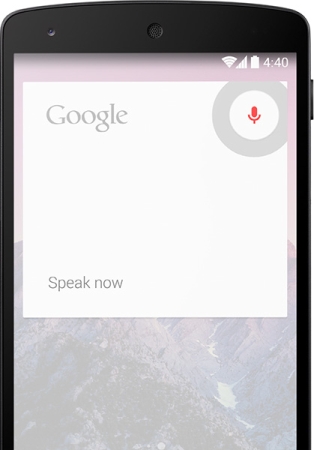 There are some restrictions: the contact has to be in your contact book, which means someone can’t call random numbers or premium toll numbers.
In addition, you can’t leave the dialing app to access the device without entering the unlock code. The dialer app is designed to run over top of the lockscreen, which is why this “hack” works in the first place.
However, anyone can still see the number of the person you’re dialing along with their name – which can pose a security risk.
Another potential problem is that Google overlays its navigation system over top of the lockscreen. You can say “OK Google, navigate home” to open a turn-by-turn navigation window.
That’s also a security risk. Someone could view your home address, work address, or whatever other addresses are stored in your phone.
Of course, if you lose your phone, the “navigate home” feature could also be used by a good Samaritan to return your precious device.
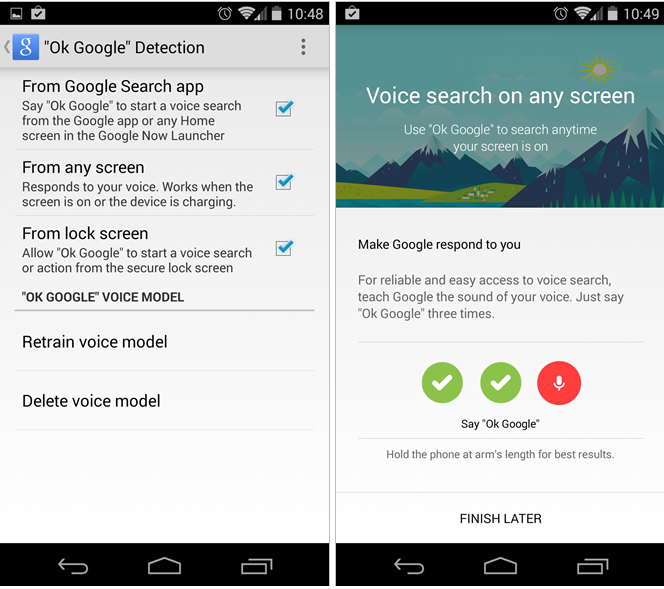
To disable this feature, open the Google Now settings menu and look for “Ok Google” Detection. This menu lets you check when your Android device will listen for the “OK Google” command. You can set it to only listen when you open the Google Search app, for example, or you can have it listen from any screen – including the lock screen.
This isn’t necessarily a security flaw, but it’s certainly something to be aware of if you enjoy using OK Google.
There are some restrictions: the contact has to be in your contact book, which means someone can’t call random numbers or premium toll numbers.
In addition, you can’t leave the dialing app to access the device without entering the unlock code. The dialer app is designed to run over top of the lockscreen, which is why this “hack” works in the first place.
However, anyone can still see the number of the person you’re dialing along with their name – which can pose a security risk.
Another potential problem is that Google overlays its navigation system over top of the lockscreen. You can say “OK Google, navigate home” to open a turn-by-turn navigation window.
That’s also a security risk. Someone could view your home address, work address, or whatever other addresses are stored in your phone.
Of course, if you lose your phone, the “navigate home” feature could also be used by a good Samaritan to return your precious device.
To disable this feature, open the Google Now settings menu and look for “Ok Google” Detection. This menu lets you check when your Android device will listen for the “OK Google” command. You can set it to only listen when you open the Google Search app, for example, or you can have it listen from any screen – including the lock screen.
This isn’t necessarily a security flaw, but it’s certainly something to be aware of if you enjoy using OK Google.
There are some restrictions: the contact has to be in your contact book, which means someone can’t call random numbers or premium toll numbers.
In addition, you can’t leave the dialing app to access the device without entering the unlock code. The dialer app is designed to run over top of the lockscreen, which is why this “hack” works in the first place.
However, anyone can still see the number of the person you’re dialing along with their name – which can pose a security risk.
Another potential problem is that Google overlays its navigation system over top of the lockscreen. You can say “OK Google, navigate home” to open a turn-by-turn navigation window.
That’s also a security risk. Someone could view your home address, work address, or whatever other addresses are stored in your phone.
Of course, if you lose your phone, the “navigate home” feature could also be used by a good Samaritan to return your precious device.
To disable this feature, open the Google Now settings menu and look for “Ok Google” Detection. This menu lets you check when your Android device will listen for the “OK Google” command. You can set it to only listen when you open the Google Search app, for example, or you can have it listen from any screen – including the lock screen.
This isn’t necessarily a security flaw, but it’s certainly something to be aware of if you enjoy using OK Google.

One Click Root Author
One Click Root Author
Content Writer
Experienced writer covering technology and mobile development.
You Might Also Like

Android Apps
Android 14 Root Methods: What Changed?
Explore the new root methods and security changes in Android 14.

Android Apps
Latest Android Security Updates Impact Root Access
Understanding how the latest security patches affect root methods.

Android Apps
Google Pixel 8 Pro Root Guide Released
Complete step-by-step guide to rooting the Google Pixel 8 Pro.
Comments
JD
John Doe
2 days ago
Great article! Very informative and well-written. Thanks for sharing.
JS
Jane Smith
5 days ago
I found the security section particularly helpful. Looking forward to more content like this!
Leave a Comment
Newsletter
Get the latest tech news delivered to your inbox weekly.
Popular Posts
-
1
Getting Started with Android Development
12.5K views
-
2
Best Practices for Mobile Security
8.2K views
-
3
Understanding Smartphone Hardware
6.8K views