As you may have noticed, Android doesn’t have FaceTime, the popular video chatting service available through iOS. And if you didn’t notice Android’s lack of FaceTime, then some smirking Apple fan may have pointed it out for you.
But instead of giving up and saying ‘Okay, iOS wins’, I need you to stop right there. In fact, there are plenty of good FaceTime alternatives for Android, and they tend to be a lot more powerful – and less restrictive – than FaceTime.
Skype
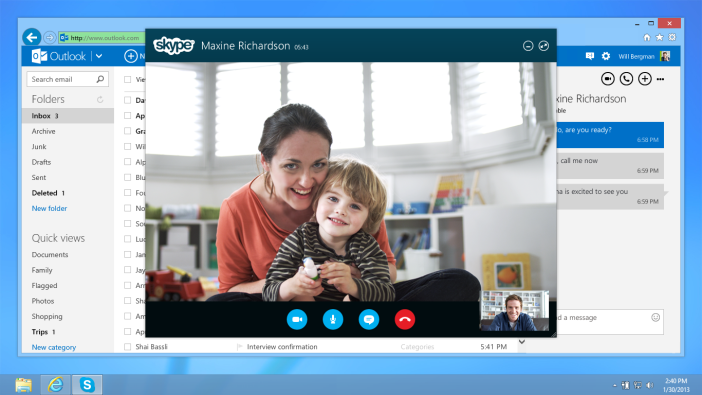
Skype was the first software to popularize video chatting. And since it’s owned by the world’s largest software company, Microsoft, it makes sense that Skype would be a fairly decent product. Skype is currently available on all major platforms, including Mac, iOS, Android, Windows, etc. Unlike FaceTime, you can actually use Skype over mobile networks as well as Wi-Fi.
Another major advantage that Skype has over FaceTime is that you don’t need an Apple device to use it. You need a free Skype account – something that many people already have since Skype has been around for so long. Skype gives you unlimited video chatting with an unlimited number of contacts. And if you pay for the premium version of Skype, you can place phone calls over Skype and add multiple users to a conversation.
And hey, if you don’t want to do any of that, then Skype is also a pretty good instant messenger.
Google+ Hangout
Yes, we get it, nobody uses Google+, the company is trying too hard to get people to use it, etc. But Google+ does come with one really cool feature: hangouts. You can host a party with all your friends and share video on one single screen.
With any company but Google, this sounds like it would be a train wreck filled with technical problems. But by all reports, Google+ hangouts actually work pretty well (note: none of my friends use Google+ so I’ve never actually hung out with anyone on Google+ myself).
Zoom.us
Stock photo man means business
Zoom isn’t nearly as well-known as the two services listed above. But it’s a very good video chat program. Zoom is designed primarily for business users, but the free trial version of the software basically provides all the functionality individual users will need.
The best thing about Zoom is that it streams HD video over mobile networks. If you’re on an LTE connection or a half-decent Wi-Fi connection, you’re going to get a good video and audio feed from your partner. On tablets, you can also screen share.
So whether you need a professional conferencing FaceTime alternative or just a high-quality one on one video chat tool, Zoom.us is a good solution – just don’t expect as many of your friends to use it as they use Skype.
Get the latest tech news delivered to your inbox weekly.
Cookie Preferences
We use cookies to enhance your browsing experience, serve personalized content, and analyze our traffic. You can choose which types of cookies to allow. See our Cookie Policy for more information.
Essential Cookies
They are necessary for the operation of our website services and to secure area access.
Always Active
Performance and Functionality Cookies
They enhance website performance. Some features may not be available without them.
Analytics and Customization Cookies
They collect aggregated data to understand usage and customize the website.
Advertising Cookies
They enhance the relevance of ads, prevent repetition, and ensure proper display.
Social Networking Cookies
They enable content sharing and may support advertising.



 Skype was the first software to popularize video chatting. And since it’s owned by the world’s largest software company, Microsoft, it makes sense that Skype would be a fairly decent product. Skype is currently available on all major platforms, including Mac, iOS, Android, Windows, etc. Unlike FaceTime, you can actually use Skype over mobile networks as well as Wi-Fi.
Another major advantage that Skype has over FaceTime is that you don’t need an Apple device to use it. You need a free Skype account – something that many people already have since Skype has been around for so long. Skype gives you unlimited video chatting with an unlimited number of contacts. And if you pay for the premium version of Skype, you can place phone calls over Skype and add multiple users to a conversation.
And hey, if you don’t want to do any of that, then Skype is also a pretty good instant messenger.
Skype was the first software to popularize video chatting. And since it’s owned by the world’s largest software company, Microsoft, it makes sense that Skype would be a fairly decent product. Skype is currently available on all major platforms, including Mac, iOS, Android, Windows, etc. Unlike FaceTime, you can actually use Skype over mobile networks as well as Wi-Fi.
Another major advantage that Skype has over FaceTime is that you don’t need an Apple device to use it. You need a free Skype account – something that many people already have since Skype has been around for so long. Skype gives you unlimited video chatting with an unlimited number of contacts. And if you pay for the premium version of Skype, you can place phone calls over Skype and add multiple users to a conversation.
And hey, if you don’t want to do any of that, then Skype is also a pretty good instant messenger.
 Yes, we get it, nobody uses Google+, the company is trying too hard to get people to use it, etc. But Google+ does come with one really cool feature: hangouts. You can host a party with all your friends and share video on one single screen.
With any company but Google, this sounds like it would be a train wreck filled with technical problems. But by all reports, Google+ hangouts actually work pretty well (note: none of my friends use Google+ so I’ve never actually hung out with anyone on Google+ myself).
Yes, we get it, nobody uses Google+, the company is trying too hard to get people to use it, etc. But Google+ does come with one really cool feature: hangouts. You can host a party with all your friends and share video on one single screen.
With any company but Google, this sounds like it would be a train wreck filled with technical problems. But by all reports, Google+ hangouts actually work pretty well (note: none of my friends use Google+ so I’ve never actually hung out with anyone on Google+ myself).
 Stock photo man means business