

Ultimate Randomizer App Simulates Coin Flips and Randomizes Numbers and Letters
2 min read
Have you ever been somewhere and needed a dice, coin, or random number?
If so, then you’ll appreciate a new app called Ultimate Randomizer made by someone named Ekimual over at the XDA Developers Forum.
Ultimate Randomizer is “a simple randomizer that gets your needed randoms done” according to the words of the original developer.
It can randomize many different indicators including everything from letters and numbers to coin flips and passwords.
Basically, this is the only randomizer app you’ll ever need to install on your phone. Here are all the features currently included in the app:
-Randomize lists you’re making
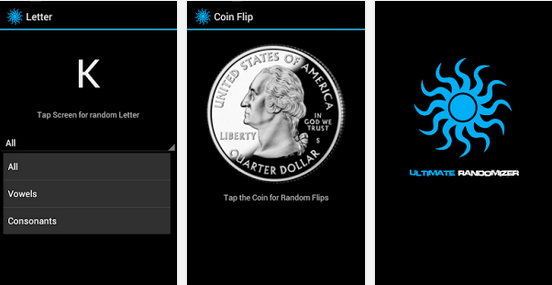
-Randomize letters (you can pick vowels, consonants, or all letters)
-Randomize numbers (you can pick your range)
-Randomize dice rolls
-Randomize colors
-Randomize coin flips
-Randomize images
-Randomize passwords
-Randomize positions
-Randomize times
More randomizable features should be added in the near future, according to Ekimual. Hopefully, he’ll add a feature like random cards – something that would make this app the ultimate drinking game app.
All randomizable options are featured in a minimalistic interface. After randomizing a certain indicator, an image will pop up with a picture of whatever the random outcome was. A large letter ‘K’ might pop up, for example, or a time, number, or coin image.
The app can be downloaded for free from the Google Play Store here: https://play.google.com/store/apps/details?id=com.w2e.activities
Newsletter
Get the latest tech news delivered to your inbox weekly.